Object List Input
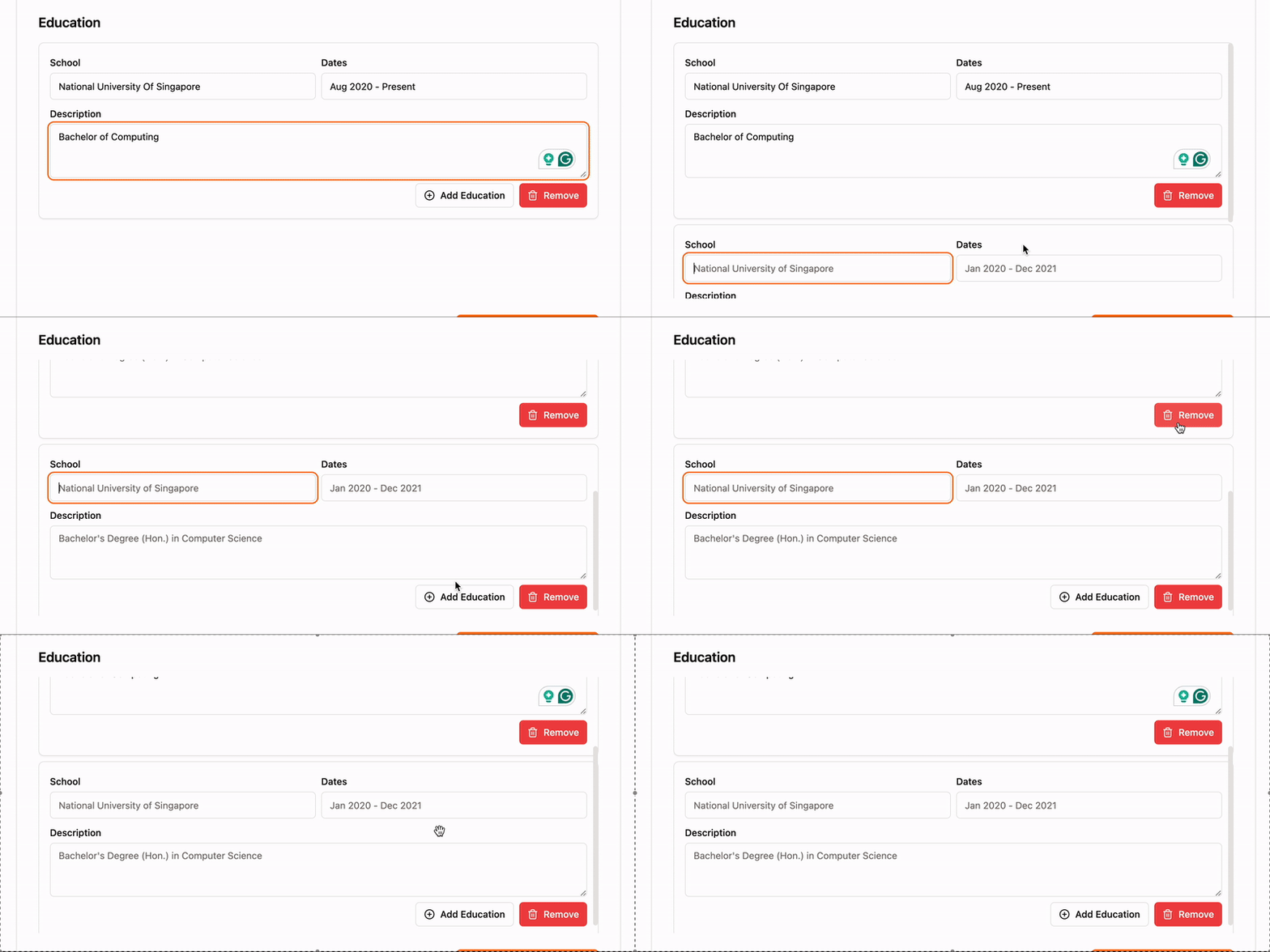
Create an input component for submitting an apendable list of objects using Shadcn/ui form components.
Demo
Prerequisites
Shadcn/ui, lucide-react, zod, and react-hook-form are required to use the code snippet below.
Make sure you add the required components to your project:
npx shadcn-ui@latest add form input textarea button card scroll-areaCode
18 collapsed lines
1import { zodResolver } from "@hookform/resolvers/zod";2import { useFieldArray, useForm } from "react-hook-form";3import { z } from "zod";4import {5 Form,6 FormControl,7 FormField,8 FormItem,9 FormLabel,10 FormMessage,11} from "@/components/ui/form";12import { Button } from "@/components/ui/button";13import { Trash2Icon, CirclePlusIcon } from "lucide-react";14import { Card } from "@/components/ui/card";15import { Input } from "@/components/ui/input";16import { Textarea } from "@/components/ui/textarea";17import { ScrollArea } from "@/components/ui/scroll-area";18
19// Define the form schema20const formSchema = z.object({21 education: z22 .array(23 z.object({24 school: z.string(),25 dates: z.string(),26 description: z.string(),27 })28 )29 .max(8),30});31
32function EducationForm() {33 // Initialize the form with 1 empty field34 const form = useForm<z.infer<typeof formSchema>>({35 resolver: zodResolver(formSchema),36 defaultValues: {37 education: [38 {39 school: "",40 dates: "",41 description: "",42 },43 ],44 },45 });46
47 // Use the field array hook to manage the input fields48 const eduFieldArr = useFieldArray({49 control: form.control,50 name: "education",51 });52
53 // Handle form submission54 const onSubmit = (data: z.infer<typeof formSchema>) => {55 console.log(data);56 };57
58 return (59 <Form {...form}>60 <h2 className="text-lg font-semibold">Education</h2>61 <form onSubmit={form.handleSubmit(onSubmit)} className="space-y-4">62 <ScrollArea className="h-[380px]">63 {eduFieldArr.fields.map((field, idx) => (64 <Card65 key={field.id}66 id={field.id}67 className="px-4 py-4 mb-2 space-y-2"68 >69 <div className="flex gap-2">70 <FormField71 control={form.control}72 name={`education.${idx}.school`}73 render={({ field }) => (74 <FormItem className="flex-1">75 <FormLabel>School</FormLabel>76 <FormControl>77 <Input78 className="mt-0"79 placeholder="National University of Singapore"80 {...field}81 />82 </FormControl>83 <FormMessage />84 </FormItem>85 )}86 />87 <FormField88 control={form.control}89 name={`education.${idx}.dates`}90 render={({ field }) => (91 <FormItem className="flex-1">92 <FormLabel>Dates</FormLabel>93 <FormControl>94 <Input placeholder="Jan 2020 - Dec 2021" {...field} />95 </FormControl>96 <FormMessage />97 </FormItem>98 )}99 />100 </div>101 <FormField102 control={form.control}103 name={`education.${idx}.description`}104 render={({ field }) => (105 <FormItem>106 <FormLabel>Description</FormLabel>107 <FormControl>108 <Textarea109 placeholder="Bachelor's Degree (Hon.) in Computer Science"110 {...field}111 />112 </FormControl>113 <FormMessage />114 </FormItem>115 )}116 />117 <div className="flex justify-end gap-2 items-center mt-4">118 {idx === eduFieldArr.fields.length - 1 && (119 <Button120 size={"sm"}121 variant={"outline"}122 onClick={() =>123 eduFieldArr.append({124 school: "",125 dates: "",126 description: "",127 })128 }129 >130 <CirclePlusIcon className="w-4 h-4 mr-2" /> Add Education131 </Button>132 )}133 <Button134 variant={"destructive"}135 size={"sm"}136 className="self-end"137 onClick={() => eduFieldArr.remove(idx)}138 >139 <Trash2Icon className="w-4 h-4 mr-2" />140 Remove141 </Button>142 </div>143 </Card>144 ))}145 </ScrollArea>146 </form>147 </Form>148 );149}150
151export default EducationForm;