SQL Cheat Sheet
Create/Drop tables
1-- Comments in SQL are preceded2-- by two hyphens3create table Students (4 studentId integer,5 name TEXT6 birthDate DATE7);8/* SQL also supports9C-style comments */10drop table Students;11drop table if exists Students;12drop table if exists Students cascade;Data Types
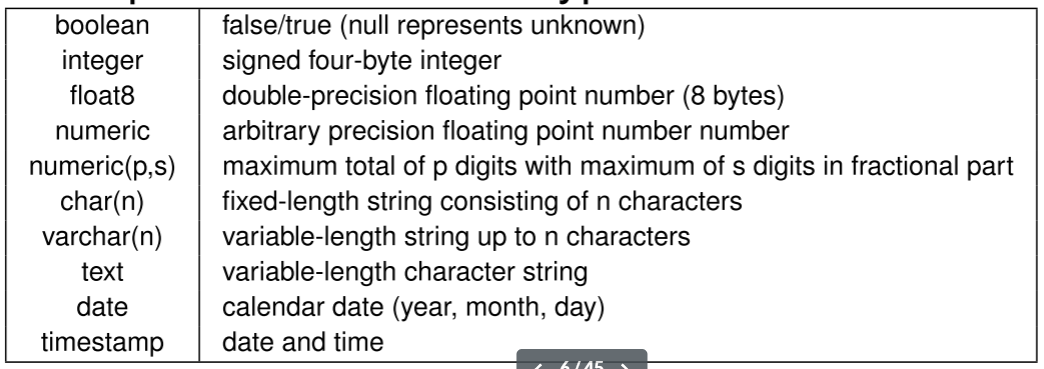
Null Values:
- Result of a comparison operation involving null value is
unknown - Result of an arithmetic operation involving null value is
null
Check for null:
x IS NULLx IS NOT NULL=NOT (x IS NULL)
x IS DISTINCT FROM y: similar to x <> y but works for null
Constraints in Data Definitions
A constraint is violated if it evaluates to false
Constraint Types:
-
Not-null constraints: is violated if where
x.name IS NOT NULLevaluates tofalse -
Unique constraints: is violated if where
x.id <> y.idevaluates tofalse -
Primary key constraints
-
Foreign key constraints:
REFERENCES Room(level, number)does not check partially null foreign keyREFERENCES Room(level, number) MATCH FULLto fix this (but still allows allnullvalue like(null, null))
-
Check constraints
1--Column constraint2day SMALLINT CHECK (day IN (1,2,3,4,5)),34--Table constraint5CHECK (6(day IN (1,2,3,4,5) AND hour >= 8 AND hour <= 17)7OR8(day = 6 AND hour IN (9,10,11))9)
Constraint Names:
1--Column constraint2pname VARCHAR(50)3  CONSTRAINT lectures_pname CHECK (pname IS NOT NULL),4
5--Table constraint:6CONSTRAINT lectures_pri_key PRIMARY KEY (cname, day, hour),
Database Modifications
Insert:
1CREATE TABLE Students (2  studentId INTEGER PRIMARY KEY,3  name VARCHAR(100) NOT NULL,4  birthDate date,5  dept VARCHAR(20) DEFAULT 'CS'6);7
8INSERT INTO Students9VALUES (12345, 'Alice', '1999-12-25', 'Maths');10
11INSERT INTO Students (name, studentId)12VALUES ('Bob', 67890), ('Carol', 11122);
Delete:
1-- Remove all students from Maths department2DELETE FROM Students3WHERE dept = 'math';Update:
1-- Add $500 to account 12345 & change name to 'Alice'2UPDATE Accounts3SET balance = balance + 500, name = 'Alice'4WHERE accountId = 12345;Foreign Key Constraint Violations
NO ACTION: rejects delete/update if it violates constraint (default option)RESTRICT: similar toNO ACTIONexcept that constraint checking can’t be deferredCASCADE: propagates delete/update to referencing tuplesSET DEFAULT: updates foreign keys of referencing tuples to some default valueSET NULL: updates foreign keys of referencing tuples tonullvalue
1foreign key (sid) references Students2 on delete cascade3 on update cascadeTransaction
begin command starts a new transaction. Each transaction must end with either a commit or rollback command
1begin;2update Accounts3set balance = balance + 10004where accountId = 2;5
6update Accounts7set balance = balance - 10008where accountId = 1;9commit;
Deferrable Constraints: By default, constraints are checked immediately at the end of SQL statement execution. A violation will cause the statement to be rollbacked. The checking could also be deferred for some constraints to the end of transaction execution. Deferrable constraints: UNIQUE, PRIMARY KEY, FOREIGN KEY
deferrable initially deferreddeferrable initially immediate: deferrable but immediate by default, can change to deferred later
1create table Employees (2  eid integer primary key,3  ename varchar(100),4  managerId integer,5  constraint employees_fkey foreign key (managerId) references Employees6    deferrable initially immediate7);8
9insert into Employees values (1, 'Alice', null), (2, 'Bob', 1), (3, 'Carol', 2);10
11begin;12set constraints employees_fkey deferred;13delete from Employees where eid = 2;14update Employees set managerId = 1 where eid = 3;15commit;
Modifying Schema
1--Add/remove/modify columns2alter table Students alter column dept drop default;3alter table Students drop column dept;4alter table Students add column faculty varchar(20);5
6--Add/remove constraints7alter table Students add constraint fk_grade foreign key(grade) references Grades;
Simple Queries
1select ∗ from Sells2where ((price < 20) and (rname <> 'Pizza King'))3or4rname = 'Corleone Corner';5
6select 'Price of '|| pizza || ' is ' || round(price / 1.3) || ' USD' as menu7from Sells8where rname = 'Corleone Corner';
Set Operations
1select cname from Customers2union3select rname from Restaurants;4
5select pizza from Contains where ingredient = 'cheese'6intersect7select pizza from Contains where ingredient = 'chili';8
9select pizza from Contains where ingredient = 'cheese'10except11select pizza from Contains where ingredient = 'chilli';
union all, intersect all, and except all preserves duplicate records
Multi-relation Queries
1select cname, rname2from Customers as C, Restaurants as R3where C.area = R.area;4--is the same as5select cname, rname6from Customers C cross join Restaurants R7where C.area = R.area;8
9select cname, rname10from Customers C join Restaurants R11  on C.area = R.area;12
13--Find distinct restaurant pairs (R1,R2) where R1 < R2 and they sell some common pizza14select distinct S1.rname, S2.rname15from Sells S1, Sells S216where S1.rname < S2.rname17  and S1.pizza = S2.pizza;18--or19select distinct S1.rname, S2.rname20from Sells S1 join Sells S221on (S1.rname < S2.rname)22and (S1.pizza = S2.pizza);
Subquery Expression
EXISTS (subquery)/NOT EXISTS (subquery)
- Returns
trueif the the output of the subquery is non-empty; otherwise,false
1--Find distinct customers who like some pizza sold by “Corleone Corner”2select distinct cname3from Likes L4where exists (5 select 16 from Sells S7 where S.rname = 'Corleone Corner'8 and S.pizza = L.pizza9 );expr IN (subquerry)
- Subquery must return exactly one column
- Returns
falseif the output of the subquery is empty; otherwise return the result of the boolean expression
where denote the result of the expression, denote the output of the subquerry
1select distinct cname2from Likes3  where pizza in (4  select pizza5  from Sells6  where rname = ’Corleone Corner’7  );8
9--Find pizzas that contain ham or seafood10select distinct pizza from Contains11where ingredient in (’ham’, ’seafood’);
expr op ANY/SOME (subquery)
- Subquery must return exactly one column
- Returns
falseif the output of the subquery is empty; otherwise return the result of the boolean expression
where denote the result of the expression, denote the output of the subquery, and denote comparison operator (i.e., =, <>, <, >, <=, >=)
1select distinct rname2from Sells3where rname <> ’Corleone Corner’4 and5 price > any (6 select price7 from Sells8 where rname = ’Corleone Corner’9 );expr op ALL (subquery)
- same as
ANY/SOMEbut use instead of
Row Constructors:
- Possible to use subqueries that return more than one column
1select pname, day, hour2from Lectures L3where row(day,hour) <= all (4 select day, hour5 from Lectures L26 where L2.pname = L.pname7);Scalar Subqueries:
- A scalar subquery is a subquery that returns at most one tuple with one column. If the subquery’s output is empty, its return value is
null. - A scalar subquery can be used as a scalar expression.
- Non-scalar subquery expressions can be used in different parts of SQL queries:
WHERE,FROM,HAVINGclause.
Database modification:
1insert into Enrolls (sid, cid)2select studentId, 1013from Students S4where S.year = 1;ORDER BY/LIMIT/OFFSET Clause
1select ∗2from Restaurants, Sells3where Restaurants.rname = Sells.rname4order by area asc, price desc;5
6select ∗7from Restaurants, Sells8where Restaurants.rname = Sells.rname9order by area, price desc;1select pizza, rname, price2from Sells3order by price desc4limit 3;5
6select pizza, rname, price7from Sells8order by price desc9offset 310limit 2;Aggregate functions
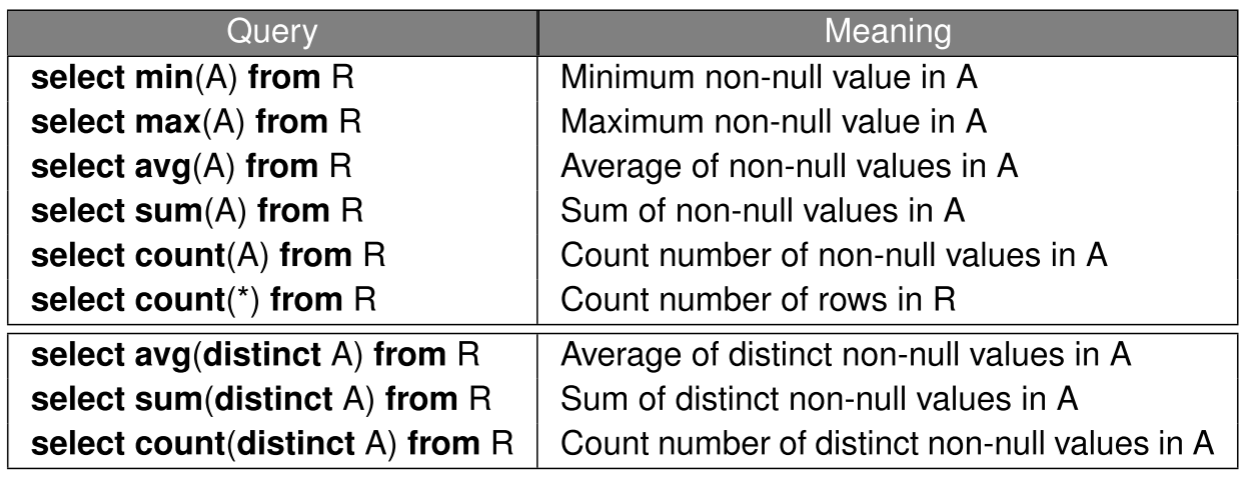
1select min (price), max (price), avg (price)2from Sells3where rname = ’Corleone Corner’Let R be an empty relation and S be a relation with cardinality = n where all values of attribute A are null values
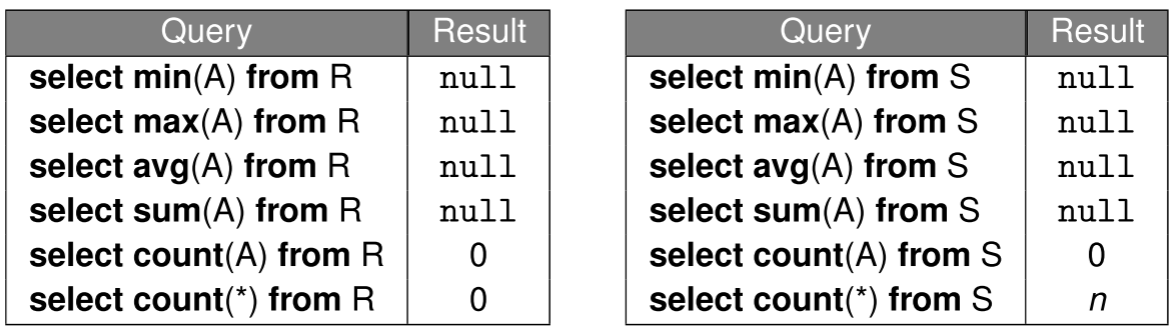
Aggregate functions can be used in different parts of SQL queries: SELECT, HAVING, and ORDER BY clause
1select count(∗), max(price ∗ qty)2from Orders;3
4select pizza, rname5from Sells6where price = (select max(price) from Sells);
GROUP BY Clause
In a query with GROUP BY a1, a2, · · · , an, two tuples t & t′ belong to the same group if the following expression evaluates to true:
1(t.a1 IS NOT DISTINCT FROM t′.a1) AND · · · AND (t.an IS NOT DISTINCT FROM t′.an)Each output tuple corresponds to one group
For each column A in relation R that appears in the SELECT clause, one of the following conditions must hold:
- A appears in the
GROUP BYclause, - A appears in an aggregated expression in the
SELECTclause (e.g.,min(A)), or - the primary (
or a candidate) key of R appears in theGROUP BYclause
1--Find the number of students for each (dept,year) combination.2--Show the output in ascending order of (dept,year).3select dept, year, count(∗) as num4from Students5group by dept, year;6order by dept, year;7
8--Show all restaurants in descending order of their average pizza price.9--Exclude restaurants that do not sell any pizza.10select rname11from Sells12group by rname13order by avg(price) desc;14
15--invalid query16select year, count(∗) --year is ambiguos17from Students18group by dept;19
20select rname, min(price), max(price) --cannot include rname if dont have GROUP BY21from Sells22
23select distinct rname24from Sells25order by price; --price is ambiguous, cannot order by price
HAVING Clause
similar to WHERRE clause but for GROUP BY
1--Find restaurants located in the ‘East’ area that sell2--pizzas with an average selling price higher than the3--minimum selling price at Pizza King4select rname5from Sells6where rname in (7 select rname8 from Restaurants9 where area = 'East'10)11group by rname12having avg(price) >13 (select min(price)14 from Sells15 where rname = 'Pizza King');For each column A in relation R that appears in the HAVING clause, one of the following conditions must hold:
- A appears in the GROUP BY clause,
- A appears in an aggregated expression in the
HAVINGclause, or - the primary (
or a candidate) key of R appears in theGROUP BYclause
Conceptual Evaluation of Queries
1SELECT DISTINCT '<select-list>'2FROM '<from-list>'3WHERE '<where-condition>'4GROUP BY '<groupby-list>'5HAVING '<having-condition>'6ORDER BY '<orderby-list>'7OFFSET '<offset-specification>'8LIMIT '<limit-specification>'- Compute the cross-product of the tables in
from-list - Select the tuples in the cross-product that evaluate to true for the
where-condition - Partition the selected tuples into groups using the
groupby-list - Select the groups that evaluate to true for the
having-conditioncondition - For each selected group, generate an output tuple by selecting/computing the attributes/expressions that appear in the
select-list - Remove any duplicate output tuples
- Sort the output tuples based on the
orderby-list - Remove the appropriate output tuples based on the
offset-specificationandlimit-specification
Common Table Expressions (CTEs)
1WITH2 R1 AS (Q1),3 R2 AS (Q2),4 ...,5 Rn AS (Qn)6SELECT/INSERT/DELETE/UPDATE '<smth>'Views: Providing Logical Data Independence
1create view CourseInfo as2select cname, pname, lectureTime,numUGrad+numPGrad+numExchange+numAudit as numEnrolled3from Courses natural join Profs natural join Enrollment;Conditional Expressions
1--Case 12case3  when condition_1 then result_14  ...5  when condition_n then result_n6  else result_07end8
9--Case 210case expression11  when value_1 then result_112  ...13  when value_n then result_n14  else result_015end16
17--Example18select name, case19  when marks >= 70 then ’A’20  when marks >= 60 then ’B’21  when marks >= 50 then ’C’22  else ’D’23end as grade24from Scores;
COALESCE(a, b, ...) returns the first non-null value in its arguments. Returns null if all the arguments are null
NULLIF(value1, value2) returns null if value1 is equal to value2; otherwise returns value1
1select name, nullif(result,’absent’) as status2from Tests;Pattern Matching with LIKE Operator
1select cname from Customers where cname like '___%e';- Underscore
_matches any single character - Percent
%matches any sequence of 0 or more characters string not like '<pattern>'is equivalent tonot (string like '<pattern>')- For more advanced regular expressions, use
similar tooperator
Queries with Universal Quantification
Example: Find the names of all students who have enrolled in all the courses offered by CS department
1/* Courses (courseId, name, dept)2Students (studentId, name, birthDate)3Enrolls (sid, cid, grade) */4
5--F(x): set of courseIds of CS courses that are not enrolled by student with studentId x6select courseId7from Courses C8where dept = 'CS' and not exists (9  select 110  from Enrolls E11  where E.cid = C.courseId and E.sid = x12);13
14--Names of students who have enrolled in all CS Courses15select name16from Students S17where not exists (18  select courseId19  from Courses C20  where dept = 'CS' and not exists (21    select 122    from Enrolls E23    where E.cid = C.courseId24    and E.sid = S.studentId25  )26);
Window Functions
SUM(), COUNT(), AVG()
1SELECT start_terminal,2 duration_seconds,3 SUM(duration_seconds) OVER4 (PARTITION BY start_terminal) AS running_total,5 COUNT(duration_seconds) OVER6 (PARTITION BY start_terminal) AS running_count,7 AVG(duration_seconds) OVER8 (PARTITION BY start_terminal) AS running_avg9FROM tutorial.dc_bikeshare_q1_201210WHERE start_time < '2012-01-08';ROW_NUMBER(): same value different number; RANK(): same value same rank
RANK() would give the identical rows a rank of 2, then skip ranks 3 and 4, so the next result would be 5
DENSE_RANK() would still give all the identical rows a rank of 2, but the following row would be 3—no ranks would be skipped.
1SELECT depname, empno, salary,2 rank() OVER (PARTITION BY depname ORDER BY salary DESC)3FROM empsalary;NTILE(#buckets) identifies what percentile (or quartile when #buckets = 4, or any other subdivision) a given row falls into
1SELECT start_terminal,2 duration_seconds,3 NTILE(4) OVER4 (PARTITION BY start_terminal ORDER BY duration_seconds)5 AS quartile,6 NTILE(5) OVER7 (PARTITION BY start_terminal ORDER BY duration_seconds)8 AS quintile,9 NTILE(100) OVER10 (PARTITION BY start_terminal ORDER BY duration_seconds)11 AS percentile12FROM tutorial.dc_bikeshare_q1_201213WHERE start_time < '2012-01-08'14ORDER BY start_terminal, duration_seconds;LAG LEAD create columns that pull values from other rows—all you need to do is enter which column to pull from and how many rows away you’d like to do the pull. LAG pulls from previous rows and LEAD pulls from following rows
1SELECT start_terminal,2       duration_seconds,3       LAG(duration_seconds, 1) OVER4         (PARTITION BY start_terminal ORDER BY duration_seconds) AS lag,5       LEAD(duration_seconds, 1) OVER6         (PARTITION BY start_terminal ORDER BY duration_seconds) AS lead7FROM tutorial.dc_bikeshare_q1_20128ORDER BY start_terminal, duration_seconds;9
10  -- Calculate differences between rows11SELECT start_terminal,12       duration_seconds,13       duration_seconds -LAG(duration_seconds, 1) OVER14          (PARTITION BY start_terminal ORDER BY duration_seconds)15          AS difference16FROM tutorial.dc_bikeshare_q1_201217WHERE start_time < '2012-01-08'18ORDER BY start_terminal, duration_seconds;19
20-- Remove NULL from boundary columns21SELECT *22FROM (23  SELECT start_terminal,24          duration_seconds,25          duration_seconds -LAG(duration_seconds, 1) OVER26            (PARTITION BY start_terminal ORDER BY duration_seconds)27            AS difference28  FROM tutorial.dc_bikeshare_q1_201229  WHERE start_time < '2012-01-08'30  ORDER BY start_terminal, duration_seconds31) sub32WHERE sub.difference IS NOT NULL;
Window Alias: If you’re planning to write several window functions in to the same query, using the same window, you can create an alias
1SELECT start_terminal,2     duration_seconds,3     NTILE(4) OVER4       (PARTITION BY start_terminal ORDER BY duration_seconds)5       AS quartile,6     NTILE(5) OVER7       (PARTITION BY start_terminal ORDER BY duration_seconds)8       AS quintile,9     NTILE(100) OVER10       (PARTITION BY start_terminal ORDER BY duration_seconds)11       AS percentile12FROM tutorial.dc_bikeshare_q1_201213WHERE start_time < '2012-01-08'14ORDER BY start_terminal, duration_seconds;15
16-- Using window alias17SELECT start_terminal,18        duration_seconds,19        NTILE(4) OVER ntile_window AS quartile,20        NTILE(5) OVER ntile_window AS quintile,21        NTILE(100) OVER ntile_window AS percentile22FROM tutorial.dc_bikeshare_q1_201223WHERE start_time < '2012-01-08'24WINDOW ntile_window AS # always come after WHERE25      (PARTITION BY start_terminal ORDER BY duration_seconds)26ORDER BY start_terminal, duration_seconds;
Pivot
1--  MSSQL2SELECT Subscription_plan,3    [2023-06-01],4    [2023-06-02],5    [2023-06-03],6FROM (SELECT Subscription_plan,[Subscribed_customers], DATE FROM customers) AS IQ7PIVOT (8  SUM([Subscribed_customers])9  FOR Date IN([2023-06-01],[2023-06-02],[2023-06-03])10) AS PT;11
12--  MySQL13SELECT Subscription_plan,14    SUM(CASE15      WHEN Date = STR_TO_DATE('06/01/2023','%m/%d/%Y') THEN Subscribed_customers ELSE 0 END16    ) AS '06/01/2023',17    SUM(CASE18      WHEN Date = STR_TO_DATE('06/02/2023','%m/%d/%Y') THEN Subscribed_customers ELSE 0 END19    ) AS '06/02/2023',20    SUM(CASE21      WHEN Date = STR_TO_DATE('06/03/2023','%m/%d/%Y') THEN Subscribed_customers ELSE 0 END22    ) AS '06/03/2023',23FROM customers24GROUP BY Subscription_plan;25
26--  PostgreSQL27CREATE EXTENSION IF NOT EXISTS tablefunc;28
29SELECT *30FROM crosstab('select Subscription_plan, Date, Subscribed_customers from customers ORDER BY 1,2') AS ct (31  Subscription_plan varchar(50),32  "06/01/2023" int,33  "06/02/2023" int,34  "06/03/2023" int,35  "06/04/2023" int,36  "06/05/2023" int,37  "06/06/2023" int,38  "06/07/2023" int39);