Final Note
L1: Fundamentals
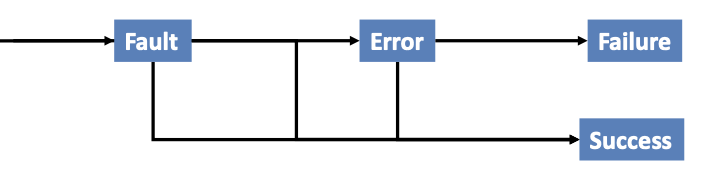
Fault: An anomaly in the source code of a program that may lead to an error
Error: The runtime effect of executing a fault, which may result in failure
Failure: The manifestation of error external to the program
Unit Testing: Testing of a single module in an isolated environment
Integration testing: Testing parts of the system by combining the modules
System testing: Testing of the system as a whole after the integration phase
Acceptance testing: customer’s evaluation of a system (usually, a form of system testing)
Regression testing: exercise a changed system, focus on modifications or their impact (bottom-up, top-down, big-bang, sandwich)
Driver: A program that calls the interface procedures of the module being tested and reports the results. A driver simulates a module that calls the module currently being tested
Stub: A program that has the same interface as a module that is being used by the module being tested but simpler. A stub simulates a module called by the module currently being tested. Mock objects: Create an object that mimics only the behavior needed for testing
Coverage Criteria:
- Line Coverage (Statement Coverage): test every line of code
- Branch Coverage: test every line, and every branch on multi-branch lines
- N-Length Sub-Path Coverage: test every sub-path of length N. E.g: In a 10,000-line program, test every possible 10-line sequence of execution
- Path coverage: test every path through the program, from entry to exit → Infeasible in general, and still not even exhaustive!
- Condition Coverage: For each executable condition c
- Check whether it can be both true or false (c could be unsatisfiable or valid in all program executions)
- For all such conditions c, c should be true in at least one test in the test suite, and c should be false in at least one test in the test suite
Random Testing: Based on a description of the legal inputs, generate test cases randomly over the program domain
- Drawbacks: (1) Need to have an oracle for each test case, (2) May not match the operational profile
- Benefits: (1) Easy to generate test cases, (2) Serves as a baseline for comparison, (3) Using the same number of test cases, does testing criterion X do as well as random testing at detecting faults/finding failure?
Error Seeding: Insert “typical” faults into a system
- Determine how many of the inserted faults are found
- If K of the N faults found, then assume that K/N of actual faults found as well
- Motivates developers/testers: Know there is something to find; Not looking for their own faults
L2: Functional Testing
Verification: checking the consistency of an implementation with a specification
- Conforming to a requirement specification
- Specification is a statement about a proposed solution to a problem (might not achieve user’s needs)
Validation: assessing the degree to which a software system actually fulfils its requirements → Meeting user’s real needs
Random Testing: (uniform)
- Pick possible inputs uniformly
- Avoids designer bias. Problem: The test designer can make the same logical mistakes and bad assumptions as the program designer (especially if they are the same person)
- But treats all inputs as equally valuable
- Might miss boundary values
Systematic Testing: (non-uniform)
- Try to select inputs that are especially valuable
- Usually by choosing representatives of classes that are apt to fail often or not at all
→ Functional testing is systematic testing
→ It is also possible to combine both – can be a less expensive, effective strategy in practice.
- Generate some boundary values first to capture corner cases or important relationships
- Cover the rest of the input domain by random testing
Example: three integers a, b , c --- input to some method
- Possible corner cases: a= 0, b = 0, and so on
- Possible important relationships: a == b
- Cover the rest of the input domain by random testing
Using the Specification:
- Uses the specification (formal or informal) to partition the input space
- Test each category and boundaries between categories
- No guarantees, but experience suggests failures often lie at the boundaries
Functional Testing: Deriving test cases from program specifications
- Verification – find discrepancies between what the program does and what it is intended to do
- Functional refers to the source of information used in test case design, not to what is tested
- Also known as: specification-based testing (from specifications) / black-box testing (no view of the code)
- Functional specification = description of intended program behavior (Either formal or informal)
Functional vs. Structural:
- Different testing strategies (functional, structural, fault-based, model-based) are most effective for different classes of faults
- Functional testing is best for missing logic faults
- A common problem: some program logic was simply forgotten
- Structural (code-based) testing will never focus on code that isn’t there!
- Functional test applies at all granularity levels: Unit (from module interface spec), Integration (from API or subsystem spec), System (from system requirements spec), Regression (from system requirements + bug history)
- Structural (code-based) test design applies to relatively small parts of a system: Unit, Integration
WHY? The base-line technique for designing test cases
- Timely - often useful in refining specifications and assessing testability before code is written
- Effective - finds some classes of fault (e.g., missing logic) that can elude other approaches
- Widely applicable: (1)To any description of program behavior serving as spec, (2) At any level of granularity from module to system testing
- Economical - typically less expensive to design and execute than structural (code-based) test cases
From Specifications to Test Cases:
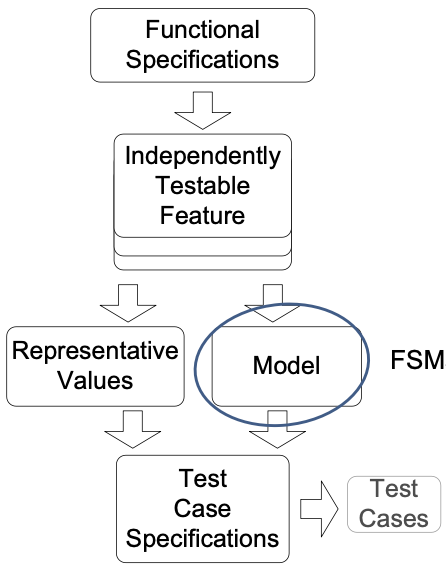
- Decompose the specification: If the specification is large, break it into independently testable features to be considered in testing
- Select representatives: (1) Representative values of each input, or (2) Representative behaviors of a model: Models in program specification, in program design, and in test design
- Form test specifications: Typically combinations of input values, or model behaviors
- Produce and execute actual tests
Independently Testable Feature:
- Need NOT correspond to a unit of source code
- The same source code may be tested several times, each time for a different feature.
- Examples: File sorting utility - allows for sorting of files, merging of sorted files, searching within a sorted file → May be tested thrice for searching, sorting and merging
- Finding independently testable features is DIFFERENT from module decomposition
- Testing a website functionality
- E.g: Sitemap, Registration of user profiles, Searching the internal database via web-forms, …
- Any single feature may involve several modules, e.g. registration of user profile code may be spread across modules
Example 1: Postal Code Lookup
- Input: ZIP code (5-digit US Postal code)
- Output: List of cities
- Testable feature: the postal code
- Valid zip code: with 0 cities as output (boundary), 1 city as output, >1 cities as output
- Malformed zip code: empty, 1-4 characters, 6 characters (boundary), very long input, non-digit characters, non-character data
Example 2: Calculator
- Input: sequence of buttons pressed
- Output: calculated value
- Testable features: Mathematical function for each button
- Each function is an independently testable feature.
- Some functions like memory access may be related to other buttons – to retrieve a value, you should store it.
Example 3: Reservation number
Consider a program that checks the validity of a reservation number. A valid reservation number should contain exactly two letter characters followed by up to three digits (at least one digit is expected). The program allows the user to input a reservation number and returns true for a valid reservation number and false for an invalid reservation number.
What is(are) the independently testable feature(s)?
- ❌ Reservation number
- ✅ Checking the validity of the format of the reservation number
- ❌ Format check
- ✅ Checking that the reservation number exists in the system
Model-based Testing: Why?
- Models used in specification or design which have structure
- Useful information for selecting representative classes of behavior; behaviors that are treated differently with respect to the model should be tried by a thorough test suite
- In combinatorial testing, it is difficult to capture that structure clearly and correctly in constraints
- We can devise test cases to check actual behavior against behavior specified by the model. “Coverage” similar to structural testing, but applied to specification and design models
State Machine Models:
- Basic idea: (1) state of an object is modified by methods, (2)transitions model the methods, (3) test cases are sequences of transitions that traverse the state machine
- State machine can be derived from specification (functional testing), code (structural testing), or both
Example 1: Vending machine work flow: Selection is made → Coins are inserted → Product is dispensed when amount of coins is enough
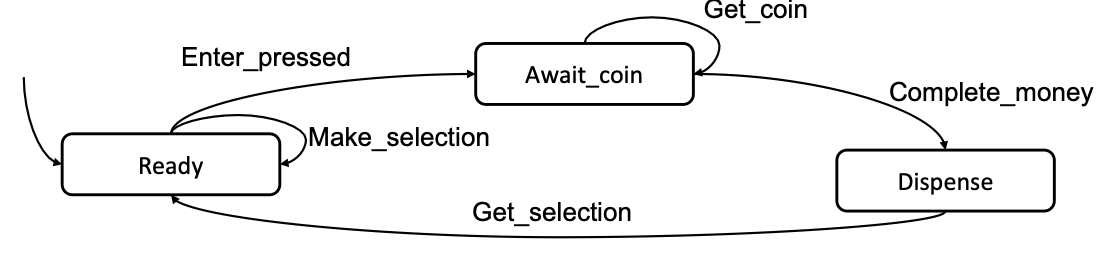
- TC-1: Ready → Await_coin → Dispense
- TC-2: Ready → Await_coin → Await_coin → Dispense
Model Coverage:
- State coverage: Every state in the model should be visited by at least one test case
- Transition coverage: (1) Every transition between states should be traversed by at least one test case. (2) This is the most used criterion. (3) A transition can be thought of as a (precondition, postcondition) pair
Testing Decision Structures:
- Basic condition coverage: Test case specification for each column in the table
- Compound condition adequacy criterion: Test case specification for each combination of truth values of basic conditions
- 2^n tests for n conditions (basic conditions)
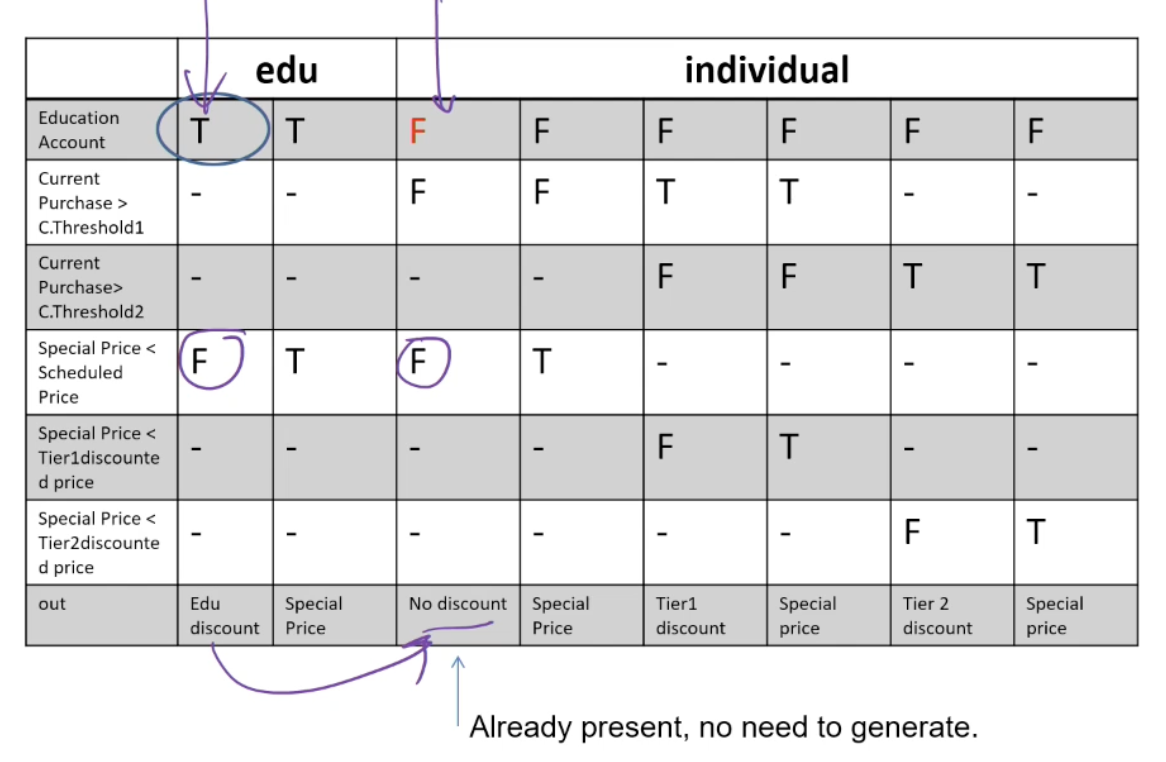
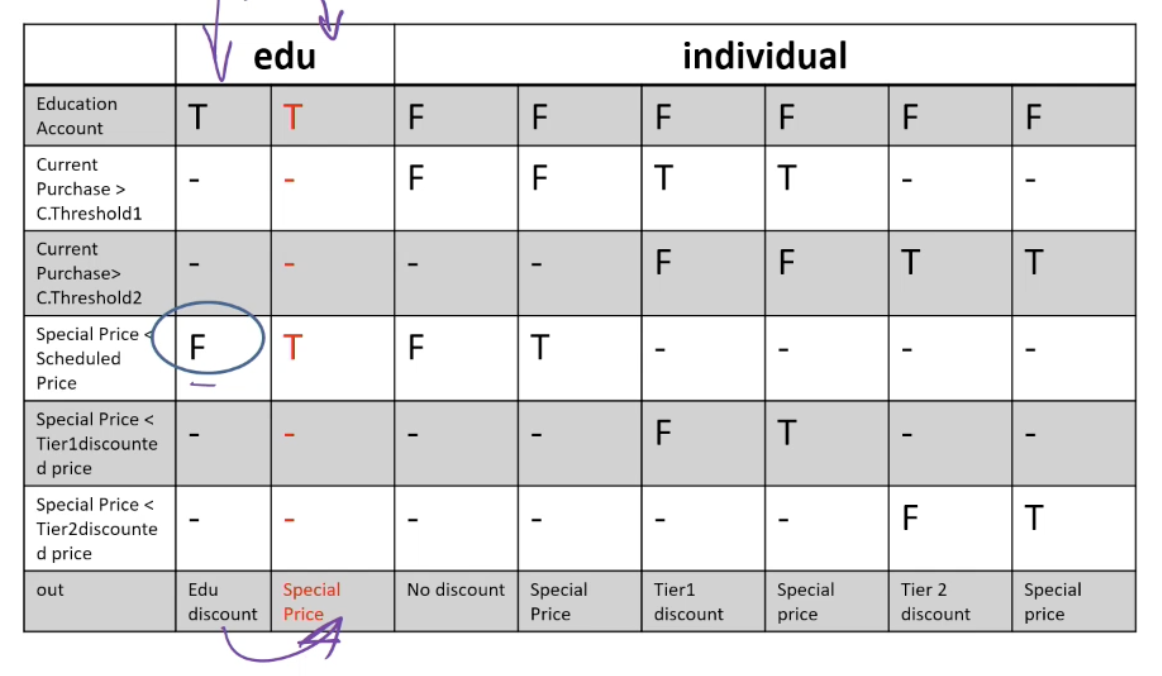
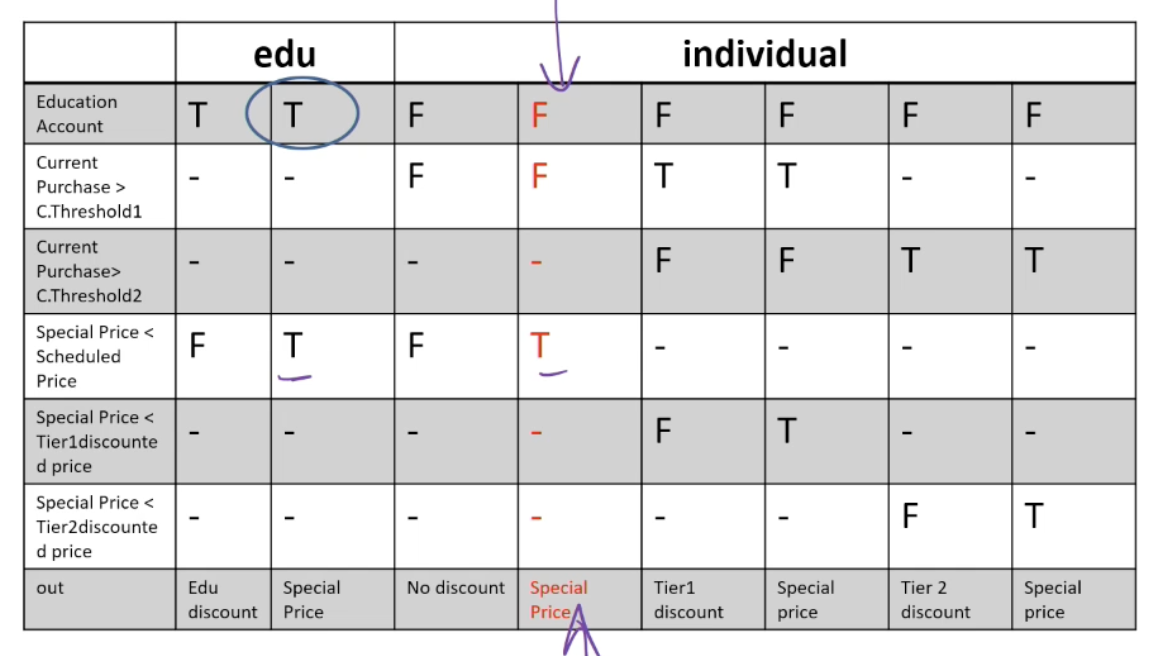
- Modified condition/decision coverage (MC/DC): Each column in the table represents a test case specification. Add columns that differ in one input row and in outcome, then merge compatible columns
Applying MC/DC:
- Decision Table: (1) Rows = Basic Condition; (2) Columns = Combinations of basic conditions; (3) Out = last row of the table = Expected output for each combination (that column)
- MC/DC: (1) Generate a test case for each column, (2) Fill up “don’t care” in any way, without violating constraints
- The test cases are combinations of truth values for each basic condition that lead to specified outputs
- Add test cases to the test suite as long as flipping one value from a combination of truth values (test case) leads to different output
- Systematically flip one truth value from the test cases – see if the new test case can be merged with an existing test case from the suite without violating any constraint → Many ways of merging test cases – due to “don’t care” cells!!
- If the test case cannot be merged, add the new test case to the test suite – for the new test case, the output should be different from the original test case whose value was flipped → Output can represent “error” meaning a flipped column is infeasible.
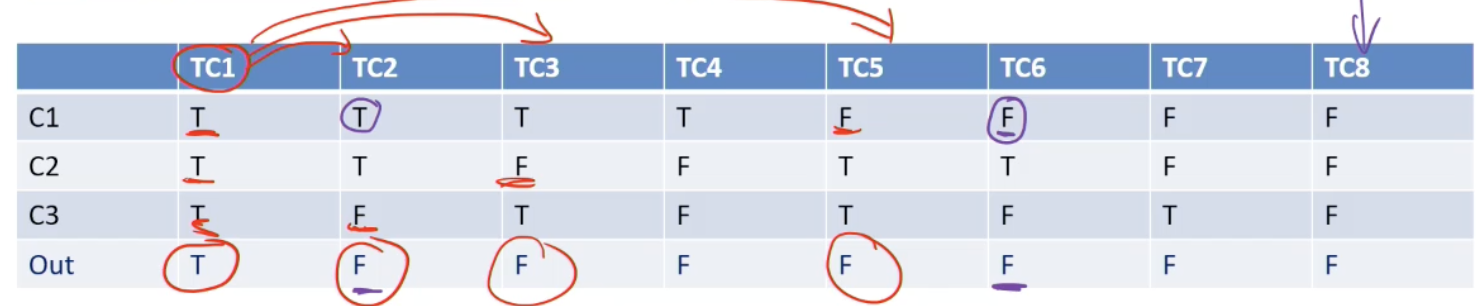
→ Choose TC1 → Choose TC2, TC3, TC5
Example: The pricing function determines the adjusted price of a configuration for a particular customer.
- Educational prices: The adjusted price for a purchase charged to an educational account in good standing is the scheduled price from the educational price schedule. No further discounts apply.
- Special-price non-discountable offers: Sometimes a complete configuration is offered at a special, non-discountable price. When a special, non-discountable price is available for a configuration, the adjusted price is the non-discountable price or the regular price after any applicable discounts, whichever is less
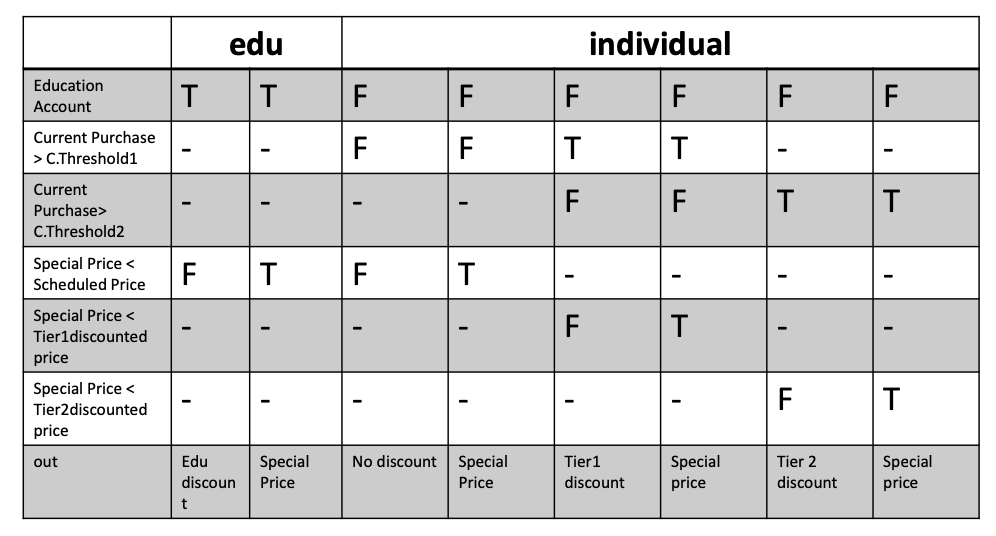
Constraints: [1] at-most-one (CP < CT1, CP > CT2), [2] CP > CT2 ⇒ CP > CT1, [3] at-most-one (SP < T1, SP > T2), [4]SP > T2 ⇒ SP > T1
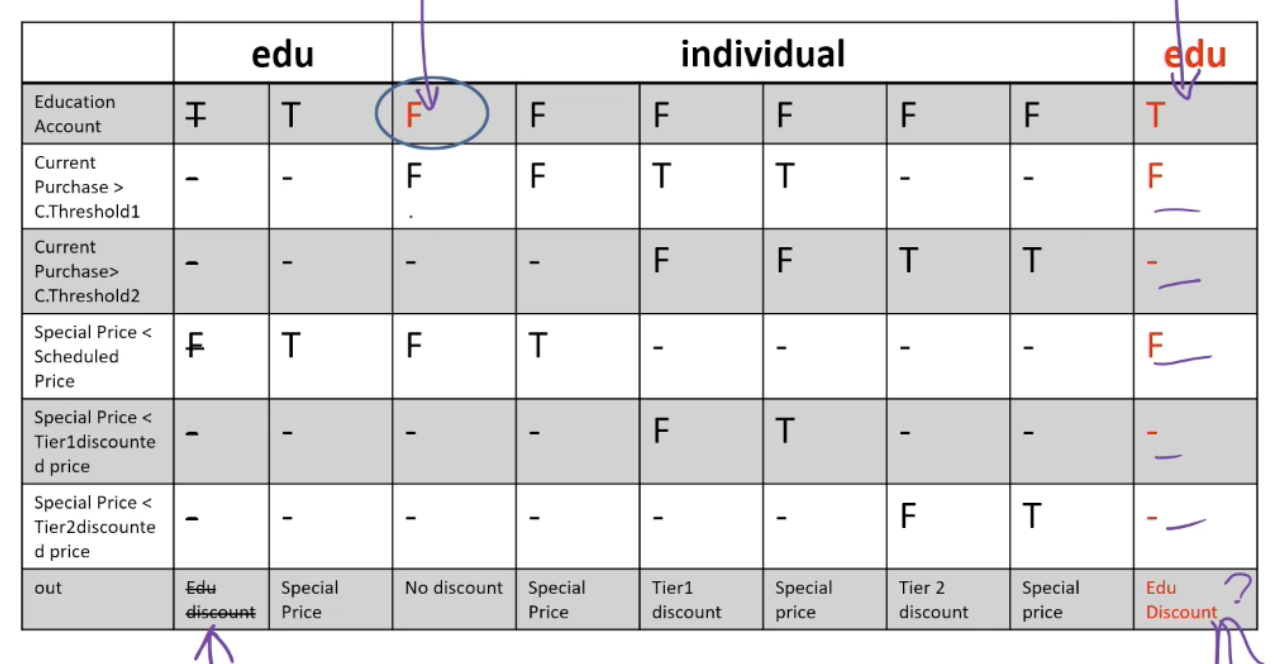
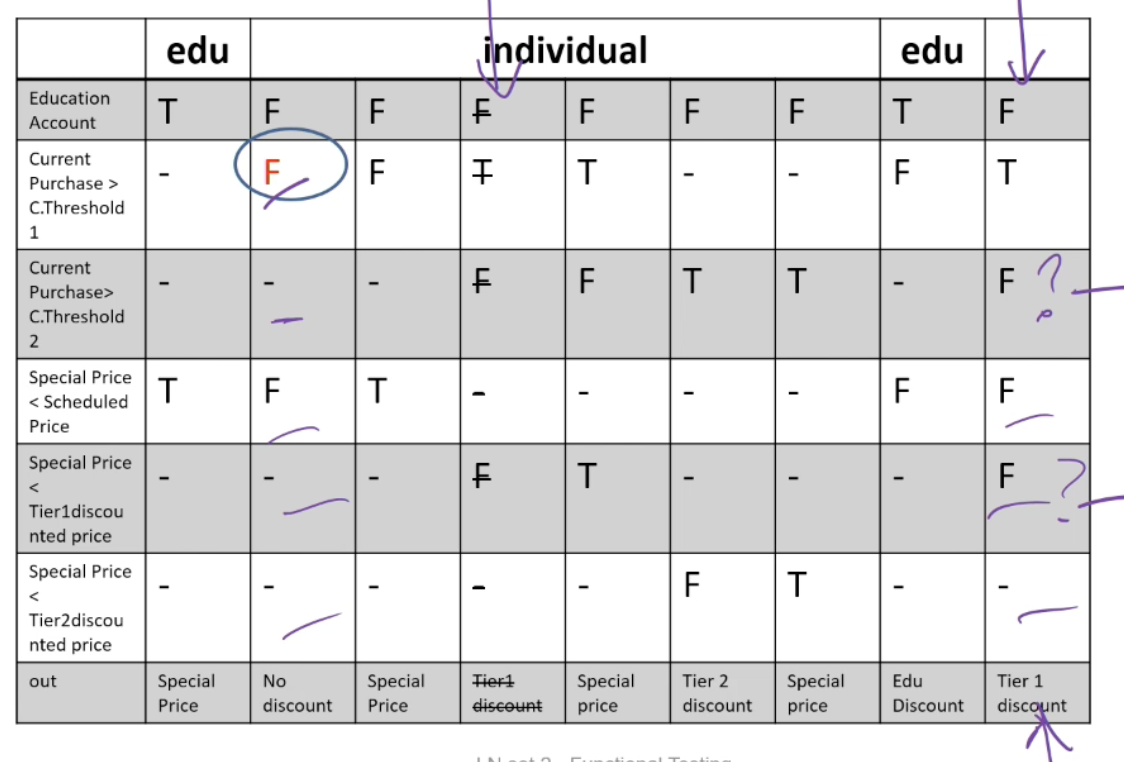
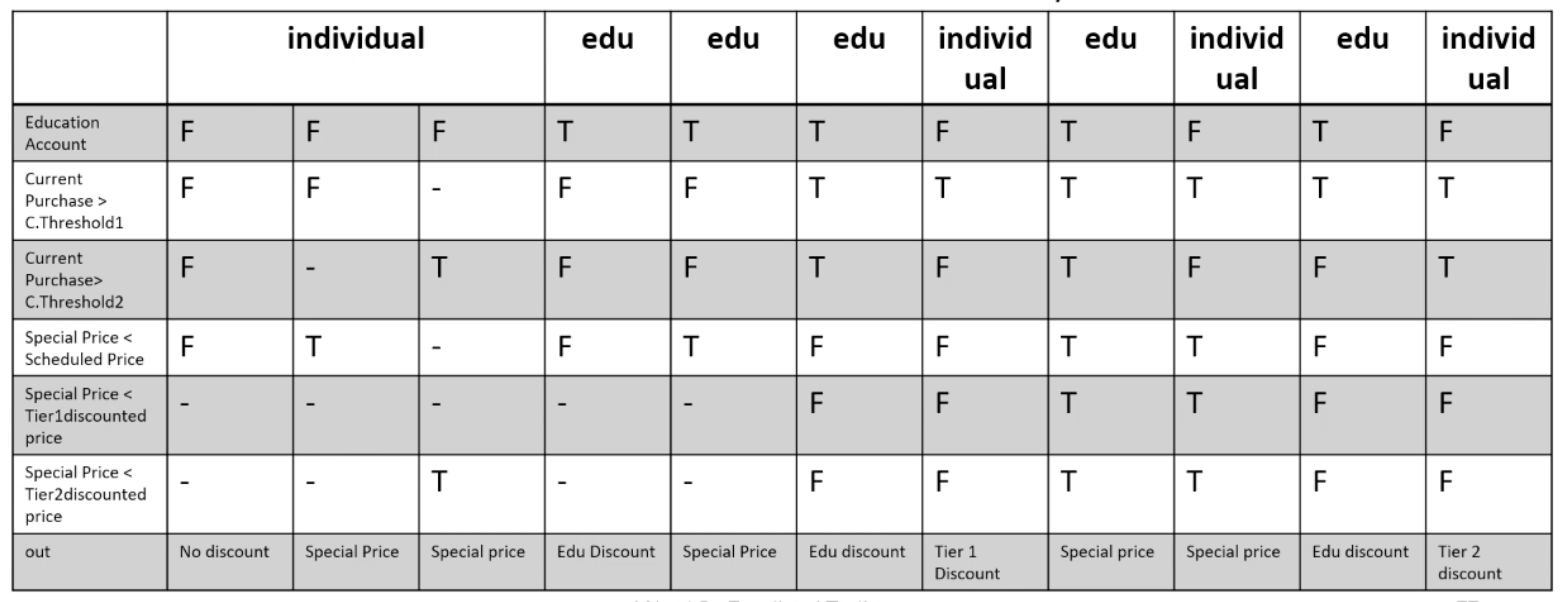
L3: Combinatorial Testing
Category-partition testing
- Decompose the specification into independently testable features:
- for each feature identify: parameters, environment elements
- for each parameter and environment element identify elementary characteristics (categories)
- Identify relevant values: for each characteristic (category) identify (classes of) values: normal values, boundary values, special values, error values
- Introduce constraints
- Enumerate tests
Step 1: Identify independently testable units and categories
- Categories reflect test designer’s judgment, regarding which classes of values may be treated differently by an implementation
- Choosing categories well requires experience and knowledge of the application domain and product architecture. The test designer must look under the surface of the specification and identify hidden characteristics
- For example: Direct sales web-site of Chipmunk Computers
- Configuration == Set of selected options for a computer
- Check configuration is a testable feature – checks if a chosen configuration is valid, e.g. Digital LCD monitor with analog video-card is an invalid configuration!
Example:
- Parameter Model: [1] Model number, [2] Number of required slots for selected model (#SMRS), [3] Number of optional slots for selected model (#SMOS)
- Parameter Components: [1] Correspondence of selection with model slots, [2] Number of required components with selection ≠ empty, [3] Required component selection, [4] Number of optional components with selection ≠ empty, [5] Optional component selection
- Environment element: Product database: [1] Number of models in database (#DBM), [2] Number of components in database (#DBC)
Step 2: Identify relevant values
- Identify (list) representative classes of values for each of the categories. Ignore interactions among values for different categories (considered in the next step)
- Representative values may be identified by applying
- Boundary value testing: [1] select extreme values within a class, [2] select values outside but as close as possible to the class, [3] select interior (non-extreme) values of the class
- Erroneous condition testing: select values outside the normal domain of the program
Example:
- Model:
- Model number: Malformed, Not in database, Valid
- Number of required slots for selected model (#SMRS): 0, 1, Many
- Number of optional slots for selected model (#SMOS): 0, 1, Many
- Component:
- Correspondence of selection with model slots: Omitted slots, Extra slots, Mismatched slots, Complete correspondence
- Number of required components with non empty selection: 0, < number required slots, = number required slots
- Required component selection: Some defaults, All valid, ≥ 1 incompatible with slots, ≥ 1 incompatible with another selection, ≥ 1 incompatible with model, ≥ 1 not in database
- Number of optional components with non empty selection: 0, < #SMOS, = #SMOS
- Optional component selection: Some defaults, All valid, ≥ 1 incompatible with slots, ≥ 1 incompatible with another selection, ≥ 1 incompatible with model, ≥ 1 not in database
- Database:
- Number of models in database (#DBM): 0, 1, Many
- Number of components in database (#DBC): 0, 1, Many
Step 3: Introduce constraints
- A combination of values for each category corresponds to a test case specification. In the example we have 37 * 62 * 4 = 314,928 test cases, most of which are impossible! e.g. zero slots and at least one incompatible slot
- Introduce constraints to rule out impossible combinations and reduce the size of the test suite if too large
Step 3: Error constraint
- [error] indicates a value class that corresponds to erroneous values and needs to be tried only once
- Error value classes: [1] No need to test all possible combinations of errors, [2] One test is enough (we assume that handling an error case bypasses other program logic)
Example: Error constraints reduce test suite from 314,928 to 2,711 test cases
-
Model number:
- Malformed [error]
- Not in database [error]
- Valid
-
Correspondence of selection with model slots:
- Omitted slots [error]
- Extra slots [error]
- Mismatched slots [error]
- Complete correspondence
-
Number of required comp. with non empty selection:
- 0 [error]
- < number of required slots [error]
- Required comp. selection
- ≥ 1 not in database [error]
-
Number of models in database (#DBM):
- 0 [error]
-
Number of components in database (#DBC):
- 0 [error]
-
Optional component selection:
- ≥ 1 not in database [error]
Step 3: Property constraints
- constraint [property] [if-property] rule out invalid combinations of values
- [property] groups values of a single parameter to identify subsets of values with common properties
- [if-property] bounds the choices of values for a category that can be combined with a particular value selected for a different category
Example: from 2,711 to 908 test cases
-
Number of required slots for selected model (#SMRS):
- 1 [property RSNE]
- Many [property RSNE] [property RSMANY]
-
Number of optional slots for selected model (#SMOS):
- 1 [property OSNE]
- Many [property OSNE] [property OSMANY]
-
Number of required comp. with non empty selection:
- 0 [if RSNE] [error]
- < number required slots [if RSNE] [error]
- = number required slots [if RSMANY]
-
Number of optional comp. with non empty selection:
- < number required slots [if OSNE]
- = number required slots [if OSMANY]
Step 3: Single constraints
- [single] indicates a value class that test designers choose to test only once to reduce the number of test cases
Example: from 908 to 69 test cases
-
Number of required slots for selected model (#SMRS):
- 0 [single]
- 1 [property RSNE] [single]
-
Number of optional slots for selected model (#SMOS):
- 0 [single]
- 1 [single] [property OSNE]
-
Required component selection:
- Some default [single]
- Optional component selection
- Some default [single]
-
Number of models in database (#DBM):
- 1 [single]
-
Number of components in database (#DBC):
- 1 [single]
Check configuration – Summary
Parameter Model
- Model number
- Malformed [error]
- Not in database [error]
- Valid
- Number of required slots for selected model (#SMRS)
- 0 [single]
- 1 [property RSNE] [single]
- Many [property RSNE] [property RSMANY]
- Number of optional slots for selected model (#SMOS)
- 0 [single]
- 1 [property OSNE] [single]
- Many [property OSNE] [property OSMANY]
Environment Product data base:
- Number of models in database (#DBM)
- 0 [error]
- 1 [single]
- Many
- Number of components in database (#DBC)
- 0 [error]
- 1 [single]
- Many
Parameter Component:
- Correspondence of selection with model slots
- Omitted slots [error]
- Extra slots [error]
- Mismatched slots [error]
- Complete correspondence
- # of required components (selection ≠ empty)
- 0 [if RSNE] [error]
- < number required slots [if RSNE] [error]
- = number required slots [if RSMANY]
- Required component selection
- Some defaults [single]
- All valid
- ≥ 1 incompatible with slots
- ≥ 1 incompatible with another selection
- ≥ 1 incompatible with model
- ≥ 1 not in database [error]
- # of optional components (selection ≠ empty)
- 0
- < #SMOS [if OSNE]
- = #SMOS [if OSMANY]
- Optional component selection
- Some defaults [single]
- All valid
- ≥ 1 incompatible with slots
- ≥ 1 incompatible with another selection
- ≥ 1 incompatible with model
- ≥ 1 not in database [error]
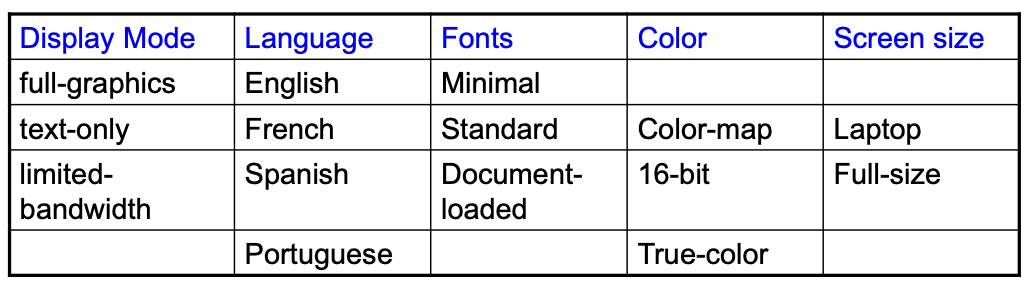
Pairwise combinatorial testing:
much smaller test suites
- Generate combinations that efficiently cover all pairs (triples,…) of classes
- Covering pairs (triples,…) reduces the number of test cases, but reveals most faults
- Rationale: most failures are triggered by single values or combinations of a few values
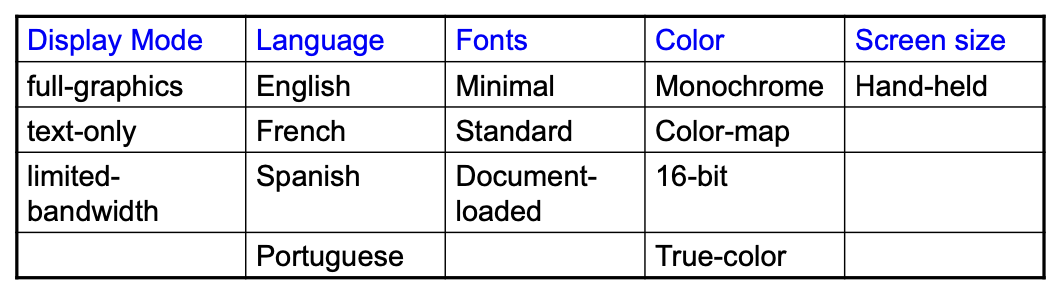
Example:
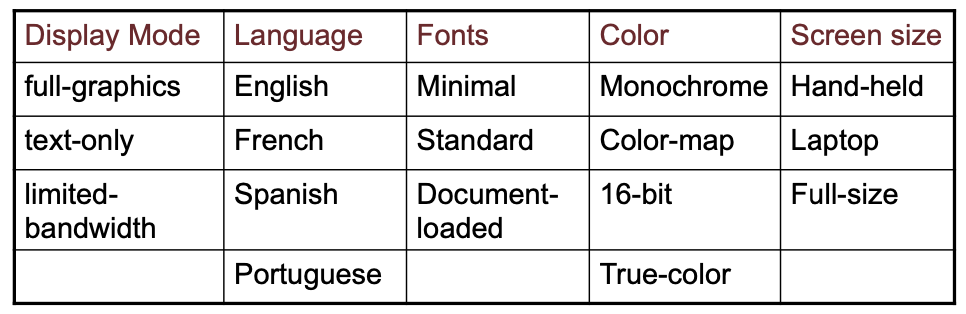
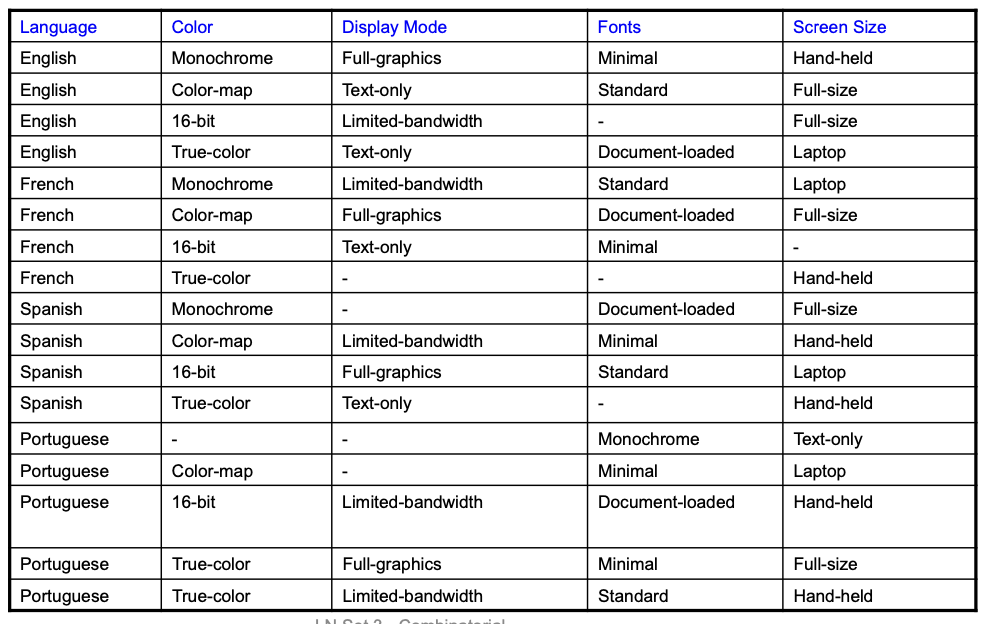
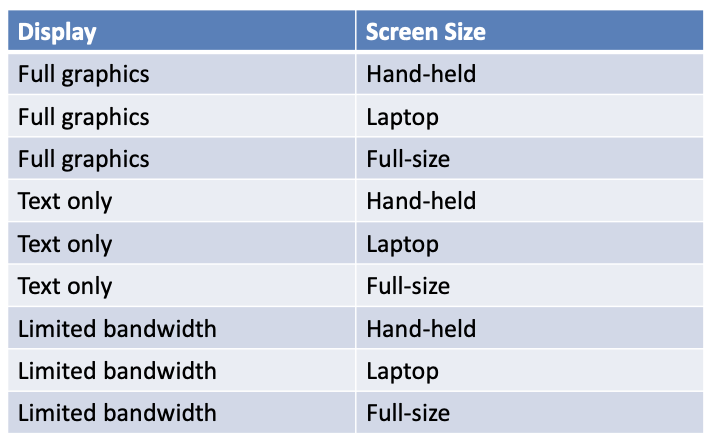
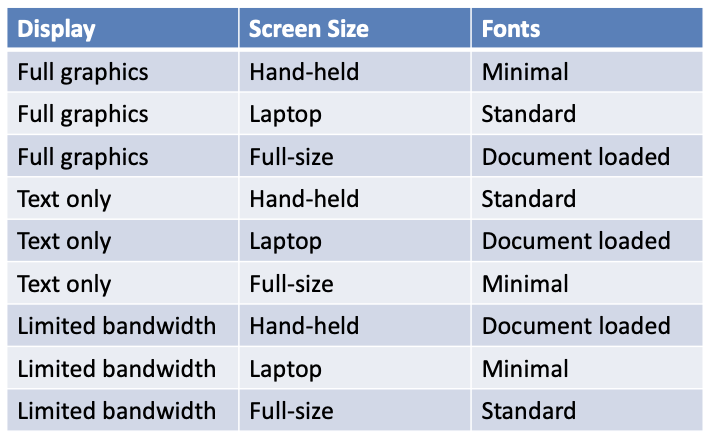
Adding Constraints: color monochrome not compatible with screen laptop and full size
Catalog based testing:
- Deriving value classes requires human judgment
- Gathering experience in a systematic collection can [1] speed up the test design process, [2] routinize many decisions, better focusing human effort, [3] accelerate training and reduce human error
- Catalogs capture the experience of test designers by listing important cases for each possible type of variable
- Example: if the computation uses an integer variable a catalog might indicate the following relevant cases: [1] The element immediately preceding the lower bound, [2] The lower bound of the interval, [3] A non-boundary element within the interval, [4] The upper bound of the interval, [5] The element immediately following the upper bound
- Analyze the initial specification to identify simple elements: Pre-conditions, Post-conditions, Definitions, Variables, Operations
- Derive a first set of test case specifications from pre-conditions, post-conditions and definitions
- Complete the set of test case specifications using test catalogs
Example: cgi_decode
- Function
cgi_decodetranslates a cgi-encoded string to a plain ASCII string, reversing the encoding applied by the common gateway interface (CGI) of most web servers - CGI translates spaces to +, and translates most other non-alphanumeric characters to hexadecimal escape sequences
cgi_decodemaps + to spaces, %xy (where x and y are hexadecimal digits) to the corresponding ASCII character, and other alphanumeric characters to themselves
[INPUT] encoded: string of characters (the input CGI sequence) can contain:
- alphanumeric characters
- the character +
- the substring %xy, where x and y are hexadecimal digits
- is terminated by a null character
[OUTPUT] decoded: string of characters (the plain ASCII characters corresponding to the input CGI sequence)
- alphanumeric characters copied into output (in corresponding positions)
- blank for each + character in the input
- single ASCII character with value xy for each substring %xy
[OUTPUT] return value cgi_decode returns
- 0 for success
- 1 if the input is malformed
Step 1: Identify simple elements
- Pre-conditions: conditions on inputs that must be true before the execution → [1] validated preconditions: checked by the system, [2] assumed preconditions: assumed by the system
- Post-conditions: results of the execution
- Variables: elements used for the computation
- Operations: main operations on variables and inputs
- Definitions: abbreviations
Example:
-
PRE 1 (Assumed) input string encoded null-terminated string of chars
-
PRE 2 (Validated) input string encoded sequence of CGI items
-
POST 1 if encoded contains alphanumeric characters, they are copied to the output string
-
POST 2 if encoded contains characters +, they are replaced in the output string by ASCII SPACE characters
-
POST 3 if encoded contains CGI hexadecimals, they are replaced by the corresponding ASCII characters
-
POST 4 if encoded is processed correctly, it returns 0
-
POST 5 if encoded contains a wrong CGI hexadecimal (a substring xy, where either x or y are absent or are not hexadecimal digits), cgi_decode returns 1
-
POST 6 if encoded contains any illegal character, it returns 1
-
VAR 1 encoded: a string of ASCII characters
-
VAR 2 decoded: a string of ASCII characters
-
VAR 3 return value: a boolean
-
DEF 1 hexadecimal characters, in range [‘0’ .. ‘9’, ‘A’ .. ‘F’, ‘a’ .. ‘f’]
-
DEF 2 sequences %xy, where x and y are hexadecimal characters
-
DEF 3 CGI items as alphanumeric character, or ’+’, or CGI hexadecimal
-
OP 1 Scan encoded
Step 2: Derive initial set of test case specs
- Validated preconditions:
- simple precondition (expression without operators): 2 classes of inputs: inputs that satisfy the precondition / inputs that do not satisfy the precondition
- compound precondition (with AND or OR): apply modified condition/decision (MC/DC) criterion
- Assumed precondition: apply MC/DC only to “OR preconditions”
- Postconditions and Definitions: if given as conditional expressions, consider conditions as if they were validated preconditions
Example:
-
PRE 1 (Assumed) input string encoded null-terminated string of chars – no tests are generated
-
PRE 2 (Validated) input string encoded sequence of CGI items
TC-PRE2-1 Encoded: a sequence of CGI elements – refined by POST tc
TC-PRE2-2 Encoded: not a sequence of CGI elements -
POST 1 if encoded contains alphanumeric characters, they are copied to the output string
TC-POST1-1 Encoded: contains one or more alphanumeric characters
TC-POST1-2 Encoded: does not contain any alphanumeric characters -
POST 2 if encoded contains characters +, they are replaced in the output string by ASCII SPACE characters
TC-POST2-1 Encoded: contains one or more character ‘+’
TC-POST2-2 Encoded: does not contains any character ‘+’ -
POST 3 if encoded contains CGI hexadecimals, they are replaced by the corresponding ASCII characters
TC-POST3-1 Encoded: contains one or more CGI-hexadecimal
TC-POST3-2 Encoded: does not contains any CGI-hexadecimal -
POST 4 if encoded is processed correctly, it returns 0 – covered by PRE2
-
POST 5 if encoded contains a wrong CGI hexadecimal (a substring xy, where either x or y are absent or are not hexadecimal digits, - cgi_decode returns 1
TC_POST5-1 Encoded: contains one or more malformed CGI-hexadecimals
POST 6 if encoded contains any illegal character, it returns 1
TC_POST6-1 Encoded: contains one or more illegal characters -
VAR 1 encoded: a string of ASCII characters
-
VAR 2 decoded: a string of ASCII characters
-
VAR 3 return value: a boolean
-
DEF 1 hexadecimal characters, in range [‘0’ .. ‘9’, ‘A’ .. ‘F’, ‘a’ .. ‘f’]
-
DEF 2 sequences %xy, where x and y are hexadecimal characters
-
DEF 3 CGI items as alphanumeric character, or ’+’, or CGI hexadecimal
-
OP 1 Scan encoded
Step 3: Apply the catalog
- Scan the catalog sequentially
- For each element of the catalog: [1] scan the specifications, [2] apply the catalog entry
- Delete redundant test cases
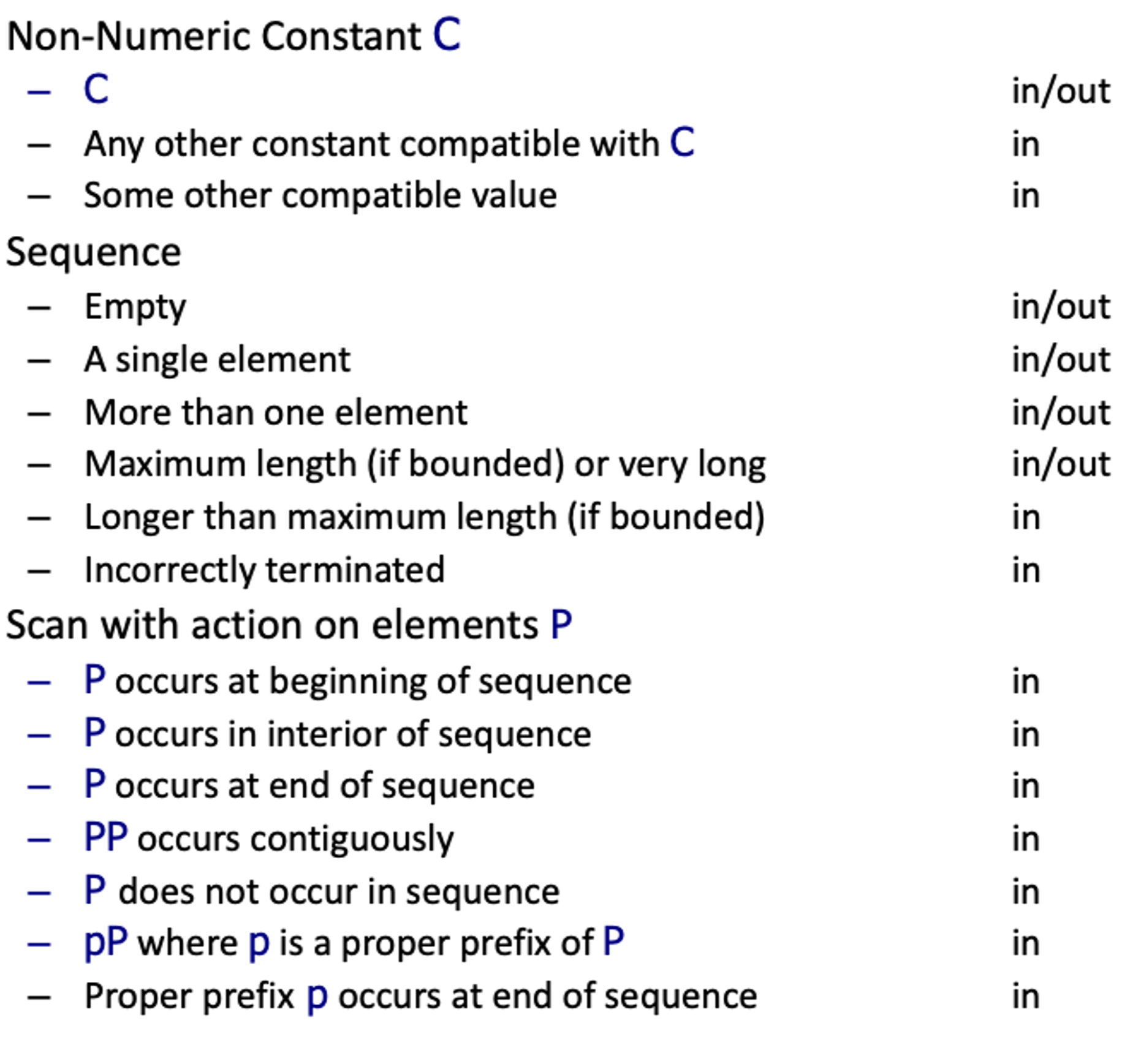
- Catalog: [1] List of kinds of elements that can occur in a specification, [2] Each catalog entry is associated with a list of generic test case specifications
Example:
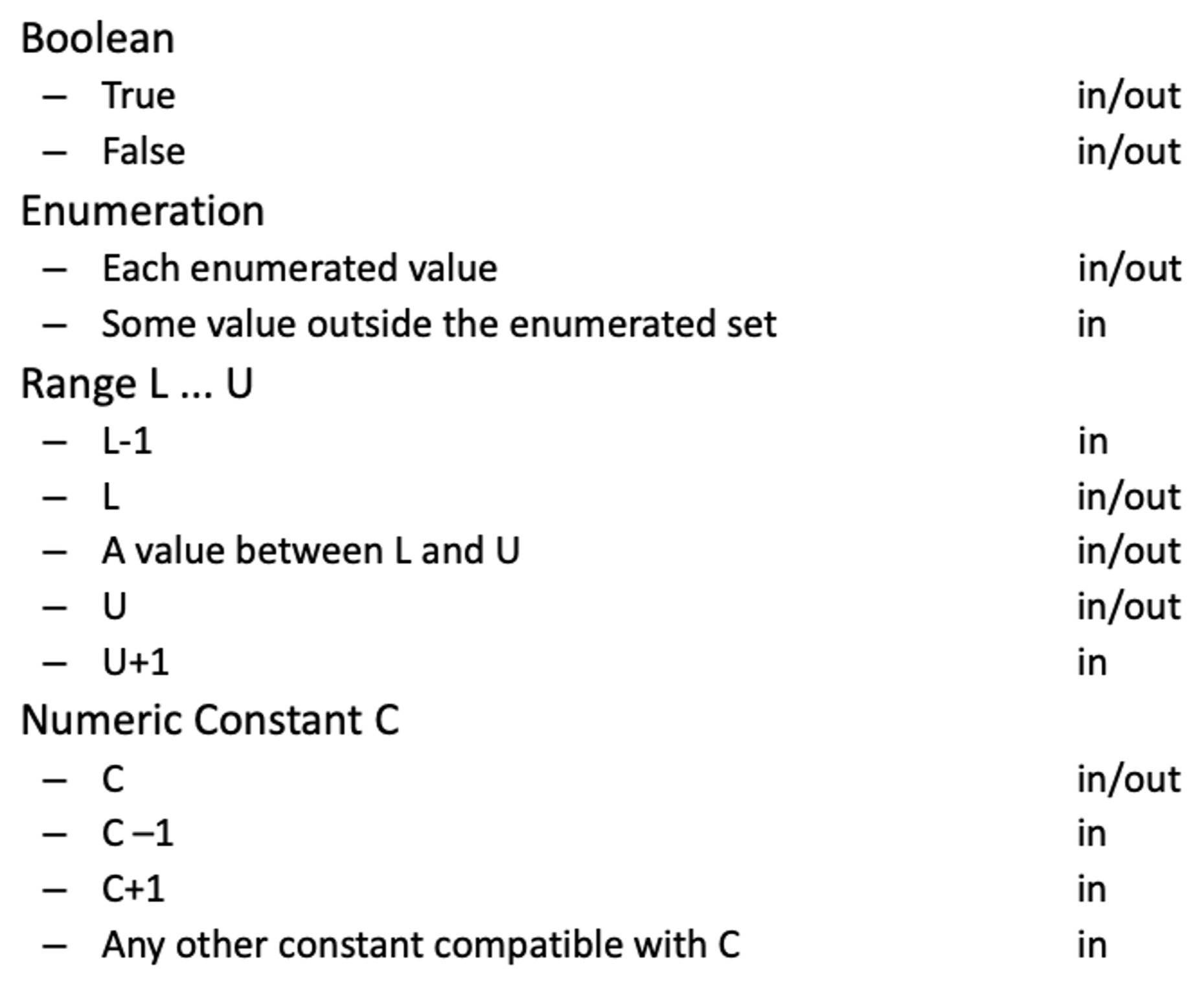
Boolean
- True in/out False in/out
→ applies to return value → generates 2 test cases already covered by *TC-PRE2-*1 and TC-PRE2-2
Enumeration:
- Each enumerated value in/out Some value outside the enumerated set in
→ applies to CGI item (DEF 3) → included in TC-POST1-1, TC-POST1-2, TC-POST2-1, TC-POST2-2, TC-POST3-1, TC-POST3-2 → applies also to improper CGI hexadecimals
- New test case specifications
- TC-POST5-2 encoded terminated with %x , where x is a hexadecimal digit
- TC-POST5-3 encoded contains %ky , where kis not a hexadecimal digit and y is a hexadecimal digit
- TC-POST5-4 encoded contains %xk , where xis a hexadecimal digit and k is not
- TC-POST3-1 encoded contains CGI hexadecimals – already covers well-formed hexadecimals
- Old test case specifications can be eliminated if they are less specific than the newly generated cases
- TC-POST5-1 encoded contains erroneous CGI hexadecimals
Range:
- hexadecimal digit (DEF 2)
- characters / and : (before 0 and after 9 in the ASCII table) values 0 and 9 (bounds), one value between 0 and 9 @, G, A, F, one value between A and F }, g, a, f, one value between a and f
- 30 new test cases (15 for each character %xy)
- Alphanumeric char (DEF 3): 5 new test cases
Numeric Constant: does not apply
Non-Numeric Constant: applies to + and %, in DEF 3 and DEF 2: 6 new Test Cases (all redundant)
Sequence: applies to encoded (VAR 1), decoded (VAR 2), and cgi-item (DEF 2)
- 6 new Test Cases for each variable
- Only 6 are non-redundant:
- encoded: [1] empty sequence. [2] sequence of length one, [3] long sequence
- cgi-item: [1] % terminated sequence (subsequence with one char), [2] % initiated sequence, [3] sequence including %xyz, with x, y, and z hexadecimals
Scan: applies to Scan encoded (OP 1) and generates 17 test cases: only 10 are non-redundant
L4: Background on Debugging and Structural Testing
Control Flow Graph (Intra-procedure):
1String collapseNewlines(String argStr) {2 char last = argStr.charAt(0);3 StringBuffer argBuf = new StringBuffer();4 for (int cIdx = 0 ; cIdx < argStr.length(); cIdx++) {5 char ch = argStr.charAt(cIdx);6 if (ch != '\n' || last != '\n') {7 argBuf.append(ch);8 last = ch;9 }10 }11 return argBuf.toString();12}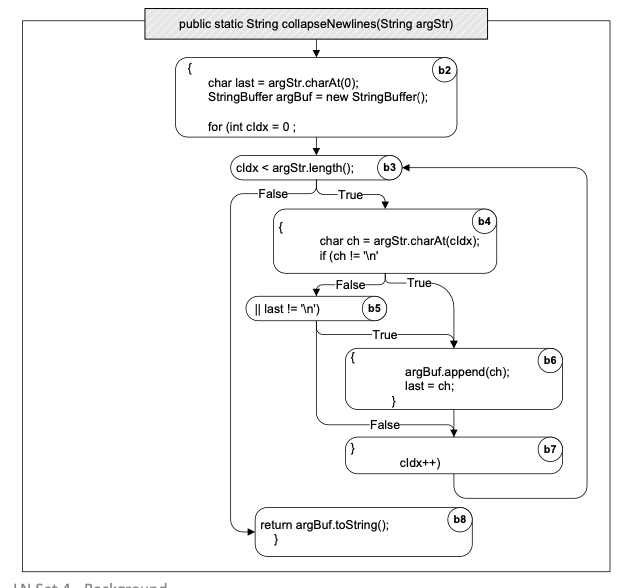
Inter-procedural CFG:
- Over-estimating call relation: The static call graph includes calls that never occur in execution (due to dynamic bindings)
1public class C {2 public static C cFactory(String kind) {3 if (kind == "C") return new C();4 if (kind == "S") return new S();5 return null;}6 void foo() {7 System.out.println("You called the parent's method");}8 public static void main(String args[]) {9 (new A()).check();}}10class S extends C {11 void foo() {12 System.out.println("You called the child's method");}}13class A {14 void check() {15 C myC = C.cFactory("S"); myC.foo();}}1flowchart TD2 Acheck("A.check()") --> Cfoo("C.foo()")3 Acheck --> Sfoo("S.foo()")4 Acheck --> cFact("C.cFactory()")1public class Context {2 public static void main(String args[]) {3 Context c = new Context();4 c.foo(3); c.bar(17);}5 void foo(int n) {6 int[] myArray = new int[ n ];7 depends( myArray, 2);}8 void bar(int n) {9 int[] myArray = new int[ n ];10 depends( myArray, 16);}11 void depends( int[] a, int n ) {12 a[n] = 42;13}}Context sensitive vs. insensitive call graph:
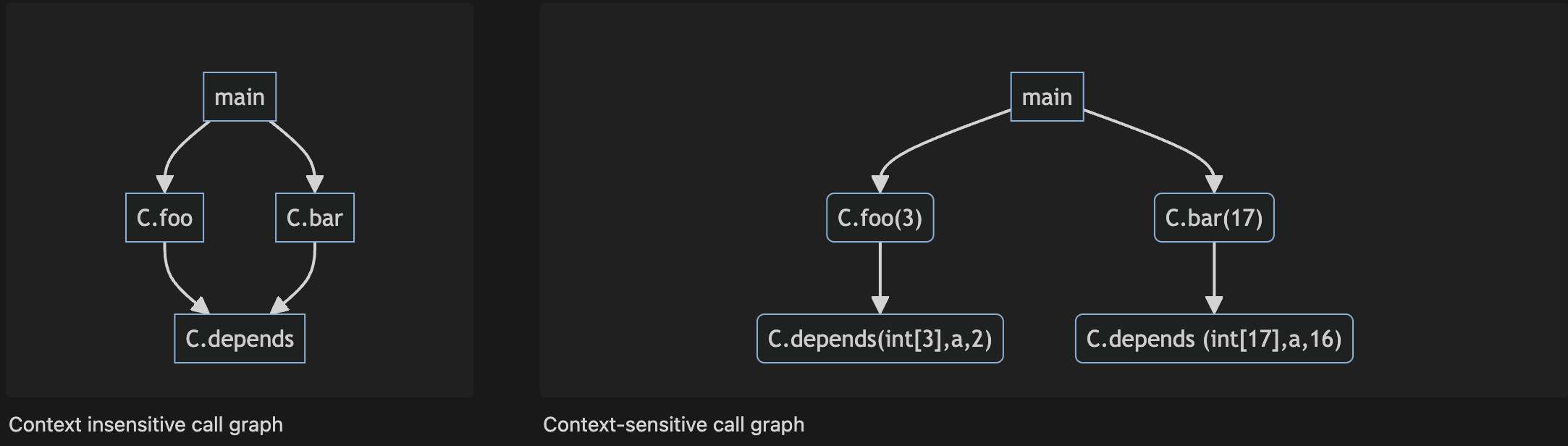
Def-use pair:
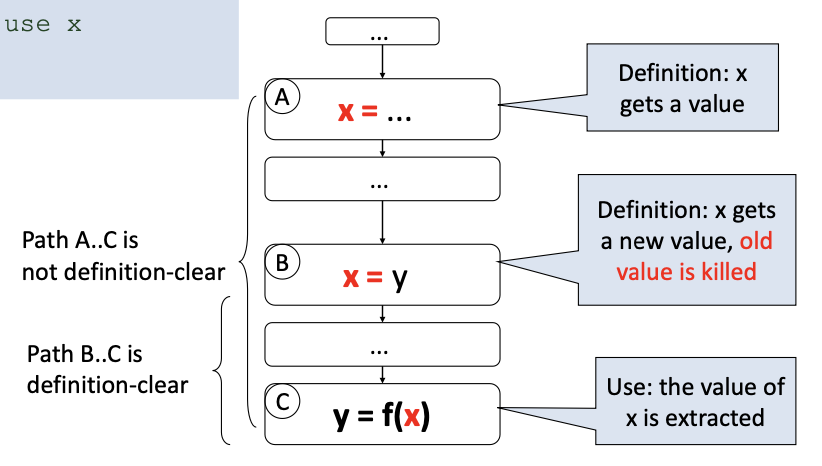
A def-use (du) pair associates a point in a program where a value is produced with a point where it is used
- Definition: where a variable gets a value: Variable declaration (often the special value “uninitialized”), Variable initialization, Assignment, Values received by a parameter
- Use: extraction of a value from a variable: Expressions, Conditional statements, Parameter passing, Returns
Definition-clear path:
- A definition-clear path is a path along the CFG from a definition to a use of the same variable without another definition of the variable in-between. If, instead, another definition is present on the path, then the latter definition kills the former
- A def-use pair is formed if and only if there is a definition-clear path between the definition and the use
Data dependence graph:
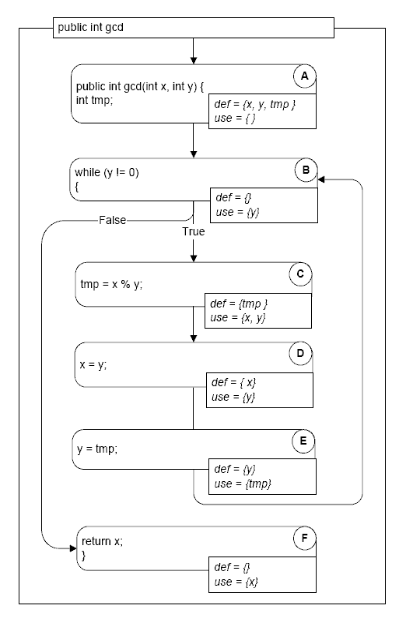
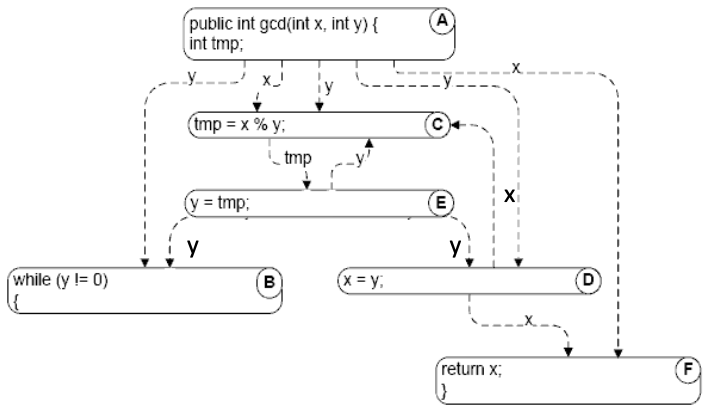
We define data dependencies corresponding to memory locations rather than variable names: A[i] = 1; U = A[j]
Static vs Dynamic data dependence:
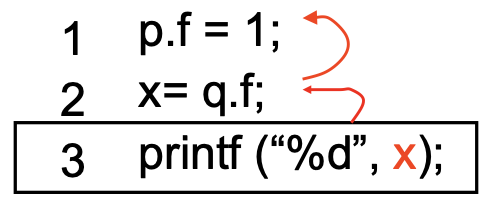
p and q point to the same object?
- Static analysis is always conservative – uses the program text
- Overestimate the data dependencies
- Dynamic analysis – uses the program runtime
- Reduces the number of dependencies that need to be considered
Dominators - controlling decision:
- Pre-dominators in a rooted and directed graph (CFG) makes this intuitive notion of “controlling decision” precise
- Node M dominates node N if every path from the root to N passes through M.
- A node will typically have many dominators, but except for the root, there is a unique immediate dominator of node N which is closest to N on any path from the root
- Because each node (except the root) has a unique immediate dominator, the immediate dominator relation forms a tree
- Post-dominators: Calculated in the reverse of the control flow graph, using a special “exit” node as the root
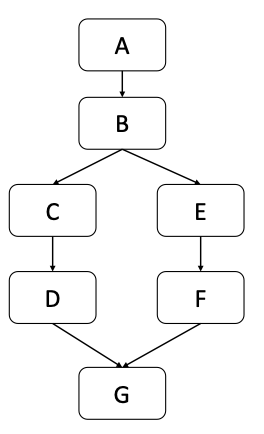
- A pre-dominates all nodes; G post-dominates all nodes
- F and G post-dominate E
- G is the immediate post-dominator of B
- C does not post-dominate B
- B is the immediate pre-dominator of G
- F does not pre-dominate G
Control dependence:
- Node N is control-dependent on node C if:
- Node N is reached on some but not all execution paths in the CFG
- There is a node C with the following property: [1] C has at least two successors in the control flow graph (i.e., it represents a control flow decision), [2] C is not post-dominated by N, [3] There is a successor of C that is post-dominated by N (including the node itself)
- Intuitively: C was the last decision that controlled whether N is executed
Static vs Dynamic control dependence:
1input n;2if (n > 0) {3 if (n < -10){4 S5}}Static control dependence: B2→B4, B3→B4
Dynamic control dependence: 1 of the 2 static dependencies, depending on value of n
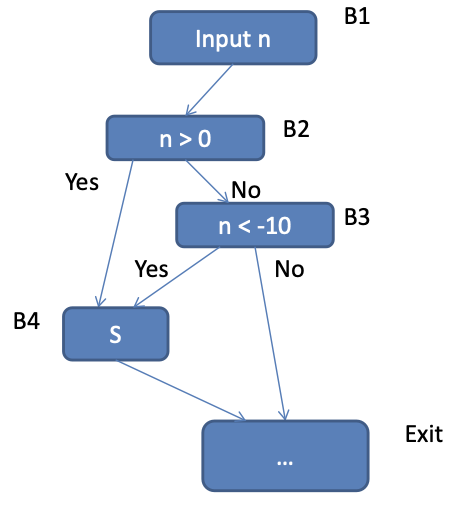
Control dependence graph:
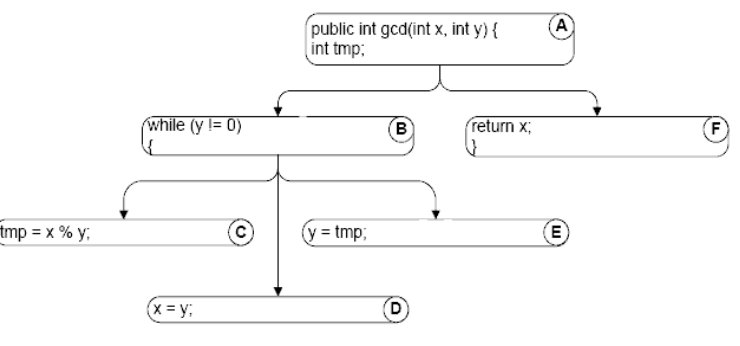
Dynamic Slicing: Closure of Dynamic data dependencies & Dynamic control dependencies from the slicing criterion
Static vs Dynamic slicing:
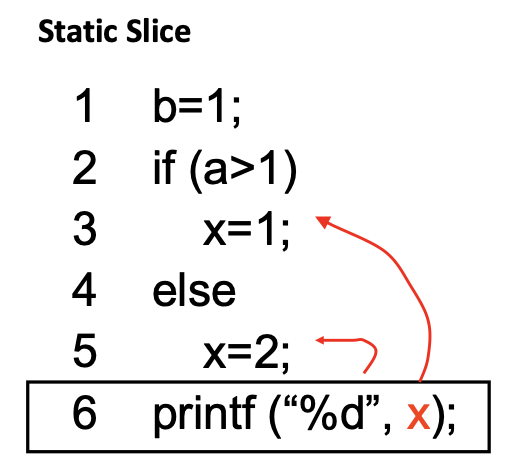
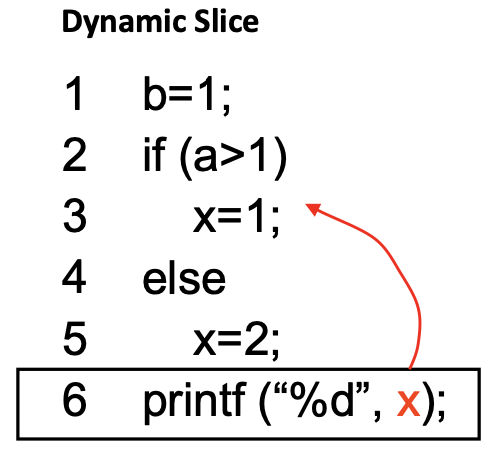
Hierarchical slicing:
1void main() {2 init(db);3 operate(db);4 output (db);5 return;6}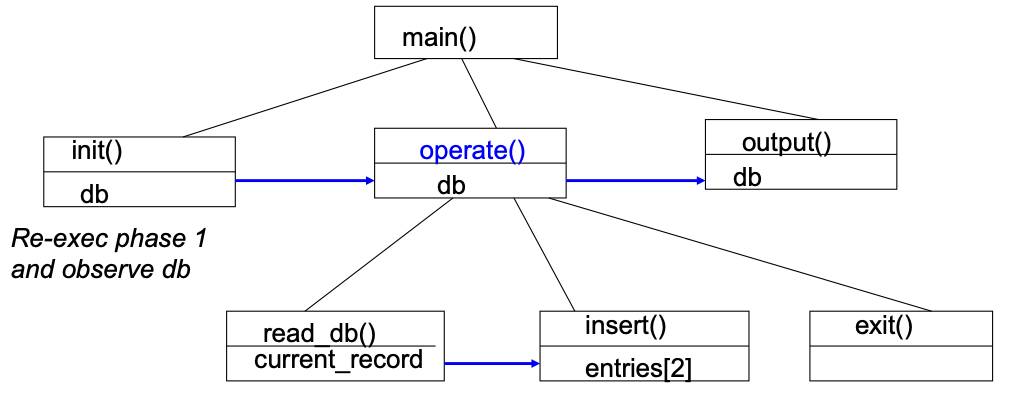
Parallel dependence chains:
1x1 = f1();2x2 = f2();3x3 = f3();4y = x1 + x2 + x3;5print(y) // Criterion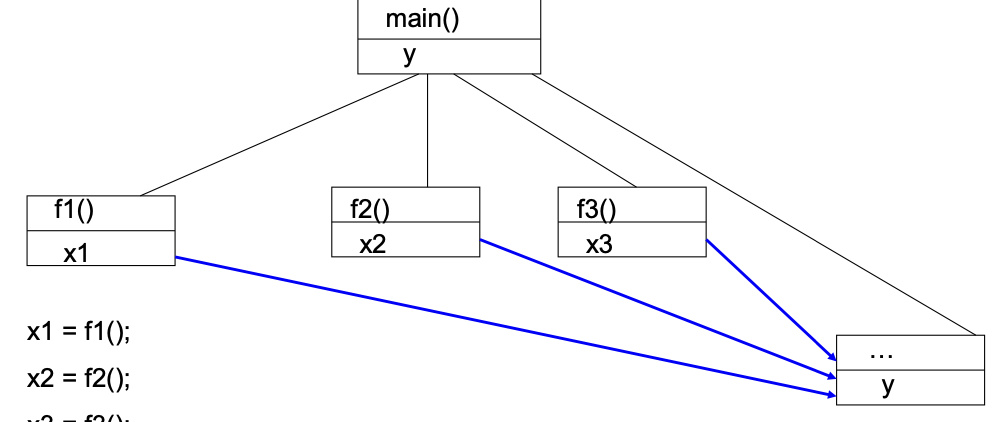
Hierarchical dynamic slicing:
- Compute “phases” of an execution trace: Control structure boundaries
- Augment dynamic slicing algorithm: [1] Mark inter-phase dependencies, [2] Compute only reachable nodes from selected inter-phase dependence
- Tester’s intervention: [1] Select the first suspicious inter-phase dependence, [2] Comprehension guides computation
L5: Debugging
Statistical fault localization: Assign scores to program statements (s) based on their occurrence in passing / failing tests.
Given a test suite T
- fail(s) = # of failing executions in which statement s occurs
- pass(s) = # of passing executions in which statement s occurs
- allfail = Total # of failing executions
- allpass = Total # of passing executions
- allfail + allpass = |T|
Ochiai metric:
Bucketing: Aggregate error reports likely to be originating from the same fault into the same bucket. [1] Client side / Server side bucketing, [2] Expanding / Condensing
Labelling - client side: Produce unique bucket label based on local information
- Program Name Version, Timestamp [Expanding]
- Module Name, Version, … [Expanding]
- Exception code, … [Expanding]
- Assert tag, … [Condensing]
- MS Office build process assigns a unique permanent tag to each source-code assert
- When an assert failure is reported, the bucket is labelled by assert tag, rather than module information
Classifying – server side: Server side bucketing – many heuristics exist
- Many heuristics to filter out error
- Code comparison of memory dump against Microsoft binaries to find possible execution of corrupt code!
- Debugging can then be stopped!
- Determine which thread context and stack frame are likely to have caused the error
- New heuristics get added every week in the WER team!
Testing-based fault localization:
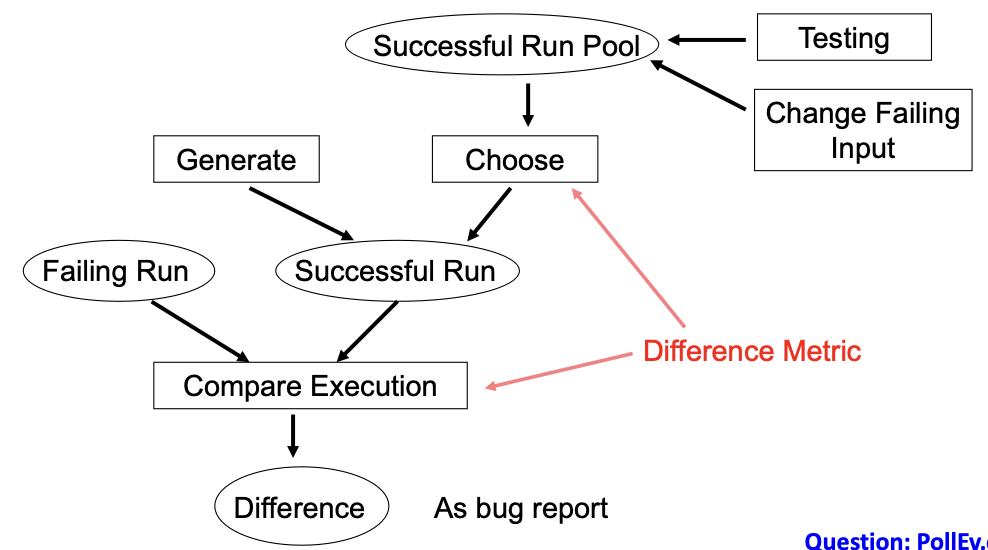
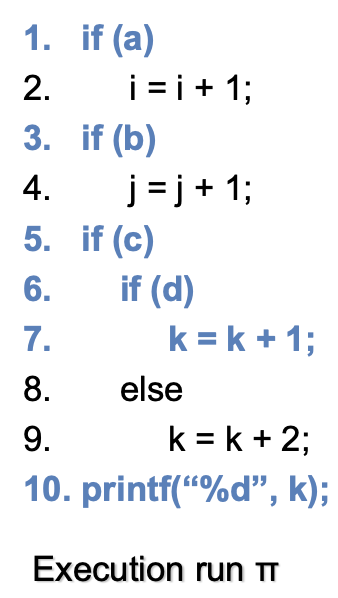
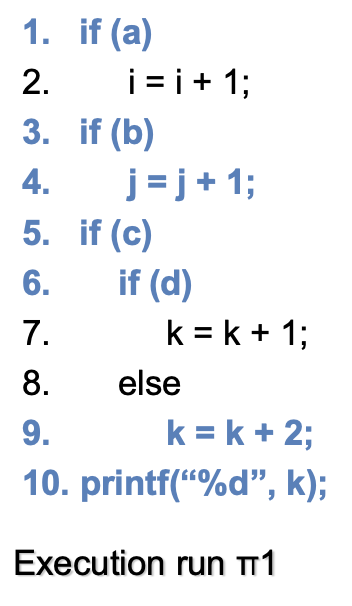
- S = Set of statements executed in π = {1,3,5,6,7,10}
- S1 = Set of statements executed in π1 = {1,3,4,5,6,9,10}
- If π is faulty and π1 is OK → Bug report = S – S1 = {7}
- Choice of the execution run to compare with is very important
Trace alignment and differences:
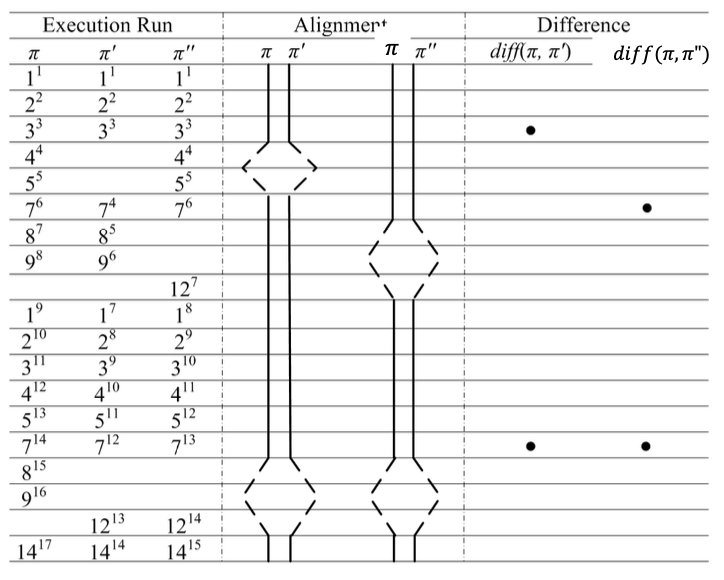
- Favor traces with lower number of differences
- Favor branches near to the observable error
Symbolic execution:
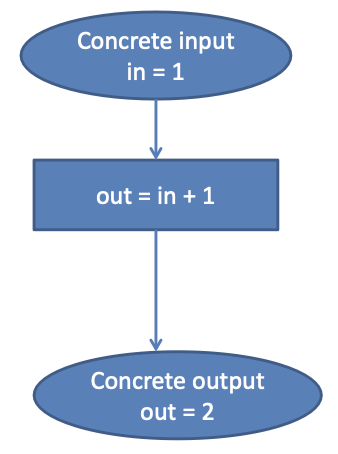
Concrete execution
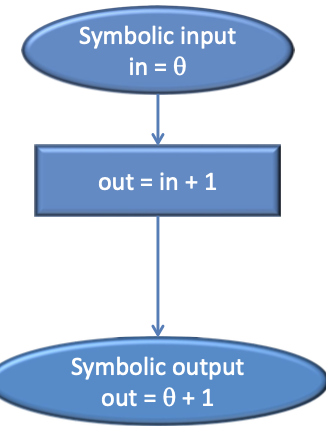
Execution with symbolic input
Static symbolic execution:
1input in;2if (in >= 0)3 a = in;4else5 a = -1;6return a;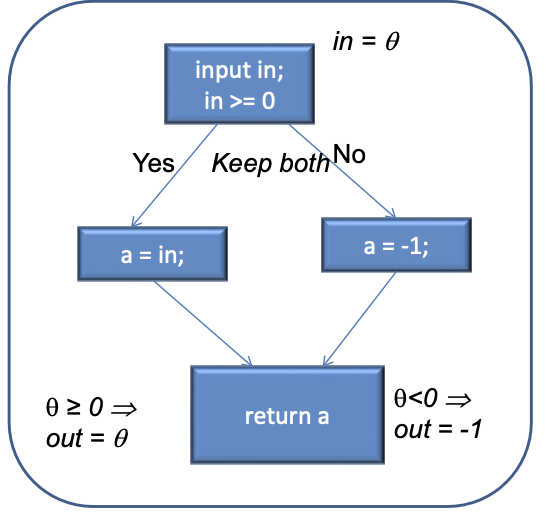
→ Does not scale!
Exploring 1 path: use of path conditions
11. input in; ## in = 522. z = 0; x = 0;33. if (in > 0){44. z = in *2;55. x = in +2;66. x = x + 2;77. }88. else …99. if ( z > x) {10 return error; }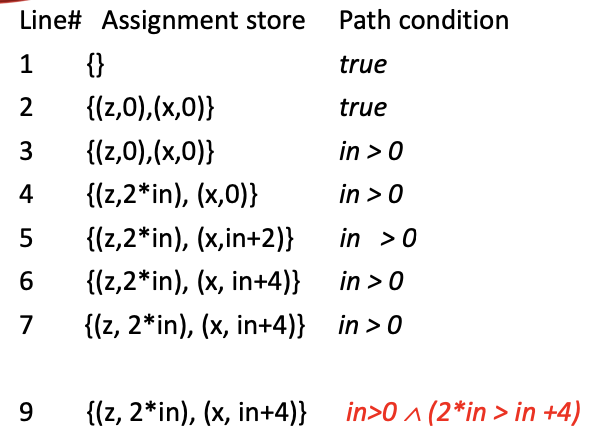
- Continue the search for failing inputs, those which do not go through the “same” path
- Directed Automated Random Testing (DART)
Path coverage:
-
Cover all paths in the program
→ Unboundedly many, unless loops can be bounded. Lot of infeasible paths i.e. paths which do not form execution trace for any input. Infeasible path detection will help test-suite construction
-
Directed testing: a technique to help exercise new paths with new tests → Attempts to achieve path coverage. Basic idea: concrete and symbolic execution at the same time
Directed testing:
- Start with a random input I
- Execute program P with I. Suppose I executes path p in program P
- While executing p, collect a symbolic formula f which captures the set of all inputs which execute path p in program P.
- f is the path condition of path p traced by input i
- Minimally change f, to produce a formula f1. Solve f1 to get a new input i1 which executes a path p1 different from path p
Backwards execution:
- So far: forward execution using symbolic inputs, for programs or a program path
- Now: backwards symbolic execution from the end state → Capture reasons for reaching failing end state. Weakest pre-condition of a failing end state
L6: Structural Testing
Structural Testing:
- Judging test suite thoroughness based on the structure of the program itself
- Complements functional testing
- If part of a program is not executed by any test case, faults in that part cannot be exposed
- But what’s a “part”? Typically, a control flow element or combination of statements (or CFG nodes), branches (or CFG edges), conditions, paths
- Recall fundamental rationale: prefer test cases that are treated differently over cases treated the same
- Executing all control flow elements does not guarantee finding all faults
- Execution of a faulty statement may not always result in a failure. The state may not be corrupted when the statement is executed with some data values. Corrupt state may not propagate through execution to eventually lead to failure
- How important is the value of structural coverage? [1] Increases confidence in thoroughness of testing, [2] Removes some obvious inadequacies
In practice:
- Create functional test suite first, then measure structural coverage to identify what is not covered
- Interpret elements that are not covered: [1] May be due to natural differences between specification and implementation, [2] May reveal flaws of the software or its development process
- Attractive because measurable
- Coverage measurements are convenient progress indicators
- Sometimes used as a criterion of completion → Use with caution: does not ensure effective test suites
Statement Testing:
- Adequacy criterion: each statement (or node in the CFG) must be executed at least once
- Coverage: \frac\{\text\{#executed stmts}}\{\text\{#stmts}}
- Rationale: a fault in a statement can only be revealed by executing the faulty statement
- Complete statement coverage may not imply executing all branches in a program
Example:
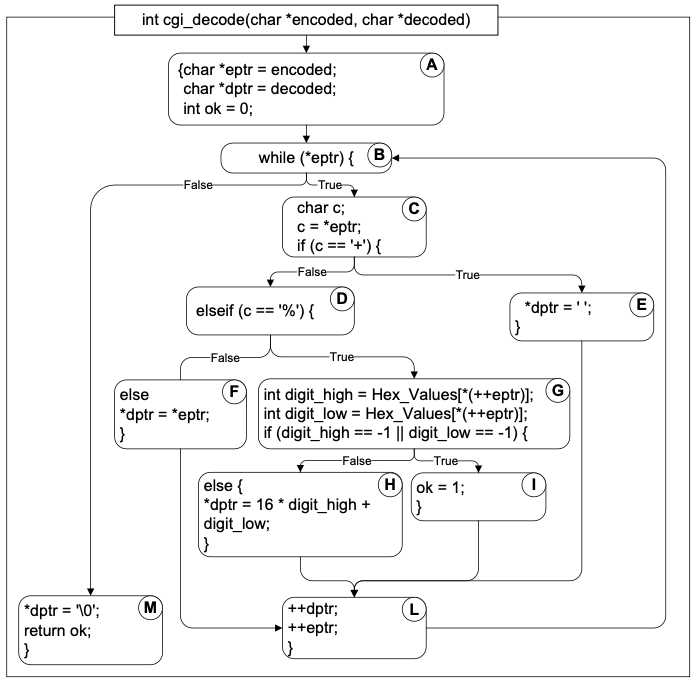
T0 = {“”, “test”, “test+case%1Dadequacy”} → 17/18 = 94% Stmt Cov.
T1 = {“adequate+test%0Dexecution%7U”} → 18/18 = 100% Stmt Cov.
T2 = {“%3D”, “%A”, “a+b”, “test”} → 18/18 = 100% Stmt Cov.
Branch Testing:
- Adequacy criterion: each branch (edge in the CFG) must be executed at least once
- Coverage: \frac\{\text\{#executed branches}}\{\text\{#branches}}
Example:
- T3 = {“”, “+%0D+%4J”} → 100% Stmt Cov. 88% Branch Cov. (7/8 branches)
- T2 = {“%3D”, “%A”, “a+b”, “test”} → 100% Stmt Cov. 100% Branch Cov. (8/8 branches)
Statements vs Branches:
- Traversing all edges of a graph causes all nodes to be visited
- Test suites that satisfy the branch adequacy criterion for a program P also satisfy the statement adequacy criterion for the same program
- The converse is not true (see T3): a statement-adequate (or node-adequate) test suite may not be branch-adequate (edge-adequate)
Condition Testing:
- Branch coverage exposes faults in how a computation has been decomposed into cases → intuitively attractive: check the programmer’s case analysis; but only roughly: groups cases with the same outcome
- Condition coverage considers case analysis in more detail
- individual conditions in a compound Boolean expression, e.g. both parts of
digit_high == 1 || digit_low == -1
- individual conditions in a compound Boolean expression, e.g. both parts of
(Basic) Condition Testing:
- Adequacy criterion: each basic condition must be executed at least once (once to TRUE and once to FALSE)
- Coverage:
Basic Conditions vs Branches:
- Earlier: branch coverage can be achieved without basic condition coverage
- Basic condition adequacy criterion can be satisfied without satisfying branch coverage
- E.g: T4 = {“first+test%9Ktest%K9”} → satisfies basic condition adequacy but not branch condition adequacy
- Branch and basic condition are not comparable (neither implies the other)
Covering Branches and Conditions:
- Branch and condition adequacy: Cover all conditions and all decisions
- Compound condition adequacy: [1] Cover all possible evaluations of compound conditions, [2] Cover all branches of a decision tree (basic conditions)
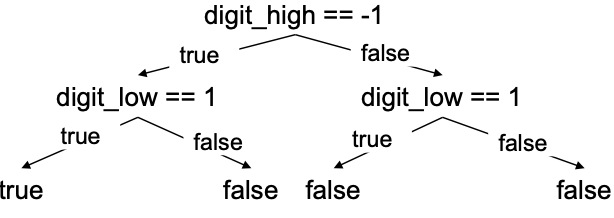
digit_high == -1 && digit_low == 1
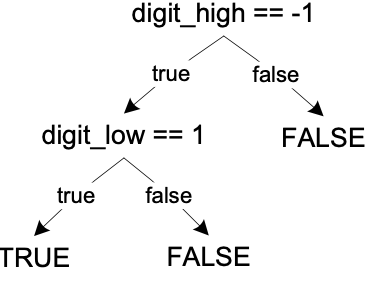
Short-circuit eval
Compound Condition and MC/DC Adequacy:
- Compound condition adequacy requires a test for each possible evaluation of compound conditions and basic conditions
- MC/DC: Effectively test important combinations of conditions, without exponential blowup in test suite size
- “Important” combinations mean: each basic condition shown to independently affect the outcome of each decision
- Requires for each basic condition C, two test cases: [1] Values of all evaluated conditions except C are the same, [2] Compound condition, as a whole evaluates, to true for one and false for the other
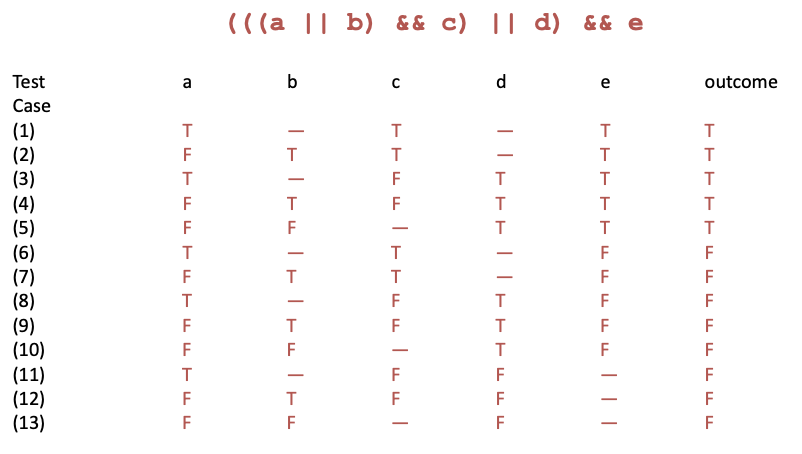
Compound Conditions
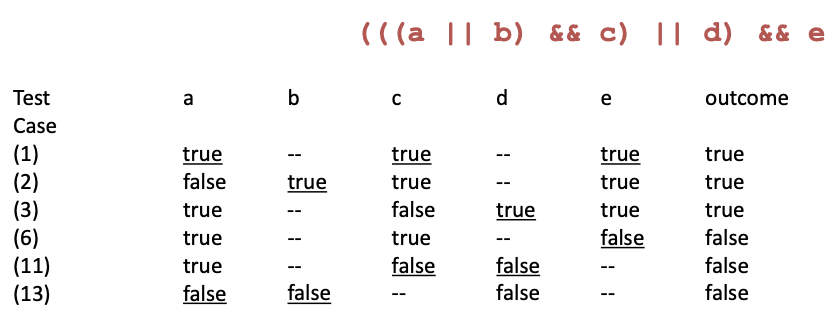
Modified Condition Adequacy Criterion
Modified Condition/Decision Coverage (MC/DC):
- MC/DC is [1] basic condition coverage (C), [2] branch coverage (DC), [3] plus one additional condition (M): every condition must independently affect the decision’s output
- MC/DC is subsumed by compound conditions (weaker). MC/DC subsumes statement and branch coverage (stronger)
- A good balance of thoroughness and test size (and therefore widely used)
Path Adequacy:
- Decision and condition adequacy criteria consider individual program decisions
- Path testing focuses consider combinations of decisions along paths
- Adequacy criterion: each path must be executed at least once
- Coverage: \frac\{\text\{#executed paths}}\{\text\{#paths}}
Practical Path Coverage Criteria:
- The number of paths in a program with loops is unbounded → Usually impossible to satisfy 100% path coverage
- For a feasible criterion: Partition infinite set of paths into a finite number of classes
- Useful criteria can be obtained by limiting [1] the number of traversals of loops, [2] the length of the paths to be traversed, [3] the dependencies among selected paths
Boundary Interior Criterion:
- Group together paths that differ only in the subpath they follow when repeating the body of a loop. [1] Follow each path in the control flow graph up to the first repeated node. [2] The set of paths from the root of the tree to each leaf is the required set of subpaths for boundary/interior coverage
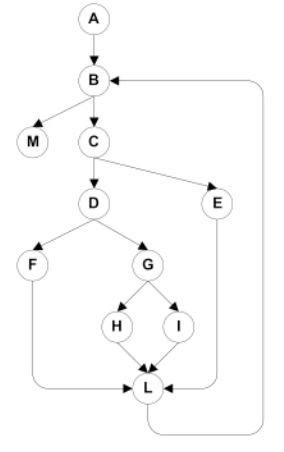
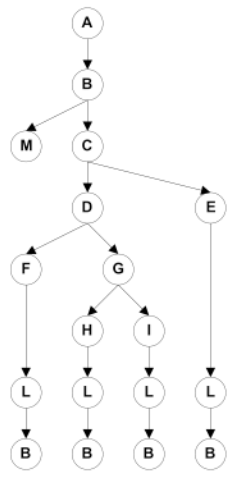
Limitations of Boundary Interior Adequacy:
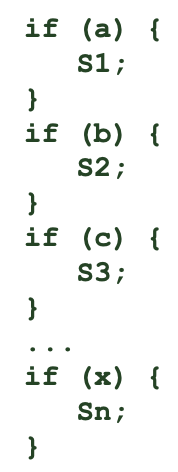
- The number of paths can still grow exponentially
- The subpaths through this control flow can include or exclude each of the statements Si, so that in total N branches result in 2^N paths that must be traversed
- Choosing input data to force execution of one particular path may be very difficult, or even impossible if the conditions are not independent
Loop Boundary Adequacy
- Variant of the boundary/interior criterion that treats loop boundaries similarly but is less stringent with respect to other differences among paths
- Criterion: A test suite satisfies the loop boundary adequacy criterion iff for every loop: [1] In at least one test case, the loop body is iterated zero times. [2] In at least one test case, the loop body is iterated once. [3] In at least one test case, the loop body is iterated more than once
- Corresponds to the cases that would be considered in a formal correctness proof for the loop
Path Partition:
11. int x,y,z; // input variables22. int out; // output variable33. int a;44. int b = 2;55. if(x - y > 0) //b166. a = x;77. else88. a = y;99. if (x + y > 10) //b21010. b = a;1111. if(z*z > 3) //b31212. printf("square(z) > 3 \n");1313. else1414. printf("square(z) <= 3 \n");1515. out = b; //slicing criterion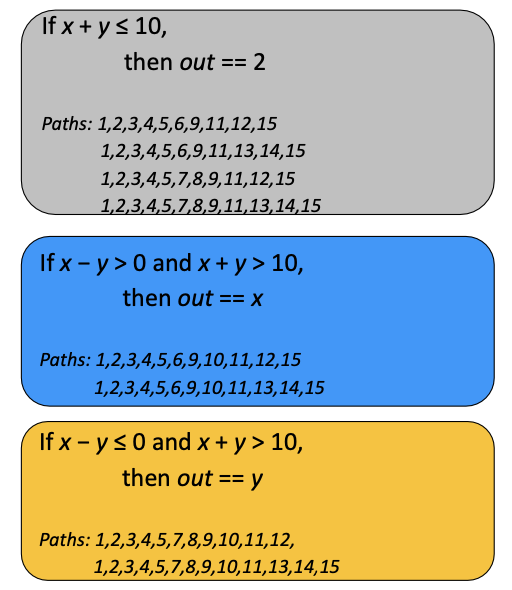
Path Partition Coverage:
- Instead of path coverage try path partition coverage
- Two paths are in the same partition, if they compute the same input-output relationship
- The input-output relationship describes the output as an expression of the inputs
- Different paths compute different relationships. Each such relationship becomes a path partition
- Computing these path partitions requires symbolic execution / program dependencies
Procedure Call Testing:
- Procedure entry and exit testing. Procedure may have multiple entry points (e.g., Fortran) and multiple exit points
- Call coverage: The same entry point may be called from many points
Satisfying Structural Criteria:
- Sometimes criteria may not be satisfiable. E.g: The criterion requires execution of
- statements that cannot be executed as a result of defensive programming, code reuse (reusing code that is more general than strictly required for the application)
- conditions that cannot be satisfied as a result of interdependent conditions
- paths that cannot be executed as a result of interdependent decisions
- Large amounts of fossil code may indicate serious maintainability problems. But some unreachable code is common even in well-designed, well-maintained systems
- Solutions: [1] Make allowances by setting a coverage goal less than 100%, [2] Require justification of elements left uncovered
Data Flow Testing:
- Middle ground in structural testing: [1] Node and edge coverage don’t test interactions. [2] Path-based criteria require impractical number of test cases
- And only a few paths uncover additional faults anyway → Need to distinguish “important” paths
- Intuition: statements interact through data flow: [1] Value computed in one statement, used in another. [2] Bad value computation revealed only when it is used
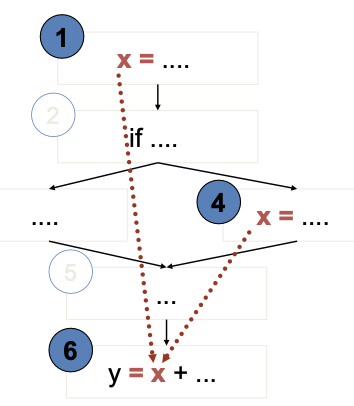
- Value of x at 6 could be computed at 1 or at 4
- Bad computation at 1 or 4 could be revealed only if they are used at 6
- (1,6) and (4,6) are def-use (DU) pairs
- defs at 1,4
- use at 6
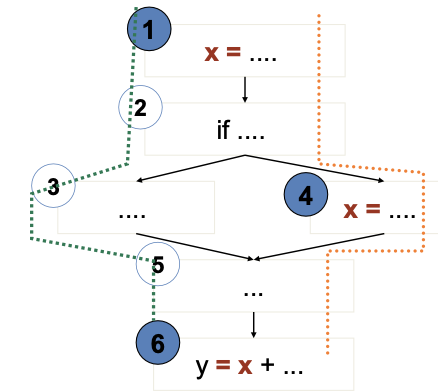
- 1,2,3,5,6 is a definition-clear path from 1 to 6
- x is not re-assigned between 1 and 6
- 1,2,4,5,6 is not a definition-clear path from 1 to 6
- the value of x is “killed” (reassigned) at node 4
- (1,6) is a DU pair because 1,2,3,5,6 is a definition-clear path
Adequacy Criteria:
- All DU pairs: Each DU pair is exercised by at least one test case
- All DU paths: Each simple (non looping) DU path is exercised by at least one test case
- All definitions: For each definition, there is at least one test case which exercises a DU pair containing it (Every computed value is used somewhere)
- Corresponding coverage fractions can also be defined
Data-flow Coverage with Complex Structures:
- Arrays and pointers are critical for data flow analysis. [1] Under-estimation of aliases may fail to include some DU pairs. [2] Over-estimation, on the other hand, may introduce unfeasible test obligations
- For testing, it may be preferable to accept under-estimation of alias set rather than over-estimation or expensive analysis
- In other applications (e.g., compilers), a conservative over-estimation of aliases is usually required
- Alias analysis may rely on external guidance or other global analysis to calculate good estimates
- Undisciplined use of dynamic storage, pointer arithmetic, etc. may make the whole analysis infeasible
Infeasibility:
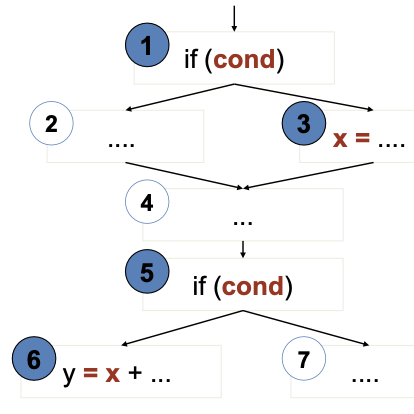
- Suppose cond has not changed between 1 and 5
- Or the conditions could be different, but the first implies the second
- Then (3,6) is not a (feasible) DU pair
- No test case can cover them
- The path-oriented nature of data flow analysis makes the infeasibility problem especially relevant. [1] Combinations of elements matter! [2] Impossible to distinguish feasible from infeasible paths. More paths = more work to check manually
- In practice, reasonable coverage is (often, not always) achievable. [1] Number of paths is exponential in worst case, but often linear. [2] All DU paths is more often impractical
L7: Testing Object-Oriented Software
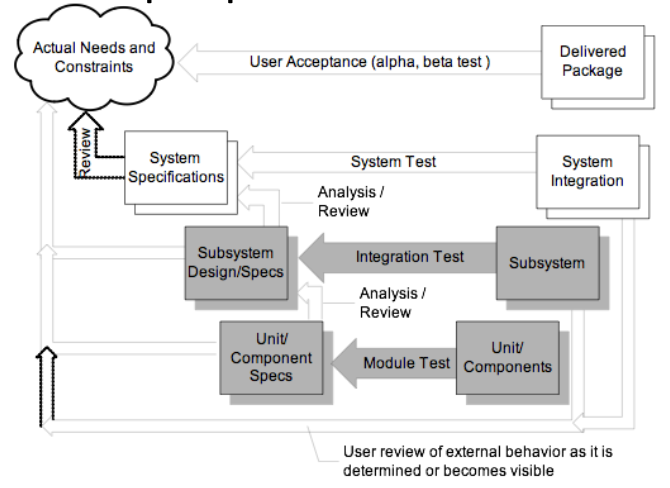
V-model
OO software vs procedural software:
Object-oriented
- Methods are short
- Interactions among method calls are more often and important
- Basic testing methods have some changes when applied in OO
Procedural
- Functions are long and prone to multiple faults
- Less attention needed in interactions among functions
- Basic testing methods are designed for procedural software
Intra-class Testing:
- Inheritance: Test individual methods
- State-dependent behaviour: Functional tests derived from state charts specification of the class and Structural tests derived from data flow information
- Exceptions: Test cases for exceptions thrown
- Polymorphic calls: Initial testcases to superclass/interface
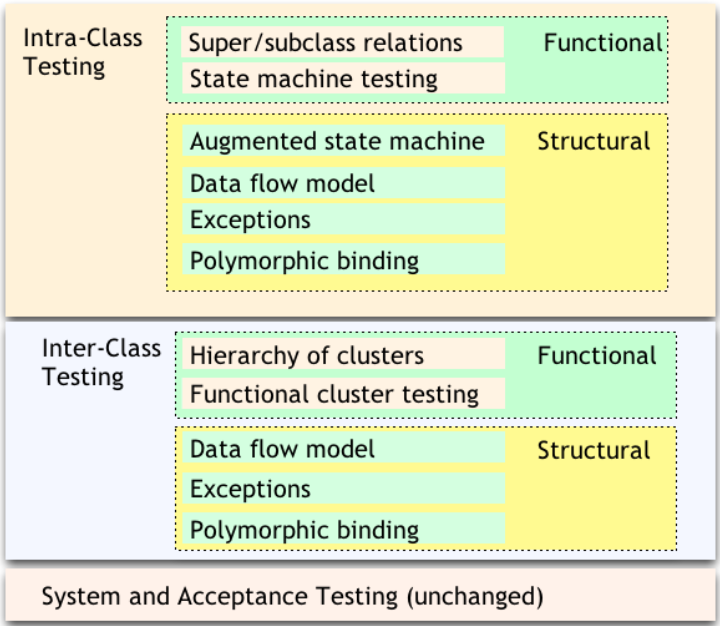
An Orthogonal Approach to Testing
Inter-class Testing:
- Hierarchy of classes: Identify and test predecessor classes first
- Polymorphism: New test cases to cover polymorphic calls integration and interaction
- Exception-handling: Testcases for exceptions propagated across classes
State Machine Models:
- Basic idea: [1] state of an object is modified by methods, [2] methods can be modelled as state transitions, [3] test cases are sequences of method calls that traverse the state machine
- State machine can be derived from specification (functional testing), code (structural testing), or both
Testing with Object states:
- Test cases can be derived from [1] UML state diagrams (statecharts), [2] UML message sequence diagrams, or [3] corner-case scenarios discussed with the customer, … either directly or by “flattening” the diagrams to FSMs first (state explosion)
- State chart-based testing criteria: [1] Transition coverage: percentage of covered state transitions. [2] Intuition: “A good test suite covers many state transitions”
Inter-class Testing:
- Integration testing: do units work correctly together?
- Focus on interaction between classes
- Start from “uses” or “includes” hierarchy: [1] Uses: Class A makes method calls to Class B. [2] Includes: Object of Class A is constructed using object(s) of Class B. [3] Inheritance is ignored, abstract classes are omitted
- Bottom-up integration: [1] Stress the “depends”-relation, [3] If A depends on B, first construct and test B, then A
Testing Dependencies:
- Each call should be exercised for all relevant states of the different classes. May lead to combinatorial explosion
- Test significant interaction scenarios in sequence diagrams (significant/difficult to understand interactions) → Vary scenarios for illegal/unexpected interactions
Structural Testing of Classes:
- Start with functional testing [1] Derive unit tests and integration tests, [2] Object states and sequence of method invocations to modify/observe object state
- Add more test cases derived from the source code: [1] Allows to test design + implementation details, [2] Increase quality of your test cases (coverage), [3] Beyond control and data flows in a single method, [4] Consider how sequences of method invocations interact
Intra-class Structural Testing: Reduce the number of object states and instance variables:
- Consider only instance variables that do not appear in the specification
- Def-use pairs for instance variables: cover the points where instance variables change values ()
- Select representative values
Intra-class Data Flow Testing:
- Exercise sequences of method calls according to DU pairs from setting/modifying a value for an instance variable to using this value in another method
- Inter-procedural control flow graph: [1] Control flows across several methods, [2] Testing to stress these inter-procedural control-flows and exercise otherwise inaccessible methods
- Adequacy criterion: [1] Test all DU pairs, [2] Might be impossible to achieve
- Cannot detect missing code
Inter-class Structural Testing:
- Incrementally follow the dependence relation derived from code
- Classify class methods as [1] Inspector: examines but does not modify object state (getter), [2] Modifier: modifies object state (setter), [3] Inspector/Modifier: examines and modifies object state (stack.pop())
Inspector and Modifiers
- Bottom-up on the dependence relation: [1] Start with leaf classes, [2] Work up one level and approximate inspector and/or modifier type based on the direct children
- Precision vs. scalability
Test Scaffolding:
- Main idea: reuse, simplify. [1] Test developer can focus on developing tests for the project. [2] Scaffolding ensures controllability and observability
- Driver (e.g. JUnit): [1] provides activation environment for tests )e.g., assert-method: allows test to fail if actual output != expected output, testX-method: executes one test for the given unit), [2] collects and visualises test statistics, [3] project-independent
- Stub (e.g. Mockito): [1] provides prototype implementation of provider classes (a class upon which the tested unit depends), [2] project-dependent, ad-hoc
Oracles:
- Checks correctness of a particular execution of the tested unit
- use modifiers to bring object into necessary state
- execute the tested behaviour
- use inspectors to access object state
- use assertions to check correctness of object state
- Identifies the test that causes a failure
- Project-dependent
Encapsulation for Oracles:
-
Break the encapsulation: Allow inspection of private variables [1] Modifications remain in code, [2] Might generate/mask faults, [3] Small differences in performance, [4] Use observability interfaces (In C++, use friend classes, Useful in debugging and testing)
-
Equivalent scenarios: Provide comparison methods for objects to Compare the final state of the object
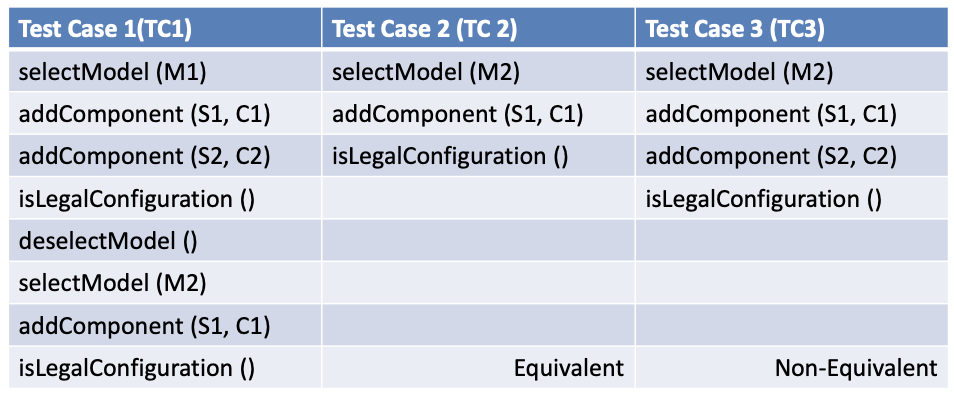
Polymorphism Testing using Pair-wise approach:
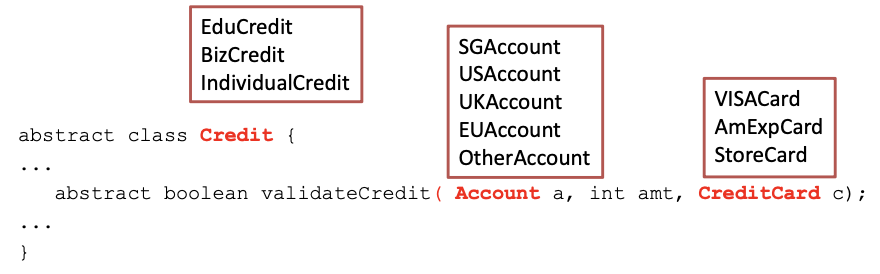
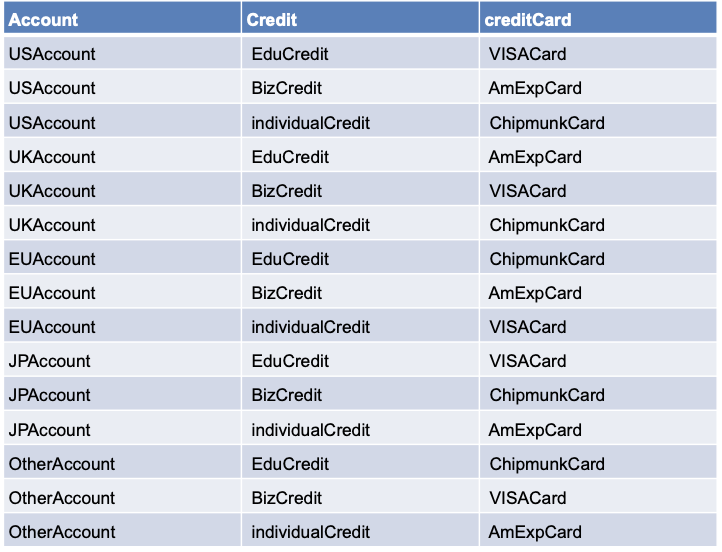
Use Data Flow Analysis:
- Identify polymorphic calls, binding sets, defs and uses
- Derive a test case for each polymorphic <def,use> pair
- Consider each binding individually
- As always: use pair-wise testing to reduce #test cases
- Example (dynamic binding of currency): [1] test cases that bind calls to different methods in the same run, [2] reveal faults due to use of different accounts with different currencies, [3] reveal faults due to use of account with itself as subsidiary
Testing of Inheritance:
- Covered by testing of polymorphism and exception handling
- Optimize by reusing testcases and test executions. Identify methods that do not need to be retested
- Addressing combinatorial explosion
- When writing tests for a subclass of a class with existing tests
- Do not test inherited methods that are not overridden/unchanged, e.g.
hashCode(),getClass()(inherited from Object in Java) - Do test overridden methods or those that might have changed
- Abstract classes and methods: [1] Design test cases when abstract method is introduced, [2] Even if it cannot be executed yet
- Dependence on state
- If Child can overwrite the state of Parent,
- Then the behaviour of foo() can also change
- Re-execute test cases from superclass on subclass and add more test cases if needed
Test History Approach:
- Reusing test suites and test executions: [1] Determine which new tests are needed, [2] Determine which old tests must be re-executed
- New and changed behaviour: [1] New methods must be tested, [2] Overridden methods must be tested
- We can partially reuse test suites defined for ancestor. Inherited methods do not need to be tested
Generics:
- Generic classes
- Designed to be instantiated with different parameter types, e.g.
class PriorityQueue<Elem Implements Comparable> {..} - Designed to behave consistently across different parameter types, e.g.
new PriorityQueue<Customer>();,new PriorityQueue<Tasks>();
- Designed to be instantiated with different parameter types, e.g.
- Testing generic classes can be broken in two parts: [1] Showing that some instantiation is correct, [2] Showing that all permitted instantiations behave consistently
Some Instantiation Is Correct:
- Design tests for one parameter type
- Create objects of a (random) parameter type T
- With various states that are relevant for generic class
- Write test cases for generic class as if it was written for T
- Example: Test different behaviours of
PriorityQueuewithCustomerobjects. Since the parameter type inherits fromComparable, testPriorityQueue[1] By adding the same customer twice, [2] By adding different customers
Permitted Instantiations Behave Consistently:
- Identify potential interactions between generic and its parameters
- By inspection or analysis, not testing
- Look for: inspectors and modifiers of parameter object
- Easy case: no interaction (e.g., container classes)
- Test potential interactions
Example:
- Generic class
PriorityQueueexpects thato.compareTo(o) == 0for parameter objecto- test whether expectations are met
- Parameter objects implement
java.lang.Comparable- So, (x.compareTo(y) == 0) == (x.equals(y)). Right? → ❌ Wrong
- e.g., it works for
String, but not forBigDecimal new BigDecimal(“4.0”).equals(new BigDecimal(“4.00”))is falsenew BigDecimal(“4.0”).compareTo(new BigDecimal(“4.00”))==0is true
Testing Exception Handling:
- Exceptions create implicit control flows
- Dynamic association of exceptions with handlers
- Exceptions are separated from the normal control flow for test design
- Dismiss exceptions triggered by normal testing of the system
- Test exceptions that contain error recovery code
Exception Handlers:
- We cannot test all exceptions [1] Every array subscript reference (OutOfBounds), [2] Every method call on an object (NullPointer), [3] Every user-defined exception, [4] Multiplied by every handler in every possible call stack
- Many exceptions may be impossible from the system-level, e.g. NullPointer by calling method bind() with component set to null, but the program will never invoke bind() with null
- Instead, we test all exception handlers
- Local exception handlers
- If throw-statement and handler are in the same method,
- Consider a subset of <throw,handler> pairs and
- Test the exception handler
- Non-local exception handlers
- Difficult to determine all pairings <throw,handler>
- Enforce (and test for) a design rule: If a method propagates an exception, the method call should have no other effect
L8: Mutation Testing
Mutation Analysis:
- Form of software fault-based testing
- Create variants of the program under test by seeding faults
- Mutation operators: patterns for changing the program text
- Mutant: variant program
Assumptions:
- Competent programmer hypothesis [1] Programs are often nearly correct, [2] Real faults are often simple (i.e., need one-line fixes)
- Coupling effect hypothesis: A test suite that is effective to expose simple (artificial) errors, is also effective at exposing more complex (real) errors
Mutant:
- A slightly changed version of the original program
- Contains a seeded fault that is a
- Valid (can be compiled) and
- Simple (single statement)
- Syntactic (not necessarily semantic) change
- Useful (behavior differs from initial program)
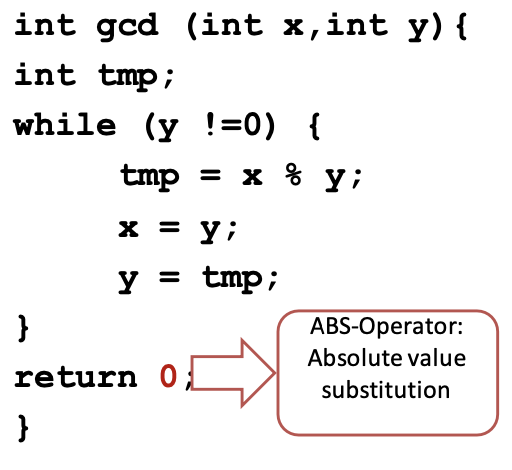
return x → return 0
Operators:
- A rule to derive mutants from your program
- Based on typical, simple faults
- Defined for most languages (incl. C, Java)
- Replace/delete values, operators, variables, parameters, …
- Object oriented: change accessibility, type, constructor, cast, modifier, …
- A mutant m is killed if at least one test case in the test suite fails for m
- A test suite T is x% mutation-adequate
- If T kills x% of all mutants
- Mutation-adequacy subsumes statement coverage-adequacy
Weak Mutation Adequacy:
- Prioritise not-killed mutants with high impact
- impact = #methods with changed coverage, or
- impact = #methods with changed return value, etc
- Only require weak mutation-adequacy:
- Test input must reach the mutation and infect the program state
- vs. strong mutation-adequacy: test case must fail for mutant
Reduce Number of Mutants:
- Mutant sampling through statistical analysis:
- Simple random sampling: mutation-adequacy for 1000 random mutants (e.g., 90%)
- Law of large numbers: computed value similar to actual mutation-adequacy
- Confidence interval: (e.g., actual adequacy: 88% - 92% at 95% confidence interval)
- Selective Mutation
- Ignore mutants that are “subsumed” by others
- Ignore mutants that are less “realistic”
- Ignore operators that produce many equivalent mutants
- Prefer operators that produce many stubborn mutants
Reduce Execution Time:
- Weak mutation: Use meta-mutants – execute multiple mutants at the same time
- Parallelization: No dependence between executions; Distribute over several machines
- Test selection: Execute only those test cases that actually execute the mutant
Meta-mutation: **[1] Inject several faults at once and compile, [2] Control the active mutant via parameter
FOM and HOM:
- FOM (First-Order Mutant): simple, one-line fault
- HOM (Higher-Order Mutant): complex, multi-line faults
- two or more statements changed to inject the fault
- #HOM = 2^#FOM - 1
- Measure percentage of higher-order mutants killed
L9: Assertions as Oracles
Oracles:
- Decides whether a program passed or failed a test
- Problem: is it a bug or a feature? “Programs were written in order to determine the answer in the first place. There would be no need to write such programs if the correct answer were known.”
- Many programs are ‘non-testable’
- Nearly impossible to construct an effective oracle
- Many numerical algorithms, e.g. Multiplication of two large matrices containing large values
Assertions as Oracles:
- Problem: [1] Program state transitions from sane to infected sometime during execution, [2] Error observed only after the execution (if at all!)
- Main Idea: Check the sanity of important state transitions
- Compare the observed facts with the expected program behaviour using assertions
Observation vs. Assertion: Observation is limited to small probes in space, Assertions can automatically cover a large area.
Debugging vs. Assertions: (1) Debugging: Post-mortem, Manual sanity checking, (2) Assertions: At runtime; Automated sanity checking
Usage:
- Assertions should not interfere with the actual run (no side effects)
- Used systematically rather than sprinkled randomly across the code
- Major uses: [1] Invariants - ensure data integrity, [2] Pre- and post-conditions - ensure function correctness
Examples:
1void Time::set_hour(int h)2{3 // precondition4 assert (0 <= hour() && hour() <= 23) &&5 (0 <= minutes() && minutes() <= 59) &&6 (0 <= seconds() && seconds() <= 60);7 ...8 // postcondition9 assert (0 <= hour() && hour() <= 23) &&10 (0 <= minutes() && minutes() <= 59) &&11 (0 <= seconds() && seconds() <= 60);12}1boolean sane() {2 assert (rootHasNoParent());3 assert (rootIsBlack());4 assert (redNodesHaveOnlyBlackChildren());5 assert (equalNumberOfBlackNodesOnSubtrees());6 assert (treeIsAcyclic());7 assert (parentsAreConsistent());8 return true;9}Use Aspects:
1public aspect RedBlackTreeSanity {2 pointcut modify():3 call(void RedBlackTree.add*(..)) || call(void RedBlackTree.del*(..));4 before(): modify() {5 assert(sane());6 }7 after(): modify() {8 assert(sane());9 }10}Design by Contract:
- Specification within the codes (assertions)
- Contract – formal, precise, and verifiable interface specifications
- Java Modelling Language (JML)
- Behavioural interface specification language (contracts for Java)
- JavaDoc annotations in source files
- Static checking: ESC/Java
- Runtime checking, e.g., during testing
Contracts in Eiffel:
1set_hour (h: INTEGER) is2 -- Set the hour from ‘h’3 require4 sane_h: 0 <= h and h <= 235 ensure6 hour_set: hour = h7 minute_unchanged: minutes = old minutes8 second_unchanged: seconds = old secondsContracts in JML:
1// 12/*@ requires 0 <= h && h <= 233  @ ensures hours() == h &&4  @ minutes() == \old(minutes()) &&5  @ seconds() == \old(seconds())6  @*/7void Time::set_hour(int h) {...}8
9// 210**/*@ requires x >= 0.0;11  @ ensures JMLDouble.approximatelyEqualTo12  @     (x, \result * \result, eps);13  @*/14
15// 316public class Purse {17  final int MAX_BALANCE;18  int balance;19  //@ invariant 0 <= balance && balance <= MAX_BALANCE;20  byte[] pin;21  /*@ invariant pin != null && pin.length == 4 &&22    @ (\forall int i; 0 <= i && i < 4;23    @ 0 <= byte[i] && byte[i] <= 9)24    @*/25  /*@ requires amount >= 0;26    @ assignable balance;27    @ ensures balance == \old(balance) - amount &&28    @ \result == balance;29    @ signals (PurseException) balance == \old(balance);30    @*/31  int debit(int amount) throws PurseException {...}32}**
Contracts in JML and Other Tools:
- JMLC conditions are translated into runtime assertions
- Documentation - JMLDOC documentation for JML specification
- Unit testing - JMLUNIT to generate test units against JML specifications
- Invariant generation - DAIKON invariant-detection tool
- Static checking - The ESC/JAVA static checker uses invariants to detect potential null pointer exceptions or out-of-bound array indexes
- Verification - JML specifications can be translated into proof obligations for various theorem provers
Reference Runs with JML
- Contracts may have bugs – specification needs to be changed
- Code changes – contracts ensure that the new version is at least as correct as previous version
- Extensions of JML – additional keywords to reference previous version, e.g.
signalled,ensured,required
1public class Purse {2 final int MAX_BALANCE;3 int balance;4 byte[] pin;5 /*@ requires amount == 0;6 @ signalled PurseException;7 @ ensures \result == \old(balance);8 @*/9 int debit(int amount) throws PurseException { … }}Fuzzing and Hardening:
- Oracles are only as good as the test cases: [1] Do not prove correctness, [2] No execution means no error reported
- Use oracles for “code hardening” during production
- Execute the program with different inputs (fuzzing)
- Depend in oracles to report any errors
- Triage and fix all reported errors
- Ship hardened program
- Fuzzing - generate random executions, scalable and efficient
- Dumb fuzzing: purely random; may generate invalid inputs
- Generation-based fuzzing: use input format for (semi-)valid random inputs
- Mutation-based fuzzing: use valid seed files, randomly mutate input bits
- White-box fuzzing: use symbolic execution to reach dangerous locations
L10: Performance Testing and Profiling
Overview:
- Look inside the different processing tasks, and analyze their timing, and energy usage!
- Two main approaches for analyzing timing
- Worst Case Execution Time (WCET) of a program for a given hardware platform. An upper bound on the execution time for all possible inputs
- Analyze performance bottlenecks and tune codes to improve timing in normal/stressing scenarios
Aspects of Performance Testing:
- Measures the quality attributes of the system: Scalability. Reliability. Resource usage
- Workload: normal (loaded) and overloaded
- Timeline: [1] Not time sensitive: testing before release, [2] Time sensitive: incident performance response (Software Reliability Engineering - SRE)
Performance Testing Techniques:
- Load testing - understand the behaviour under a specific load → [1] Measure critical transactions, [2] Monitor the load on components (database, server, etc.)
- Stress testing - find upper limit capacity of the system, determine performance if load goes well above the expected maximum
- Soak testing (endurance testing) - determine the system parameters under continuous expected load (sustained use) → Monitor memory utilization, memory leaks
- Spike testing - suddenly increase the number of users
Load Testing:
- Putting simulated demand on software
- Single-user – workload (large/ many inputs, ordinary stress)
- Processing large files in Word; opening multiple files at the same time should not affect response time
- Task manager visible should not overload processor when there are many processes running
- Multi-user – number of users
- Web-based applications should handle normal load within a Service Level Agreement (SLA) – response time
Anti-methodologies:
- The lack of a deliberate methodology…
- Street Light Anti-Method: Look for obvious issues in tools that are [1] Familiar, [2] Found on the Internet, [3] Found at random
- Drunk Man Anti-Method: Tune things at random until the problem goes away
Problem Statement Method:
- What makes you think there is a performance problem?
- Has this system ever performed well?
- What has changed recently? (Software? Hardware? Load?)
- Can the performance degradation be expressed in terms of latency or run time?
- Does the problem affect other people or applications (or is it just you)?
- What is the environment? Software, hardware, instance types? Versions? Configuration?
Performance Analysis in 60 Sec (Linux):
- Load averages →
uptime - Kernel errors →
dmesg | tail - Overall stats by time →
vmstat 1 - CPU balance →
mpstat -P ALL 1 - Process usage →
pidstat 1 - Disk I/O →
iostat -xz 1 - Memory usage →
free -m - Network I/O →
sar -n DEV 1 - TCP stats →
sar -n TCP,ETCP 1 - Check overview →
top
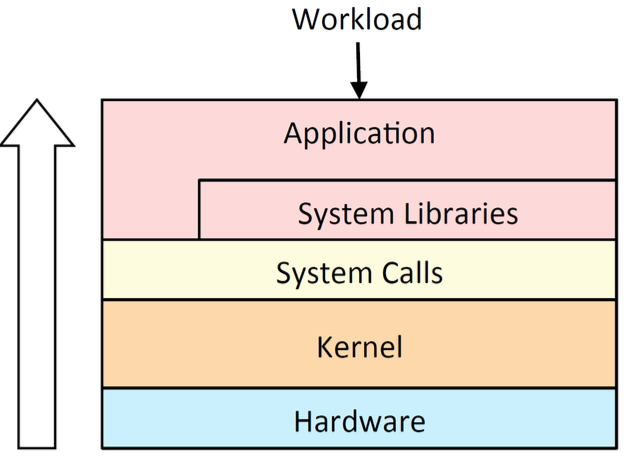
Resource Analysis:
- Typical approach for system performance analysis begin with system tools & metrics
- Pros: Generic; Aids resource perf tuning
- Cons: Uneven coverage; False positives
Resources to Check List
- CPUs: sockets, cores, hardware threads (virtual CPUs)
- Memory: capacity
- Network interfaces
- Storage devices: I/O, capacity
- Controllers: storage, network cards
- Interconnects: CPUs, memory, I/O
USE Method:
- For every resource, check
- Utilization: busy time
- Saturation: queue length or queued time
- Errors: easy to interpret (objective)
- Helps if you have a functional (block) diagram of your system / software / environment, showing all resources
- Start with the questions, then find the tools
Off-CPU Profiling:
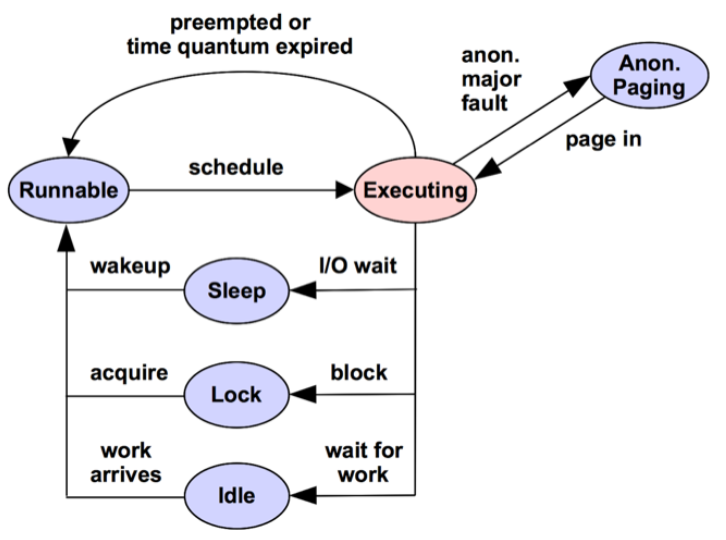
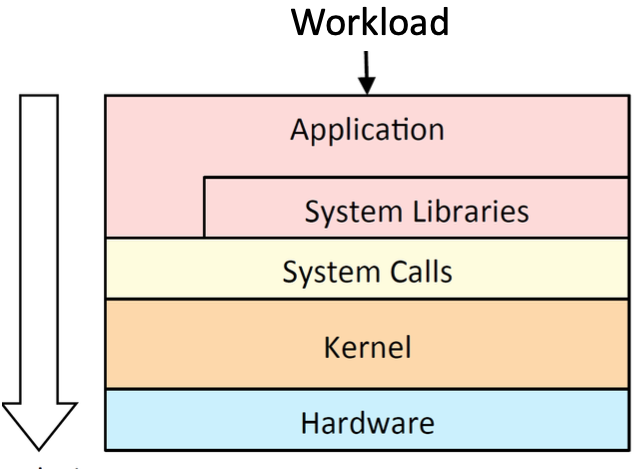
Workload Analysis:
- Begin with application metrics & context
- Pros: Accurate, proportional metrics; App context
- Cons: App specific; Difficult to dig from app to resource
Types of Tools:
| Type | |
|---|---|
| Observability | Watch activity under workload. Safe, usually, depending on resource overhead. - insert timing statements - check performance counters |
| Static | Examine attributes of the system at rest rather than under active workload. Should be safe. |
| Benchmarking | Load test. Caution: production tests can cause issues due to contention. |
| Tuning | Change default settings. Danger: changes could hurt performance, now or later with load. |
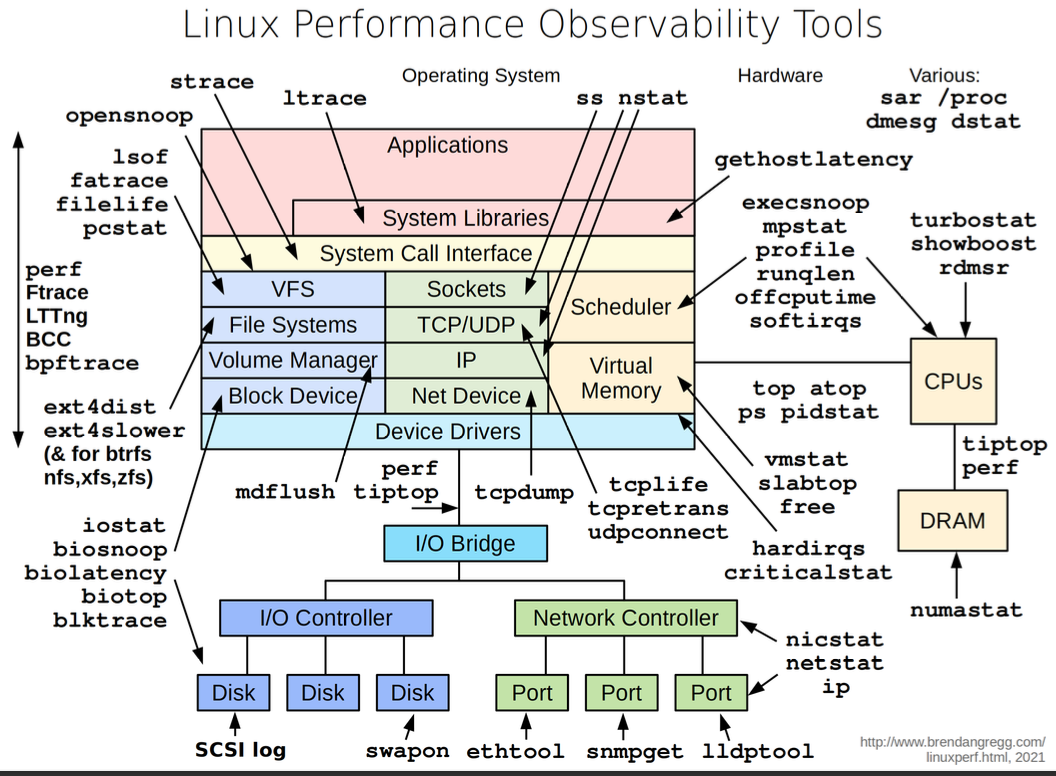
Observability Tools:
- Command line tools useful to study even if you never use them
- GUIs and commercial products often use the same interfaces as command line interfaces
- E.g:
uptime,top(orhtop),vmstat,iostat,free,ps,perf_events
Uptime: One way to print load averages:

- A measure of resource demand: CPUs + disks
- Exponentially-damped moving averages
- Time constants of 1, 5, and 15 minutes → Historic trend without the line graph
- Load > ## of CPUs, may mean CPU saturation. Don’t spend more than 5 seconds studying these
Top: System and per-process interval summary
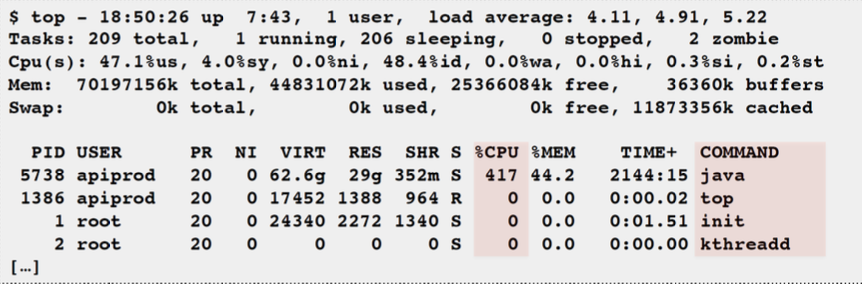
- %CPU is summed across all CPUs
- Can miss short-lived processes (atop won’t)
- Can consume noticeable CPU to read /proc
vmstat: Virtual memory statistics and more
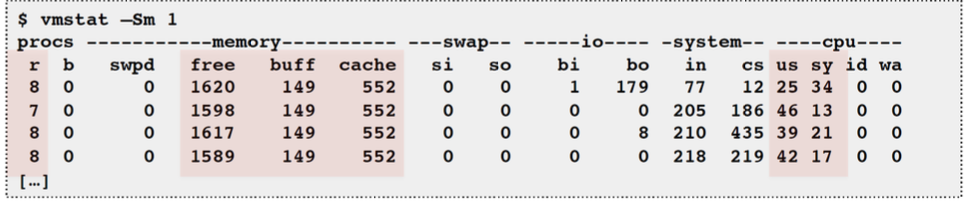
- USAGE:
vmstat [interval [count]] - First output line has some summary since boot values → Should be all; partial is confusing
- High level CPU summary - “r” is runnable tasks
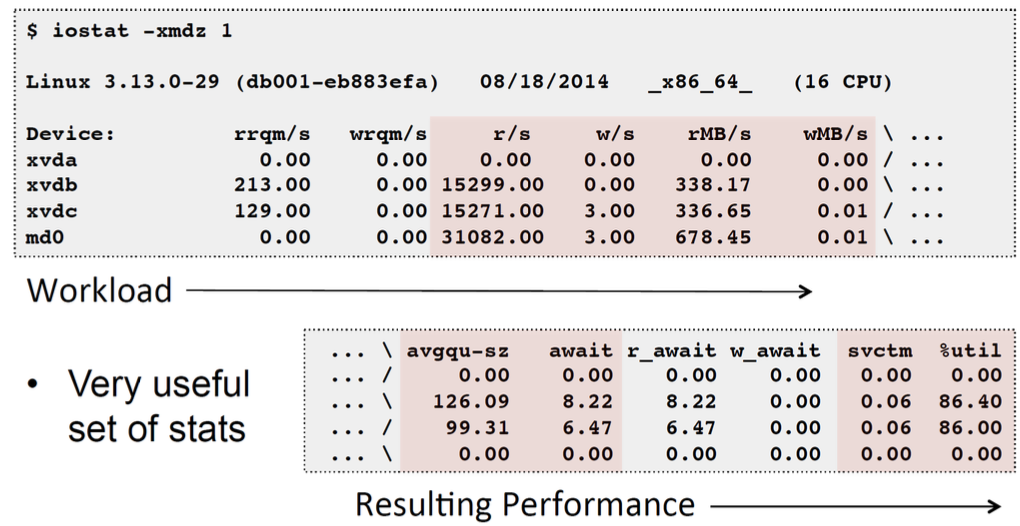
iostat: Block I/O (disk) stats. 1st output is since boot.
free: Main memory usage

- buffers: block device I/O cache
- cached: virtual page cache
strace: System call tracer

- Eg: -ttt: time (us) since epoch; -T: syscall time (s)
- Translates syscall args → Very helpful for solving system usage issues
- Currently has massive overhead (ptrace based). Can slow the target by > 100x. Use extreme caution.
tcpdump: Sniff network packets for post analysis
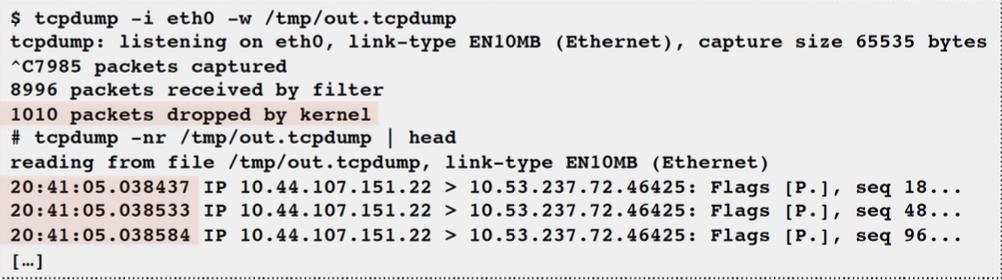
- Study packet sequences with timestamps (us)
- CPU overhead optimized (socket ring buffers), but can still be significant. Use caution.
netstat:
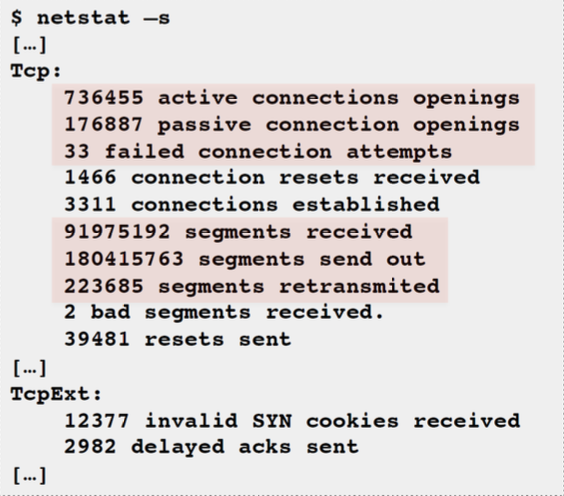
- Various network protocol statistics using -s:
- A multi-tool:
- -i: interface stats
- -r: route table
- default: list conns
- netstat -p: shows process details!
- Per-second interval with -c
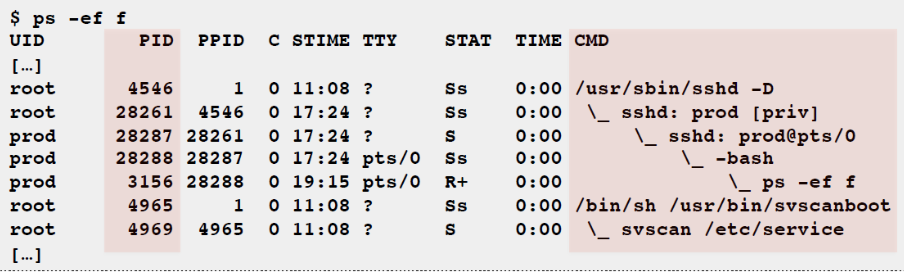
ps: Process status listing (eg, “ASCII art forest”)

perf_events: Provides the “perf” command
- In Linux source code: tools/perf
- Usually pkg added by linux-tools-common, etc.
- Multi-tool with many capabilities
- CPU profiling
- PMC profiling
- Static & dynamic tracing
Benchmark Tools:
- Benchmarking is the act of running a computer program, a set of programs, or other operations, to assess the relative performance of an object
- Benchmarks are like standard tests and trials that are used as workload
- Synthetic workload
- ~100% of benchmarks are wrong
- Results are usually misleading
- you benchmark A, but actually measure B, and conclude you measured C
- Common mistakes: [1] Testing the wrong target: eg, FS cache instead of disk, [2] Choosing the wrong target: eg, disk instead of FS cache … doesn’t resemble real world usage, [3] Invalid results: eg, bugs
Active Benchmarking Method: (Synthetic Performance Testing)
- Run the benchmark for hours
- While running, analyze and confirm the performance limiter using observability tools
- Disk benchmark: run iostat, …
- CPU benchmark: run pidstat, perf, flame graphs, …
- Answer the question: why isn’t the result 10x better?
Profiling:
- Objectives:
- Profile CPU usage by stack sampling
- Generate CPU flame graphs
- Use
perf_events
CPU Profile Method:
- Understand all software in CPU profile > 1%
- Discovers a wide range of issues by CPU usage [1] Directly: CPU consumers, [2] Indirectly: initialization of I/O, locks, times, …
- Narrows down software to study
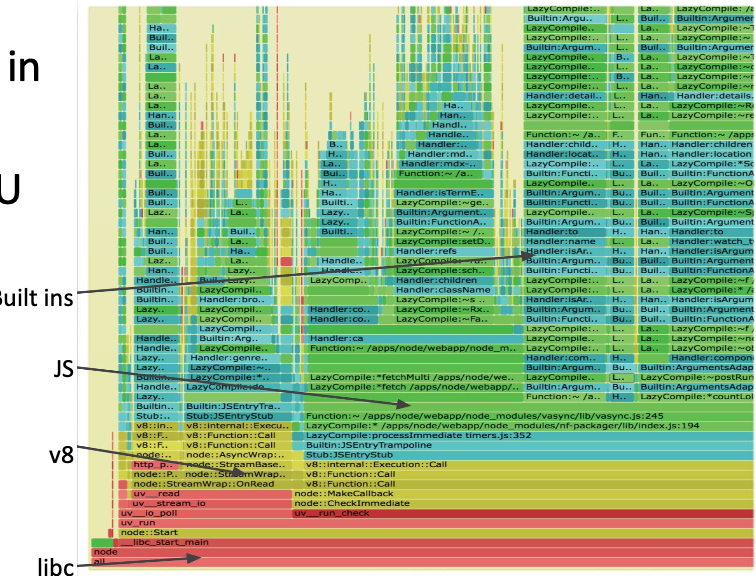
Profiling with Flame Graphs:
- Each box presents a function in the stack (stack frame)
- x-axis: percent of time on CPU
- y-axis: stack depth
- colors: random, or can be a dimension
Performance Incident Response:
- Time sensitive performance testing
- Aim: resolve issue in minutes. Quick resolution. Can scale up, roll back, redirect traffic.
- Previously was in a “good” state. Spot the difference with historical graphs
- Reliability & performance issues often related
- Where to start? [1] Correlate events in time. [2] Which instance is down? [3] Which resource is overloaded/faulty?
- Follow a checklist like a flight manual
- When to stop?
L11: Testing Distributed Systems
Definition of Distributed Systems:
- Distributed system is a system where multiple processes located on networked computers communicate via messages to achieve a common goal
- Examples: client-server applications, map-reduce, grid computing, peer-to-peer networks, skype, cloud computing, email clients, music streaming, ftp connection, hadoop, web service compositions, video streaming, etc.
Challenges:
- Non-determinism of ordering and timing within a system – no now
- No centralized view
- Many states
- Aggregation – unexpected behavior from putting components together (concurrent access to resources)
- Partial failure - components can fail along the way, resulting in incomplete results or data
- No global clock [1] How to execute each test step in certain order? [2] When to timeout an expected response?
- No ordering of events [1] Heisenbug: the bug disappears in a subsequent run [2] Difficult to reproduce a failure!
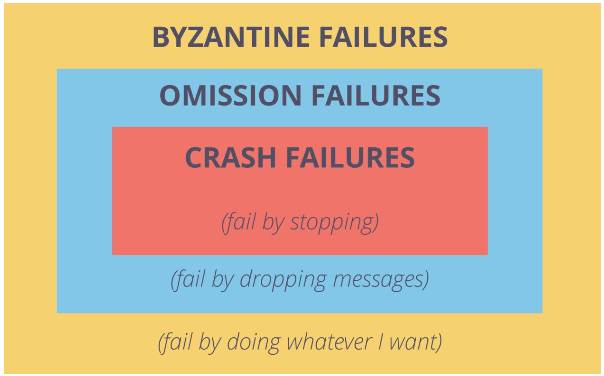
- Resilience – Consistency - Consensus
- Hierarchy of Errors: Deadlocks, Livelock/starvation, Under specification, Over specification, Lack of consensus
Byzantine Failures:
- More disruptive that a crash failure
- A process that experiences a Byzantine failure may send contradictory or conflicting data to other processes, or it may sleep and then resume activity after a lengthy delay.
- Consensus protocols – to tolerate Byzantine failures
- It has been proved that consensus is impossible in a fully asynchronous message-passing distributed system, in which one process may have a crash failure
- Some forms of failures can be handled by a synchronous consensus protocol
Consensus Protocols: Formal requirements for a consensus protocol:
- Agreement - all correct processes must agree on the same value
- Weak validity - for each correct process, its output must be the input of some correct process
- Strong validity - if all correct processes receive the same input value, then they must all output that value
- Termination - all processes must eventually decide on an output value
Formal Methods (FM):
- Human assisted proofs → Considered slow and hard to use
- Safety-critical domains (TLA+, COQ, ISABELLE)
- Model checking
- State machine of properties and transitions
- Particularly used in protocols (TLA+, MODIST, SPIN, …)
- Lightweight FM: Best of both worlds (ALLOY, SAT)
- Pros: Rigorous; Verify all traces exhaustively; Produce a system run that violates the requirement
- Cons: The specification used is faulty; Tedious in coming up with a complete specification; Time consuming
“Classic” Approach for Testing:
- Adapted integration/system/regression testing
- Adapted black-box/white-box testing
- End-to-end testing
- Pros: Pay-as-you-go: gradually increase confidence; Focus on important processes (e.g. performance, concurrency, etc.)
- Cons: Sacrifice rigor (less certainty) for something reasonable; Large state space
Testing Processes for DS: Conformance, Interoperability, Functional, Performance, Time-rate-resource, Reliability, Availability / Yield, Security
Simplistic Approach:
- Unit test: testing the classes and the code
- Integration test: testing a service with its attached resources
- End-to-end/ functional test: testing how different system components and services work together, e.g. API testing
End-to-end Testing:
- A simple DS – each component might run on a different machine
- Approach: make all the components run locally or in virtual machines
- Disadvantages: [1] Network events are not tested, [2] Infeasible for large number of components or components are inaccessible
- Complex DS – large number of components and some components might not be accessible
- Approach: write simulators to mimic various types of outputs from components
- Disadvantages: [1] Time consuming, [2] Impossible to know the outputs for other components, [3] Impossible to know how other components react to inputs
Testing of Distributed Data Systems (DDS)
- Test DDS on their own (not in end-to-end)
- Asynchronous data delivery: [1] Deliver to one node, [2] Replicate on other nodes
- Problems: [1] Check that data has been replicated and it is consistent on all nodes, [2] Adding artificial delays to wait for consistency would change the overall system behavior
- Possible solution: Add delays and run tests in parallel
Node Failure in DDS:
- Checklist: [1] The test data was added and fully propagated, [2] The node is really down, [3] Pull data without error
- Reconstructing information for the node that failed should be possible – consensus
Distributed Debugging
- Example: [1] Message gets stalled into a network loop and delayed. [2] Meanwhile, the message is resent. [3] At the destination, the same message is received and applied twice. [4] The final result is different because the same operation was applied twice instead of once
- Non-repeatable. Non-deterministic
- Solution: Record-replay, Simulation, “Simple testing”
Record-replay:
- Interpose on message and timer APIs
- Record the behaviour of the non-deterministic components
- Execute the regression test by replaying the failures
- Accelerate the execution when replaying
Deterministic Simulation of Failures:
- (Pseudo-)randomly simulate network/disk/CPU failures
- Easy to repeat and debug in detail
- Debuggers can be difficult to use
- Printf still used, but it is better because of determinism
- Problems:
- Not an accurate representation of the actual failures
- Sometimes deterministic failures might cause real (hardware) failures
Simple Testing:
- Failures require only 3 nodes to reproduce
- Multiple inputs needed (~ 3) in correct order
- Culprit: Complex sequences / Error handling code
- Even unit tests can help
Formal Methods at AWS:
- Precise description of system in TLA+ (PlusCal language - like c) in 6 large complex real-world systems, 7 teams
- Found subtle bugs
- Confidence to make aggressive optimizations w/o sacrificing correctness
- Use formal specification to teach system to new engineers
Game Days at AWS:
- A game day simulates a failure or event to test systems, processes, and team responses
- The purpose is to perform the actions the team would perform as if an exceptional event happened
- Process: [1] Define scenario, [2] Execute simulation, [3] Analyze the game day
Netflix:
- Canary testing: [1] Deploy new codes on less powerful /less used servers and observe for errors on that server, [2] Automate deployment/observation
- A/B testing: [1] Deploy two versions of the application (minor differences) to different users and observe specific metrics, [2] Performance and user interaction
Simian Army (Netflix):
- Test many failures: Chaos Monkey - seek out AWS Auto Scaling Groups (ASGs) and terminate instances (virtual machines) per group, Latency Monkey, Conformity Monkey, Doctor Monkey, Janitor Monkey, Security Monkey, 10-18 Monkey (short for Localization-Internationalization), Chaos Gorilla
- The applications should continue working when an instance goes offline
- In case of problems (i.e. application crashes), engineers should be around to respond
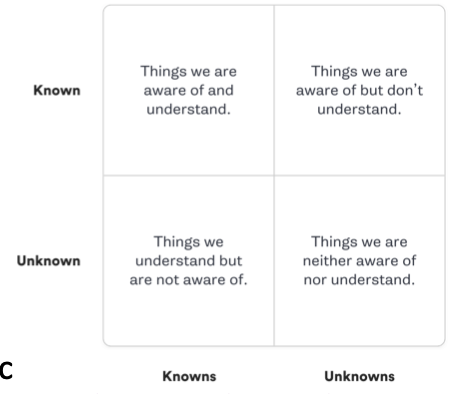
Chaos Engineering:
- Break things on purpose!
- Involves running thoughtful, planned experiments that teach us how our systems behave in the face of failure
Performance Testing for Distributed Systems: Process of testing
- Setup the test environment
- Metrics (acceptance criteria)
- Design / implement/run tests
- Analyze, report, retest
L12: Testing the User Interface
Types of User Interfaces:
- Command-line interfaces (CLI)
- Graphical user interfaces (GUI)
- Hypertext – non-linear way of presenting information to the user
- Web-based– access to remote resources
- Form-based– independent graphical window
- Direct manipulation – drag-and-drop
- Rich client – online and offline
- Multi-modal – extract meaning from communication among humans
- Voice user interfaces (VUI)
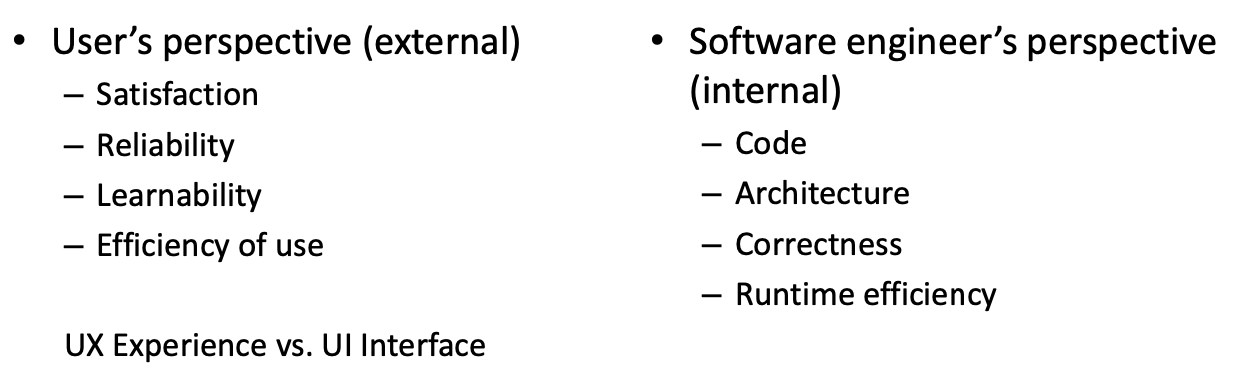
Desired Qualities
UI Errors: Usability errors, Functionality errors, Performance errors
Testing of Applications with Command-line Interface (CLI)
- Program takes highly structured inputs/files, e.g. xml, png, pdf, csv, json, java, zip, sql
- Most random text / files are rejected as invalid
- PNG requires at least 52 bytes to be set correctly even if the image contains just one pixel
- About 1 in 2 x 10125 random files is a valid PNG file.
Grammar-based Testing:
- Write a grammar to represent program inputs
- Of varying unbounded size
- With recursive structure
- e.g., regular expressions for numbers, addresses:
^[A-Z0-9._%+-]+@[A-Z0-9.-]+\.[A-Z]{2,}$ - Words accepted by the grammar are valid programs inputs, e.g. correct phone numbers: 3469900, 9904567, 3300000, incorrect phone numbers: 3469***, 123, PHONE
- Program parser can be buggy in three ways [1] Does not accept a valid input [2] Does not reject an invalid input [3] Crashes during the attempt to parse an input
- Derive test cases from grammar
- As productions (accepted words)
- As slightly invalid inputs (aka. file fuzzing)
- Take a valid input and inject tiny faults
- “Mutate” valid input using bit flips and substitutions
- To achieve production coverage
- Each production rule must be used at least once
- To achieve boundary condition coverage
- Annotate each recursive production rule with min/max number of applications
- Then generate: min, min+1, max, max-1
Example 1:
- BNF grammar:
::= ::= | - Annotate palindrom max = 7
- Annotate palindrom min = 1
::= [a-zA-Z][:space:][:punct:] //ignore whitespace and punctuation
- Test cases (production- and boundary condition adequate)
- “A” and “AA” — boundary condition min
- “Step on no pets” and “Never odd or even” — boundary condition max
- “Not so, Boston.” — exercise the [:punct:] production
Example 2: Simple grammar fuzzer
- Starts with a start symbol (
) - Keeps on expanding it
- Place a limit (max_nonterminals) on the number of nonterminals
- Limit the total number of expansion steps.
Testing of Applications with Graphical User Interface (GUI):
| UI Testing | UX Testing |
|---|---|
| Focuses on the visual elements of an interface | Focuses on overall user experience |
| Validates the design, layout, and functionality | Assess user satisfaction, usability, and efficiency |
| Tests individual components like buttons, menus, and forms | Focuses on testing the entire user flow and product interaction |
| Ensure consistency, responsiveness, and accessibility in the interface | Ensures that users complete their jobs to be done effectively and enjoyable |
| Includes both manual and automated testing methods | Includes qualitative and quantitative research methods, such as user interviews and surveys |
Challenges:
- Test input is an event sequence
- A program input is a sequence of left- and right clicks, drag and drops, touch, swipe, pinch, enter text
- At different coordinates in the program’s UI
- Program is stateful and reactive
- Same event sequence executed sequentially may produce different output each time
- Search space is huge
- User may click so many pixels, choose so many options
- At all times only a small portion of the GUI is visible
GUI Testing Checklist:
- Properties of GUI elements - size, position, width, length and acceptance of characters or numbers
- Intended functionality of the application can be executed using the GUI
- Error messages are displayed correctly
- Clear demarcation of different sections on screen
- Font used in application is readable, proper alignment of the text
- Colour of the font and warning messages is aesthetically pleasing
- Images have good clarity and are properly aligned
- Positioning of GUI elements for different screen resolutions
Approaches for GUI Testing:
- Manual based testing
- graphical screens are checked manually by testers in conformance with the requirements
- Record and replay
- During record, test steps are captured by the automation tool
- During playback, the recorded test steps are executed on the System Under Test (SUT)
- Model based testing
- Determine undesirable states that your GUI can attain
Record and Replay:
- Record: [1] Launch application, [2] Simulate and capture mouse and keyboard events, [3] Capture GUI state at each event (e.g., screenshot)
- Playback: [1] Launch application, [2] Automated execution of captured events, [3] Automated comparison of actual to captured GUI state
Black-box Automation Testing:
- Record: What happens if field names change?
- Write testing code – parametrize → Use variables for field names (things that can change). What if workflow changes?
- Embed a framework in your test → Testing code looks more like code than testing
- Advantages: [1] Useful for regression, [2] Less testing code tests more production code (compared to unit/integration testing)
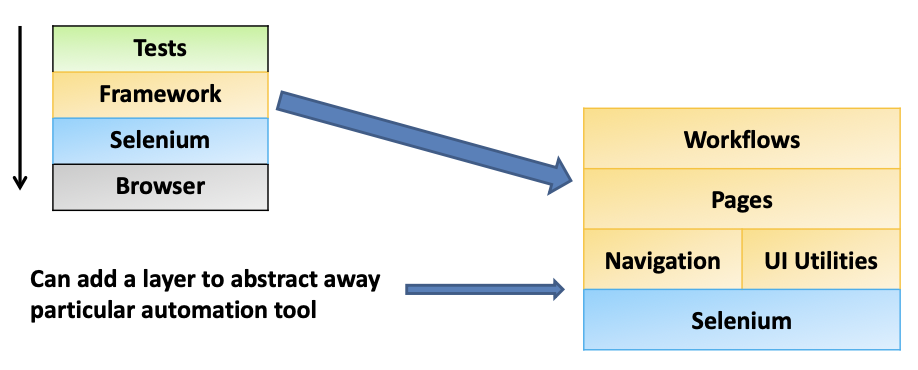
Guidelines for Writing Tests:
- Never declare variable, never manage states
- Never specify a browser/DOM and never manipulate the browser directly
- Reduce number of parameters for methods
- Use default values instead of parameters (use enumeration)
- APIs should be simple, but framework can be complex
Model-based Testing: Models as abstractions
- Structural model to address a component uniquely
- Event-based model to represent GUI state transitions
Structural model:
- Tree structure representing contains-relationship
- E.g: Window 1 has Title, Menu bar, Icon bar, Main panel, A footer
Event-based Model:
- Graph model of all possible sequences a user can execute
- State: screenshot of the GUI or specific GUI structure
- Initial state: state after launch of the application
- State transition: event that changes the GUI state
- e.g., clicking on Window1->Menu->File->Open will open the FileChooser Window
Coverage:
- Achieve event coverage: All events executed, states visited, transitions exercised, … at least once
- Achieve structural GUI coverage: All windows opened, buttons pressed, options selected, … at least once