L3: Cloud Architectures
How to organize (partition) resources?
- Workload distribution
- Resource pooling
- Dynamic Scalability (Usage fluctuation)
- Elastic resource capacity (resource availability fluctuations)
- Service load balancing
How to operate/manage resources to meet certain objectives?
- Cloud bursting
- Elastic disk provisioning
Workload Distribution Architecture
- What: horizontal resource scaling
- How: Load balancer distributes workload to reduce over-utilization or under-utilization of resources
- Additional mechanisms:
- Audit monitor: monitors resource pool usage for compliance
- Cloud usage monitor: runtime tracking and synchronization
- Hypervisor (VM Manager): hosts virtual servers (which are resource pools) and provides virtual server access to resource pool
- Logical network perimeter: organizes and isolates resource pools
- Resource cluster: clustered IT resources used to support workload balancing between different cluster nodes
- Resource replication: generates new instances of virtualized IT resources in response to runtime workload distribution demands
Amazon ELB
- Automatically distributes application traffic across multiple Amazon EC2 instances (VMs)
- Achieve greater levels of fault tolerance in your applications
- Seamlessly providing the required amount of load balancing capacity needed to distribute application traffic
Resource Pooling Architecture
- Resource pooling: aggregate cloud resources of different types to serve needs of cloud consumers
- Architecture: automatically maintain identical IT resources to ensure that they remain synchronized
- Common resource pools:
- Physical server pool
- Virtual server pool
- CPU pool
- Memory pool
- Storage pool
- Network pool
- Dedicated pools: grouped each type of resource into a larger pool, where each individual pool becomes a sub-pool
- E.g: dedicated pool with 4 sub-pools with CPUs, memory, storage and network devices
- Complex: multiple pools for specific application or customer
- Creates hierarchical structure of parent, sibling and nested pools to meet diverse requirements
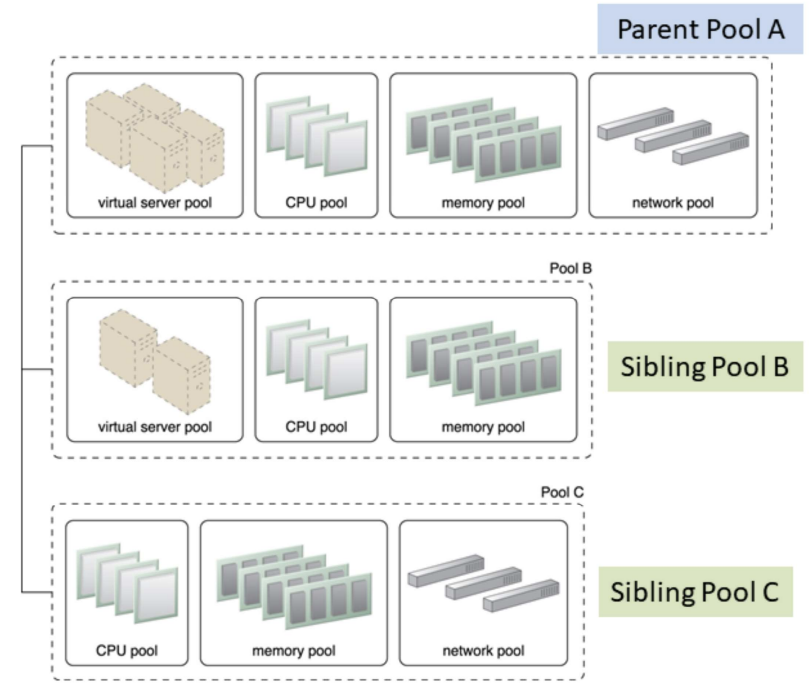
Sibling Pools: Pools B and C are sibling pools of Pool A
- Sibling resource pool:
- Are drawn from physically grouped IT resources and not spread out across data centers
- Isolated from one another so each cloud consumer is given access to its respective pool
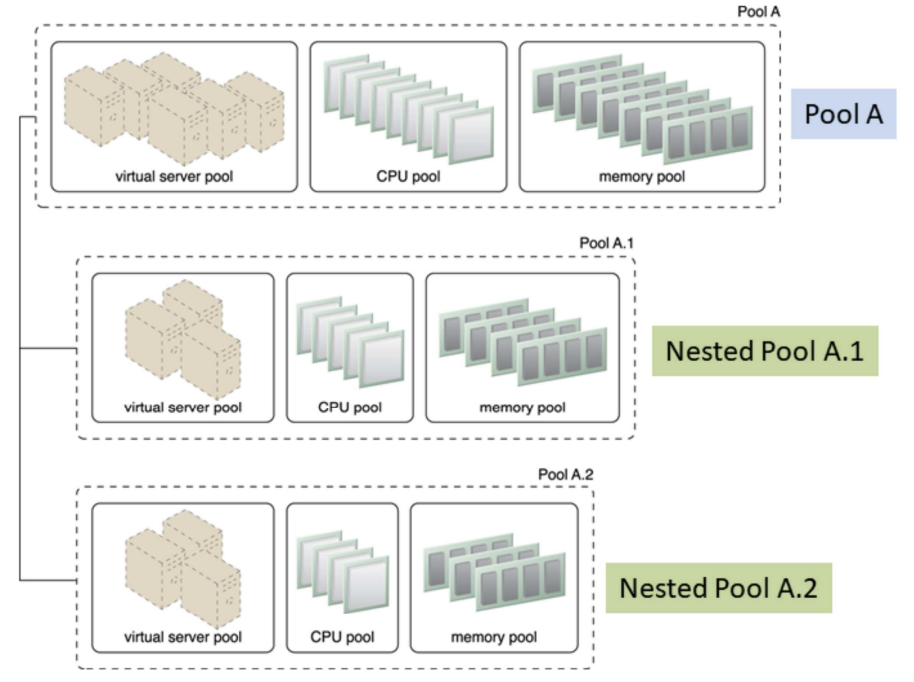
Nested Pools: Nested pools A.1 and A.2 are comprised of the same IT resource types as pool A but in different quantities
- Nested resource pool:
- Larger pools divided into smaller pools with same type of IT resources
- For assigning resource pools to different departments and groups in the same organization
- Multiple instances from each pool may be created
- Additional mechanisms:
- Audit monitor: monitors resource pool usage for compliance
- Cloud usage monitor: runtime tracking and synchronization
- Hypervisor: hosts virtual servers (which are resource pools) and provides virtual server access to resource pool
- Logical network perimeter: organizes and isolates resource pools
- Pay-per-use monitor: collects billing information information: consumer usage of different resource pools
- Remote administration system
- Resource management: provides cloud consumers with tools for administration resource pools
- Resource replication: generates new instances of IT resources from resource pools
Dynamic Scalability Architecture
- Why: enables variable resource utilization to meet usage demand fluctuations
- Based on predefined scaling conditions to trigger dynamic allocation of resources from resource pools
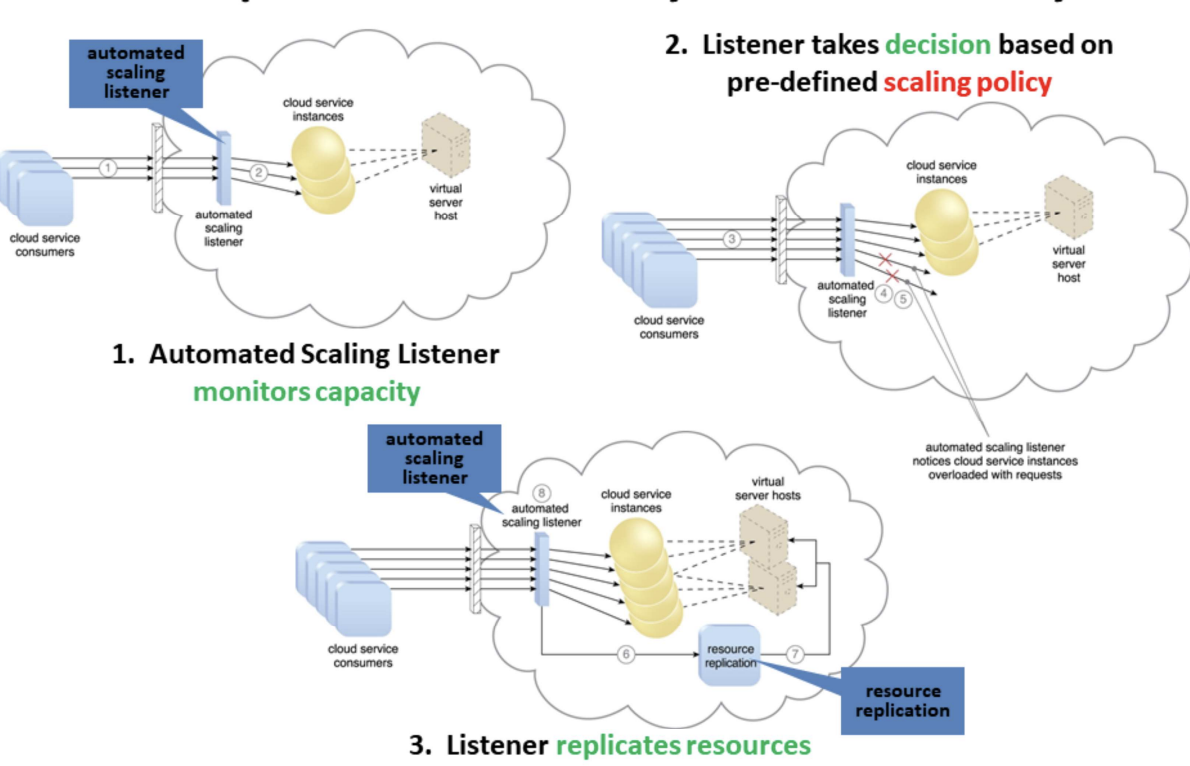
- Common types of dynamic scaling
- Dynamic horizontal scaling (same resource types): resource instances scaled dynamically with fluctuating workloads, e.g. replicate resources
- Dynamic vertical scaling (change size): scale processing capacity of a single IT resource, e.g. increased memory dynamically when virtual server is overloaded
- Dynamic relocation (different resource types): resource relocated to host with larger capacity, e.g. SAN storage tape-based (4GB/s) to disk-based (8GB/s)
Elastic Resource Capacity Architecture
- Dynamic provisioning of virtual servers:
- Fluctuating processing requirements
- Allocates and reclaims CPUs, RAMs
- Runtime of virtual server is monitored
- Additional resources leveraged before capacity threshold reached
- Virtual server and It resources vertically scaled
- Use Intelligent Automation Engine: sends scaling request to hypervisor or VIM (Virtual Infrastructure Manager)
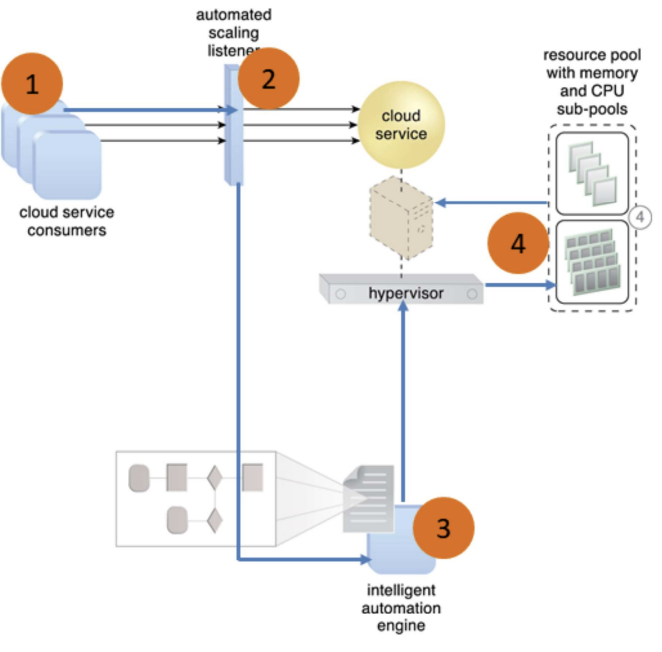
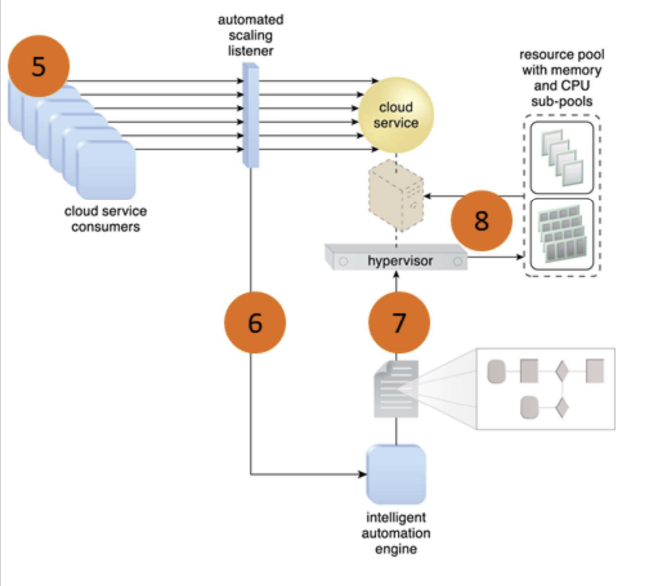
- Cloud service consumers send requests (1) to a cloud service, which are monitored by an automated scaling listener (2)
- An intelligent automation engine deployed with workflow logic (3) notify the resource pool using allocation request (4)
- Cloud service consumers requests increased (5), causing automated scaling listener to signal the intelligent automation engine to execute the workflow logic scripts (6)
- The script then signals the hypervisor to allocate more resources from the resource pools (7)
- The hypervisor allocates additional resources to the virtual service to handle the increased workload (8)
Service Load Balancing Architecture
- A specialized variation of the workload distribution architecture for scaling cloud service implementations
- Redundant cloud service deployments are created with a load balancer to dynamically distributes workload
- Duplicate cloud service as a resource pool
- 2 type of load balancer:
- Independent of cloud services as their host servers
- Built-in into a cloud service as part of application or server’s environment (a primary server serves as a LB and communicates with neighboring servers to balance workload)
Independent LB
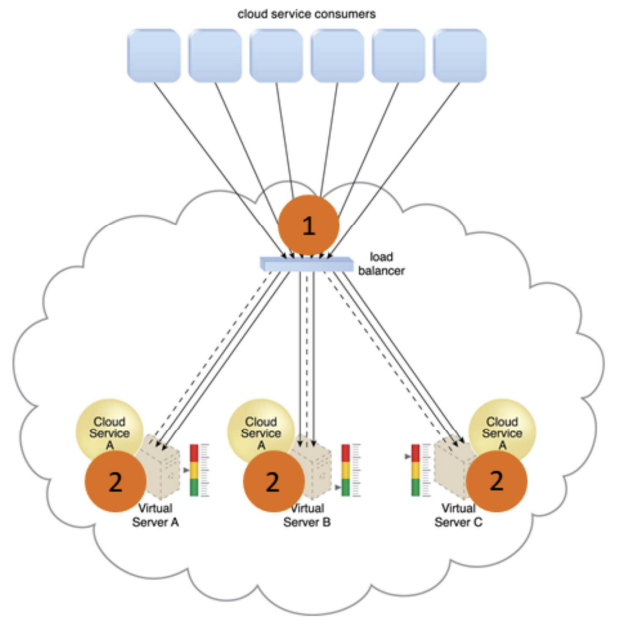
- Cloud service A is replicated and runs on different virtual servers
- LB intercepts messages sent by cloud service consumers (1), and forwards them to the virtual servers so that the workload processing is horizontally scaled (2)
Built-in LB
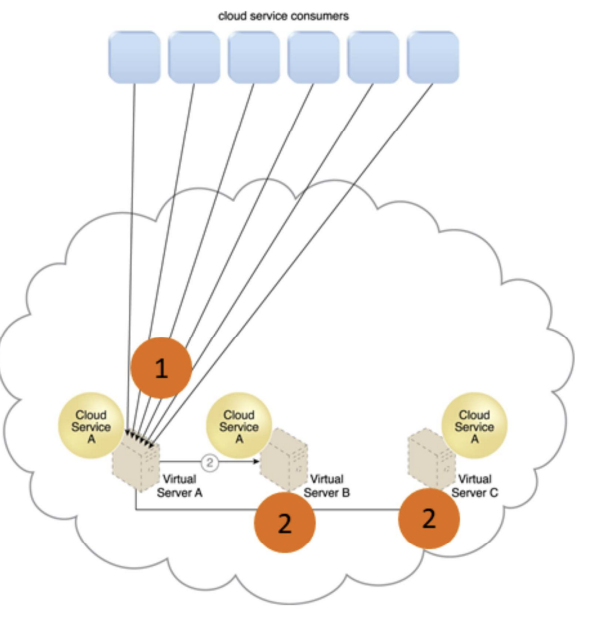
- Cloud service consumer requests are sent to cloud service A on virtual server A (1)
- Cloud service implementation includes built-in LB logic capable of distributing requests to the neighboring cloud service A implementations on virtual servers B and C (2)
Amazon Auto Scaling Service
- Maintain application availability by scaling Amazon EC2 capacity up or down automatically according to workload conditions you define
- Automatically increase the number of instances during demand spikes to maintain performance and decrease capacity during lulls to reduce costs
- Combines with ELB to distribute traffic to your instances to run instances at optimal utilization
Cloud Bursting Architecture
- To meet higher usage demand, dynamic scaling or “bursts-out” of on-prem resources to cloud-based resources
- Cloud services are redundant, pre-deployed and inactive until cloud bursting
- Releases or “bursts-in” to on-prem when no longer required
- Based on
- Automated scaling listener to redirect requests to cloud-based services
- Resource replication to maintain synchronicity between on-prem and cloud-based resources
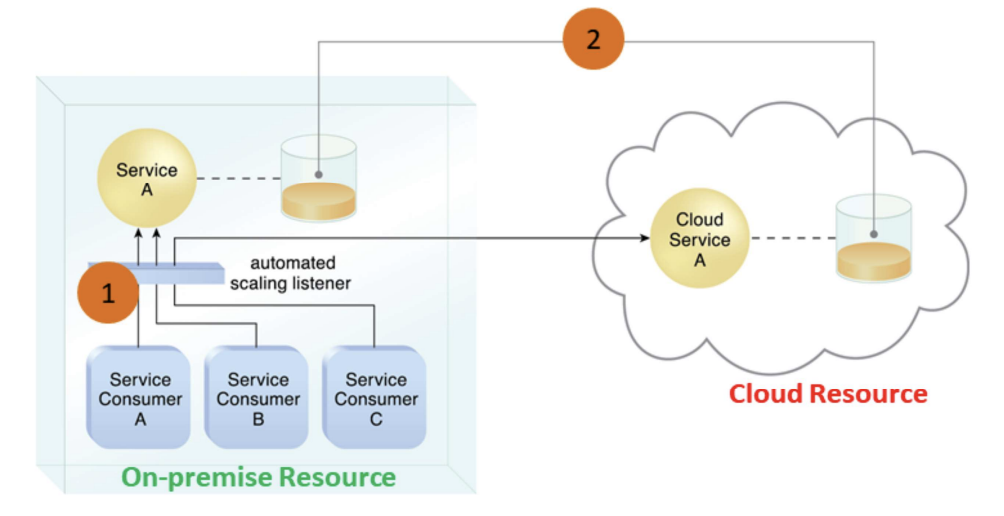
- Automated scaling listener monitors the usage of on-prem service A
- When usage threshold is exceeded, Service Consumer C request to Service A is redirected to Service A’s redundant implementation in the cloud (Cloud Service A) (1)
- A resource replication system ensures the state management databases are synchronized
Elastic Disk Provisioning Architecture
- Typically, cloud consumers are charged based on fixed disk storage allocation
- Aim: achieve dynamic storage provisioning and charge based on actual usage
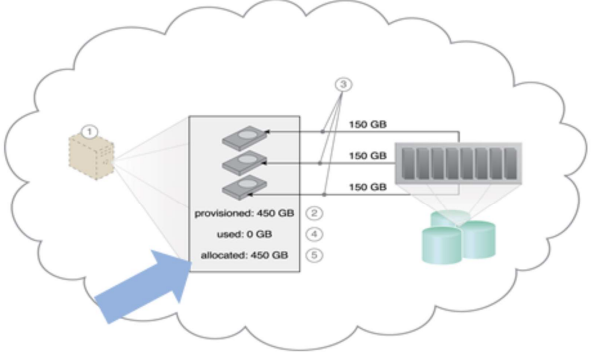
Fixed Disk Storage Allocation: charge at the point of allocation
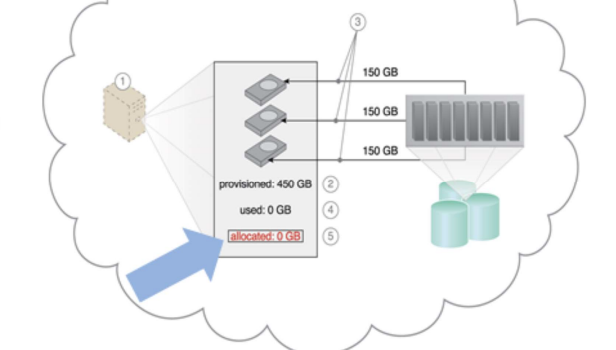
Elastic Disk Provision: No charge when allocated but not used
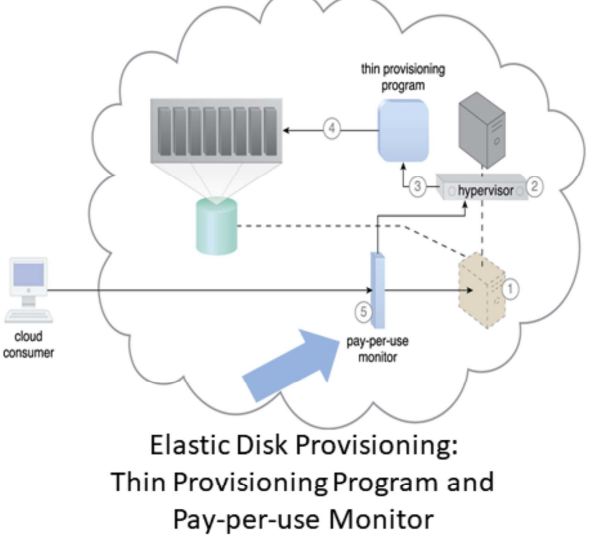
- Granular billing for exact amount of storage actually used
- Runtime monitoring to collect data usage
- Thin-provisioning software on virtual servers
- Dynamic storage allocation using hypervisor
- Pay-per-use monitor tracks and reports usage for billing