L5: Virtualization & Multitenancy
Virtualization
- Enables a single physical infrastructure to function as a multiple logical infrastructure or resources
- Breaks the one-to-one relationship between hardware and OS. Many OSs can run and share a single hardware (one-to-many improves utilization)
- Not limited to hardware, e.g. processor, memory, storage, network, data, application
- Why? Improve resource utilization through sharing → lower cost and increase ROI, improve scalability, ease of administration
Pros:
- hardware independence
- resource consolidation
- different virtual resources share 1 physical resource
- increase hardware utilization, load balancing
- resource replication
- virtual resources are created as virtual disk images (with binary copies of hardware content)
- virtual images are accessible to the host OS, agility in migration and to deploy new instances (rapid scaling)
Cons:
- performance overhead
- single point of failure of virtualization software
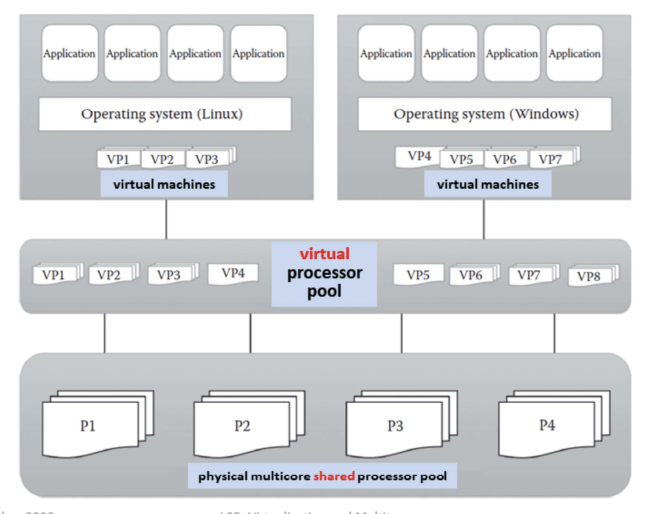
Processor virtualization – process of abstracting physical processor to pool of virtual processor
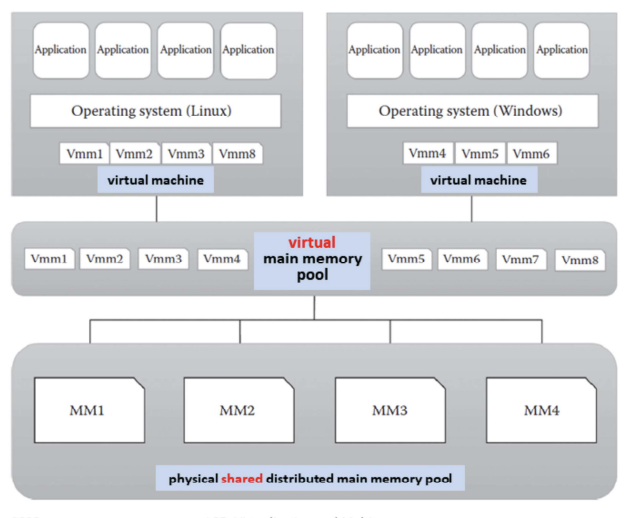
Memory virtualization – process of providing virtual main memory to the VMs that are abstracted form the physical main memory
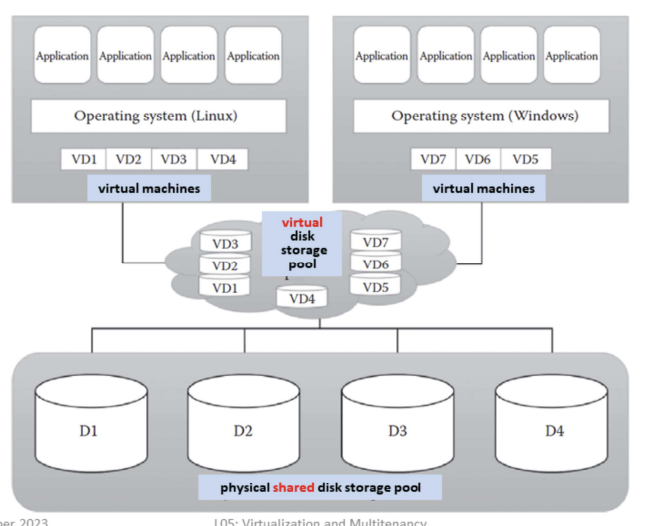
Storage virtualization – form of resource virtualization where a multiple physical storage is abstracted as a multiple logical storage
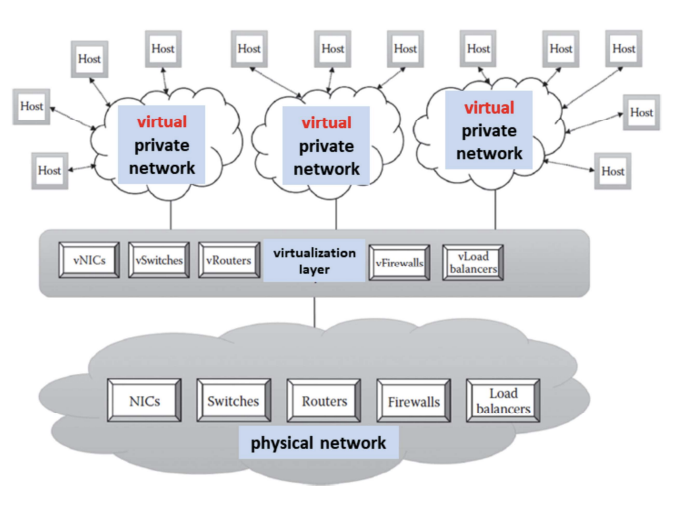
Network virtualization – process of abstracting physical network components to form a virtual network
Data virtualization – aggregates heterogeneous data from different sources to a single logical or virtual volume of data
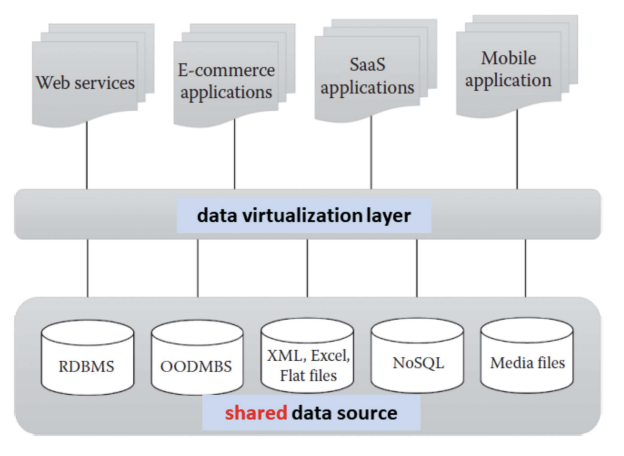
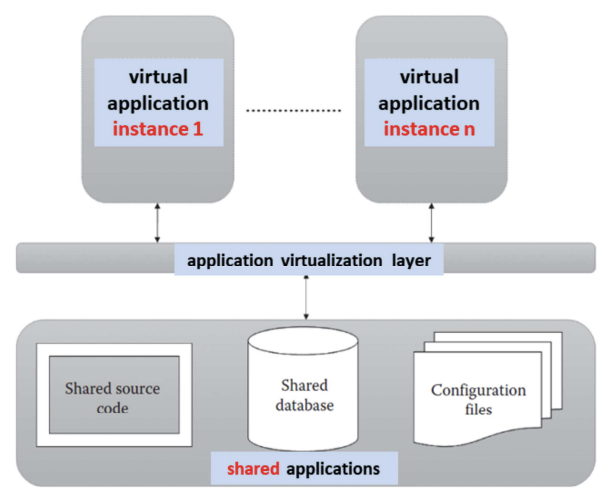
Application virtualization – allows users to access the virtual instance of centrally hosted application without installation
Approaches
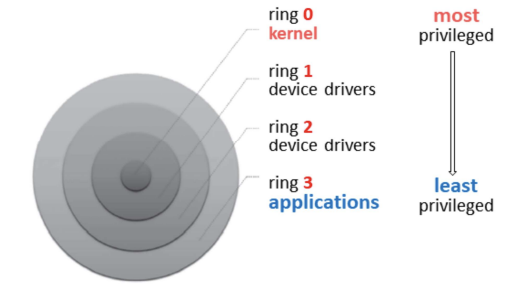
Protection Rings in OS
- Aim: restricts the misuse of resources and malicious behavior of untrusted user-level program
- How? protection rings isolate OS from untrusted users
- Ring 0: programs have most privilege (e.g. highly trusted OS instructions)
- Ring 3: programs/applications with least privilege (untrusted user application with restricted access to physical resources)
- Depending on the types of virtualization approach, the cirtualization software (ring 0) and guest OS will run in different privilege levels (ring 3)
- Virtualization software called hypervisor or virtual machine manager (VMM)
- software that sits between VMs and physical infrastructure
- allows IaaS provider to manage VMs and execute consumer;s guest OS
- physical infrastructure resources are shared among the consumer;s VMs
Full Virtualization
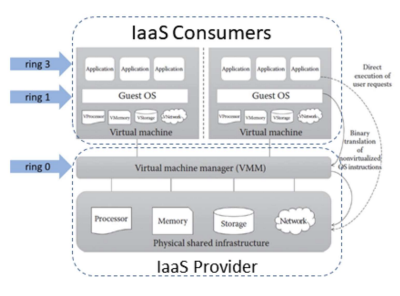
- VMs can run different guest OSs
- Guest OS is abstracted from the hardware, i.e. not aware that it is virtualized and thinks it is running on the real hardware
- VMM at ring 0 provides all the virtual infrastructures needed for VMs, i.e. guest IS communicates with hardware through VMM
- Guest OS communicates with VMM using binary translation - translates guest OS instructions with new instructions that have the same effect on the virtual infrastructure
Pros:
- Provides VMs with best isolation and security
- Different OSs can run simultaneously
- Virtual guest OS can easily be migrated to native hardware
- Easy to install and use - no changes to guest OS
Cons:
- Binary translation overhead reduces system performance
- Need for correct combination of hardware and software - hardware may not have drivers for virtualization software
Para Virtualization
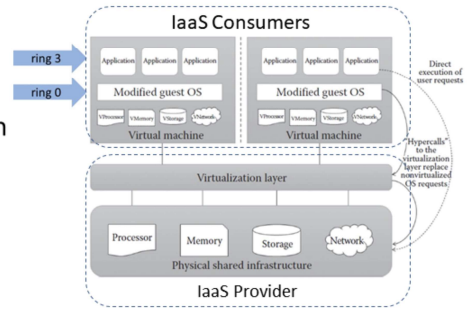
- Modified guest OS replaces OS requests with hypercalls - also called OS-assisted virtualization
- hypercalls: system calls with privilege to communicate directly between OS and hypervisor without translation
- Guest OS knows that it is running in a virtualized environment
Pros:
- Eliminates overhead of binary translation → improves performance
- No need for special hardware
Cons:
- Overhead of guest OS kernel modifications
- Modified guest OS cannot migrate to run on physical hardware
- VMs lack backward compatibility, difficult to migrate to other hosts
Hardware-assisted Virtualization
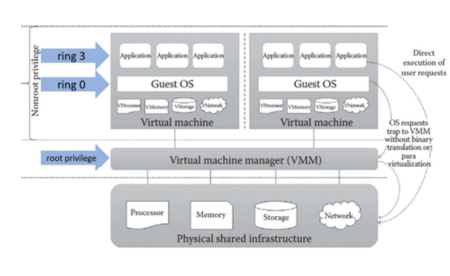
- IaaS Consumer:
- Hardware (processor) extension supports virtualization: guest states are stored in virtual machine control structures
- OS requests directly trap the hypervisor: eliminates binary translation and guest OS modification
- VMM has the highest root privilege and guest OS and user applications have the same non-root privilege
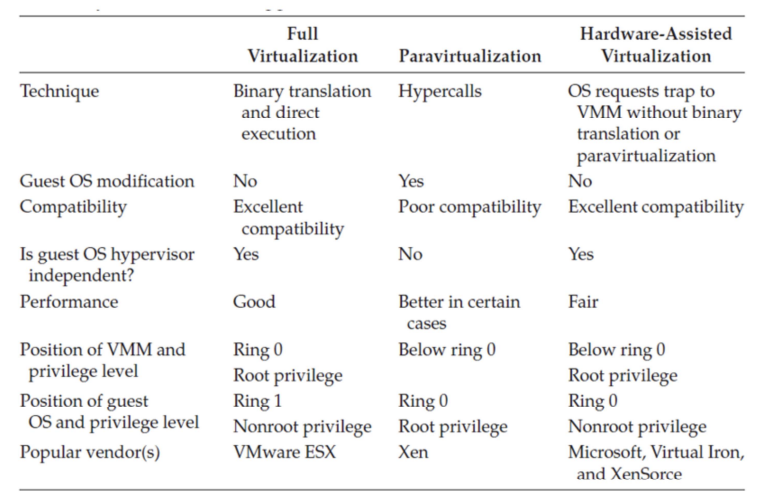
Summary
Hypervisor
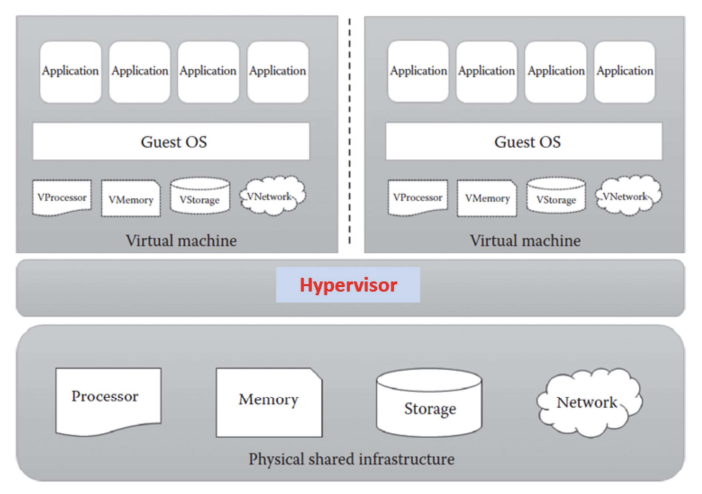
- Hypervisor or VMM sits between VMs and physical infrastructure to provides the required virtual infrastructure for VMs
- 2 types:
- bare metal (or native) or type 1 hypervisor: hypervisor runs on physical infrastructure without any help from the host OS
- hosted (or embedded) or type 2 hypervisor: require the help of host OS to communicate with the underlying infrastructure
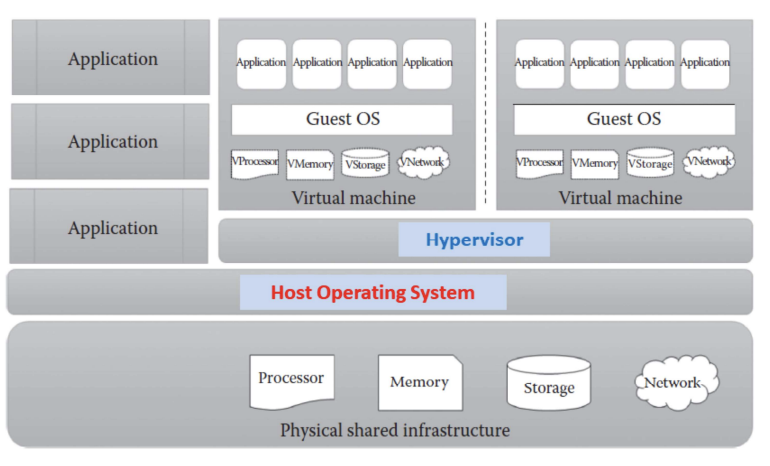
Hypervisor Attacks:
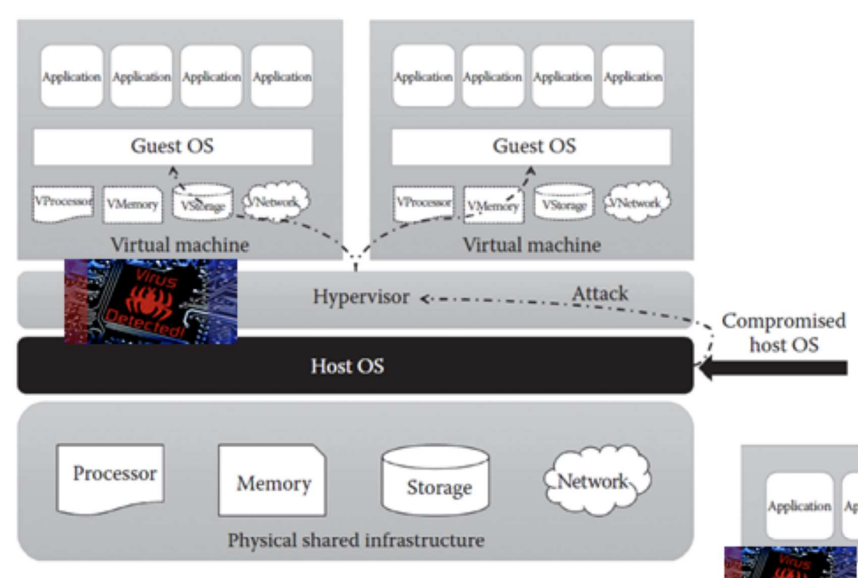
Attack through Host OS
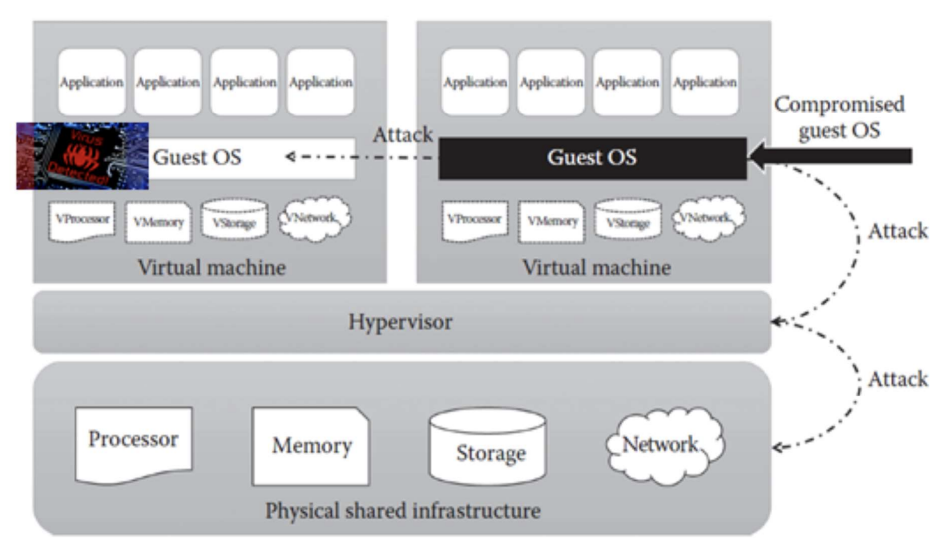
Attack through Guest OS
Containers vs VMs
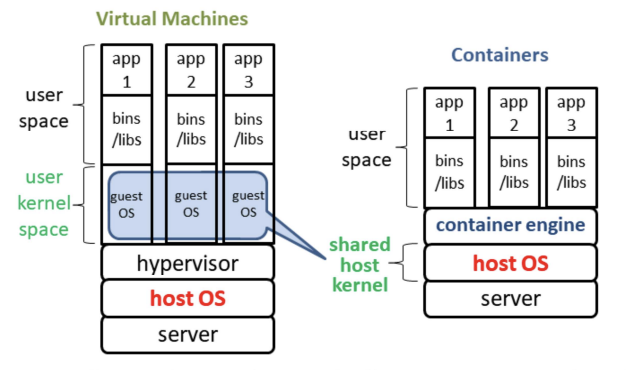
- Containers (hosted virtualization) allows existence of multiple isolated user space instances called containers, e.g. Docker
- Unlike VMs, containers share the host system’s kernel with other containers, making it lightweight
Multitenancy
Cloud providers:
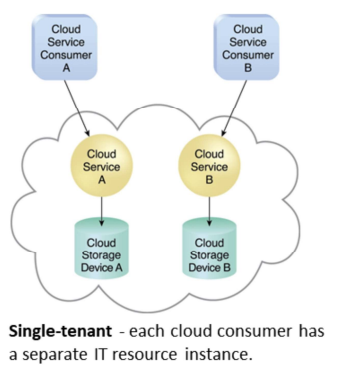
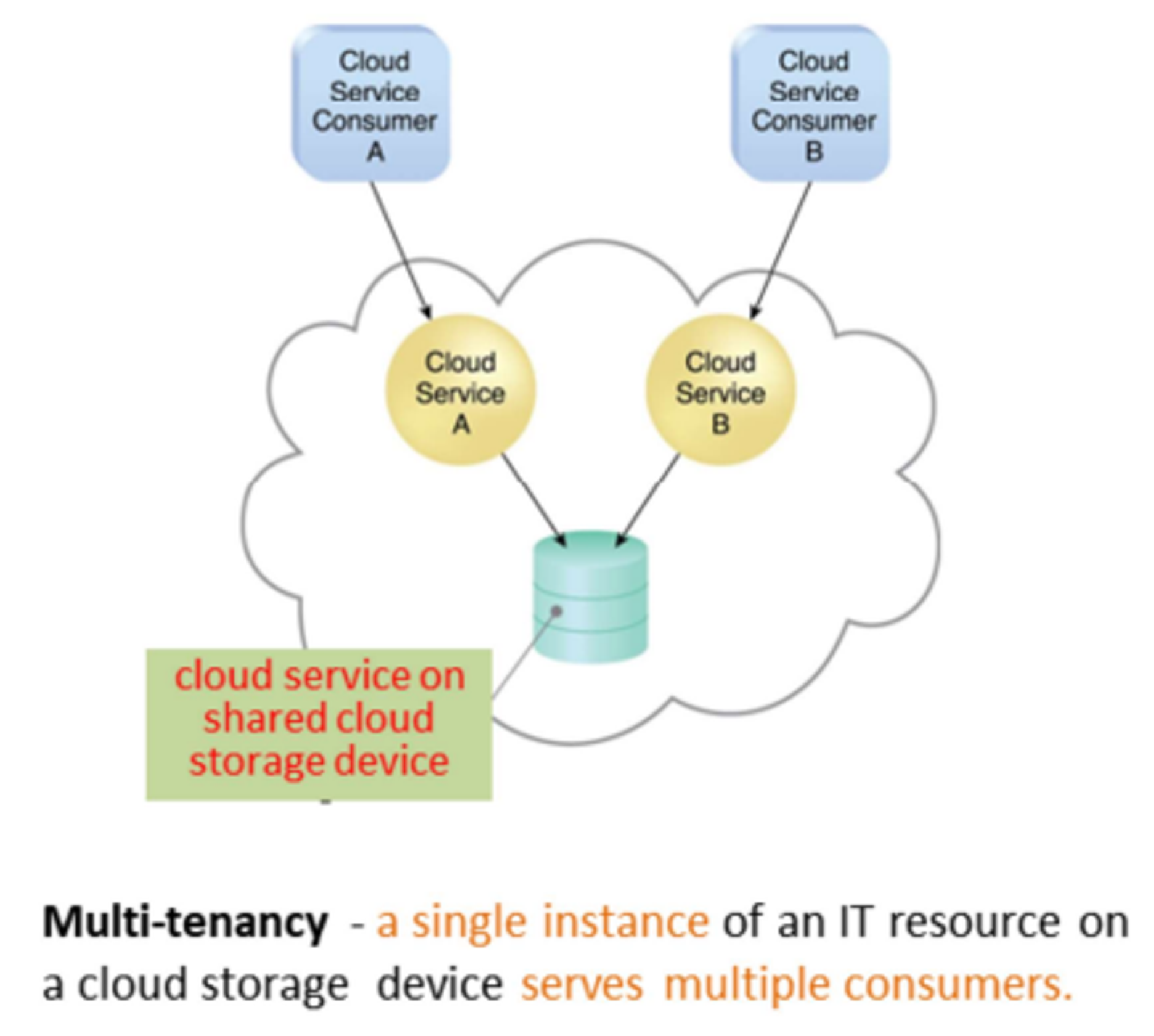
- A single instance of software runs on a server and serves multiple tenants
- Enable multiple users (tenant) to share the same application, e.g. cloud platforms, cloud services
Cloud consumers:
- dedicated instance of software with customized view
- tenants isolation ensures that tenants do not have access to data and configuration information that it do not own
Characteristics
- Usage/Tenant isolation: a tenant behavior does not affects other tenants
- Data security: separate procedures for each tenant
- Recovery: backup, restore
- Scalability:
- Increase in usage by existing tenants
- Increase in number of tenants
- Metered usage: each tenant is charged only for the features being used
- Data tier isolation: databases, tables, schemas can be isolated or allowed as shared resources among tenants